 VapuAI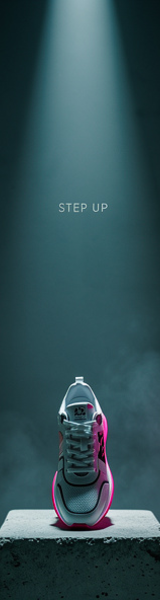
Skyscraper
Skyscraper template for Banner Ad: generate an on-brand skyscraper visual with VapuAI in minutes.
How Do You Create High Impact Vertical Banner Ads That Convert?
Master the Art of Vertical Composition with Skyscraper Layouts
The Skyscraper template is an AI-powered design layout built specifically to generate tall, vertical banner ads featuring a striking product shot grounded in the bottom third of the frame, leaving a generous column of clean space above for your marketing copy. With this template, you can instantly produce stunning, elevated streetwear or luxury product visuals, such as a designer sneaker resting on a concrete plinth under dramatic spotlighting. By isolating your physical product in the lower portion of this ultra-tall canvas, you solve the age-old digital marketing challenge of balancing high-end imagery with readable, stacked call-to-action text.
How to create it in VapuAI
- 1
Select the Skyscraper Template
Open the VapuAI dashboard and choose the Skyscraper option within the AI Banner Ad Generator category.
- 2
Define Your Product Prompt
Input your product details, specifying the look of your item placed on the concrete plinth in the lower third.
- 3
Configure Style and Lighting
Select dramatic lighting, cinematic color grades, or vibrant gel accents to make your vertical banner stand out.
- 4
Generate and Refine Visuals
Run the AI generator and verify that the upper portion of the frame remains clean and free of clutter.
- 5
Download Your Banner Asset
Export your final vertical creative to use directly in your ad campaigns or send to your design team for text overlays.
Prompt & settings
Tips for best results
- •Keep the upper two thirds of the prompt simple to guarantee a clean, distraction-free space for your promotional text and brand logo.
- •Leverage contrasting accent colors, like a vibrant magenta or neon gel highlight on a dark background, to draw eyes down to the physical product.
- •Describe specific textures for the product plinth, such as brushed concrete, polished marble, or raw metal, to add tactile depth to the dramatic spotlighting.
Best for
- E-commerce fashion brands who need to showcase footwear or apparel accessories in a sleek, premium vertical format that captures mobile and desktop sidebar attention.
- Ad operations specialists and media buyers looking to rapidly spin up multiple creative variations for the classic 160x600 skyscraper ad placement.
- Streetwear and lifestyle marketing agencies wanting to generate dramatic, moody product shots that align with high-end editorial aesthetics.
- Social media managers who require vertical creative assets with built-in negative space to easily overlay text, logos, and promotional stickers.
Frequently asked questions
What is the best aspect ratio to use with the Skyscraper template?
This template is optimized for tall, vertical formats like the industry-standard 160x600 or 120x600 skyscraper dimensions, ensuring your product stays in the lower third with ample copy space above.
Can I generate products other than sneakers using this layout?
Yes, you can swap the sneaker for any vertical-friendly product, such as perfume bottles, cosmetic tubes, premium beverage cans, or tech accessories, while maintaining the same dramatic lighting.
Does the generated image contain pre-written text?
No, the AI generates a clean, text-free visual asset, leaving the top column completely open so you can overlay your own custom marketing copy, buttons, and logos later.
How does the template ensure there is enough negative space for ads?
The internal prompt logic enforces a strict compositional hierarchy, positioning the main subject on a low plinth and applying a shallow depth of field to keep the upper canvas clean and uncluttered.
More Templates in AI Banner Ad Generator

Billboard
Billboard template for Banner Ad: generate an on-brand billboard visual with VapuAI in minutes.

Leaderboard
Leaderboard template for Banner Ad: generate an on-brand leaderboard visual with VapuAI in minutes.

Medium Rectangle
Medium Rectangle template for Banner Ad: generate an on-brand medium rectangle visual with VapuAI in minutes.