 VapuAI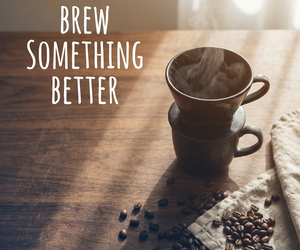
Medium Rectangle
Medium Rectangle template for Banner Ad: generate an on-brand medium rectangle visual with VapuAI in minutes.
How do you design a high converting 300x250 display ad with perfect negative space?
Mastering the classic Medium Rectangle format for digital campaigns
The VapuAI Medium Rectangle template is a dedicated digital advertising layout designed to generate a perfectly balanced 300x250 visual featuring a cozy, bottom-right-anchored flat-lay of artisanal coffee over warm walnut wood, leaving ample negative space in the upper-left for your custom marketing copy. This template solves the common problem of cluttered ad creatives by using a professional 50mm depth of field and soft daylight to anchor the viewer's eye on the product while leaving plenty of room for headlines. Whether you are running programmatic display campaigns or social retargeting ads, this template helps you generate high-end, editorial-style visuals that convert without needing an expensive product photoshoot.
How to create it in VapuAI
- 1
Choose the Layout
Select the Medium Rectangle template inside the VapuAI workspace to set up your 300x250 ad canvas.
- 2
Customize the Subject
Edit the prompt details to swap the coffee theme with your own product while retaining the bottom-right composition.
- 3
Set the Lighting
Refine the daylight and shadow settings to generate a soft, high-contrast background that makes your product pop.
- 4
Generate and Export
Run the generation to produce your clean, copy-ready banner asset, then download the file for final text placement.
Prompt & settings
Tips for best results
- •Keep your main subject confined to the lower-right third of the frame to prevent it from clashing with your planned headline text.
- •Leverage the built-in warm amber and cyan color grade to create a modern, cinematic contrast that naturally draws the reader's eye down the page.
- •When adding copy in your post-processing tool, use clean sans-serif fonts in the upper-left negative space to maintain the template's sophisticated, minimalist aesthetic.
- •Experiment with specifying different tabletop textures, like rustic oak or white marble, to align the background color with your brand's visual identity.
Best for
- Digital marketing agencies who need to rapidly produce and test multiple variations of 300x250 display ads for food, beverage, and lifestyle brands.
- Social media managers looking for elegant, cozy visuals to drive traffic from sidebars and content feeds to their artisanal online shops.
- E-commerce brand owners who want premium, flat-lay product imagery that accommodates promotional text overlays without looking cluttered.
- Media buyers running programmatic ad campaigns who require highly polished, natively styled creatives to boost click-through rates on editorial websites.
- B2B marketers promoting webinar events or lead magnets who want to replace dry, stock-heavy banner graphics with warm, inviting lifestyle compositions.
Frequently asked questions
Why is the Medium Rectangle banner format so effective for digital ads?
The 300x250 medium rectangle is one of the most widely used ad sizes online, fitting seamlessly into both sidebar and in-article placements. Its balanced aspect ratio provides enough space for both a compelling product image and a clear call-to-action.
Can I replace the coffee cup in this template with my own product?
Yes, you can customize the user prompt placeholder within VapuAI to feature your specific product, such as cosmetics or packaged goods, while maintaining the same professional flat-lay composition.
Does the generated image include the text overlay automatically?
No, the image is generated clean and without flat text. This gives you complete creative freedom to overlay your own high-resolution brand typography, pricing, and buttons during your final campaign assembly.
How does the template ensure there is enough room for my ad copy?
The underlying prompt recipe is engineered to anchor all physical subjects to the bottom-right corner, naturally creating a soft, uncluttered negative space in the upper-left quadrant specifically for text.
More Templates in AI Banner Ad Generator

Billboard
Billboard template for Banner Ad: generate an on-brand billboard visual with VapuAI in minutes.

Leaderboard
Leaderboard template for Banner Ad: generate an on-brand leaderboard visual with VapuAI in minutes.
Mobile
Mobile template for Banner Ad: generate an on-brand mobile visual with VapuAI in minutes.