 VapuAI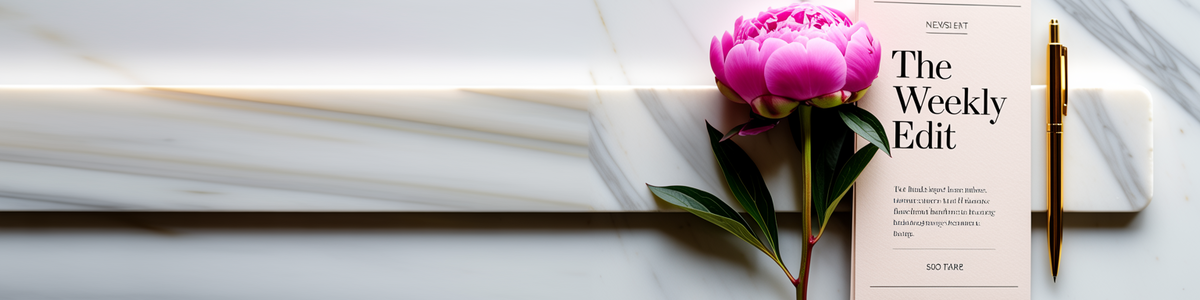
Newsletter Header
Newsletter Header template for Banner Ad: generate an on-brand newsletter header visual with VapuAI in minutes.
How do you design a high-converting newsletter header that instantly captures subscriber attention?
Create elegant, boutique-style editorial banner layouts with VapuAI
The VapuAI Newsletter Header template is a specialized layout designed to generate sophisticated, editorial-style header graphics featuring a clean marble surface, elegant floral accents, and a dedicated negative space for your email subject lines or branding. Ideal for lifestyle, fashion, and boutique businesses, this template lets you create polished visual headers that anchor your email campaigns. By positioning props like a delicate peony and gold pen on the right side, it leaves a sweeping, distraction-free left side perfect for overlaying your weekly digest title, logo, or promotional copy.
How to create it in VapuAI
- 1
Choose the Template
Navigate to the VapuAI Banner Ad Generator and open the Newsletter Header template.
- 2
Customize Props and Tones
Define your floral accents, surface materials, and color grading parameters in the prompt field.
- 3
Generate the Flat-lay Visual
Click generate to render the boutique-style arrangement with optimal left-aligned copy space.
- 4
Export and Add Typography
Download your clean visual and overlay your publication title or marketing copy onto the left marble band.
Prompt & settings
Tips for best results
- •Keep the left side of the image uncluttered to ensure your overlay text remains highly readable against the marble background.
- •Use soft, complementary brand colors in your custom prompt to match the delicate magenta and cream palette of the default layout.
- •Experiment with different floral elements like white roses or eucalyptus if peonies do not fit your specific seasonal campaign.
Best for
- Boutique e-commerce brands wanting to establish a premium, high-end editorial feel at the very top of their weekly customer newsletters.
- Lifestyle and fashion bloggers who need consistent, elegant visual banners to divide their curated email content sections.
- Digital marketing agencies managing email campaigns for luxury services that demand soft, sophisticated flat-lay aesthetics.
- Substack creators and independent editorial writers looking to elevate their publication branding with clean, professional layouts.
- Social media managers who want to repurpose elegant header graphics for Pinterest pins or blog post cover images.
Frequently asked questions
What is the ideal aspect ratio for a newsletter header image?
Newsletter headers typically perform best with wide landscape aspect ratios, providing a panoramic view that fits cleanly at the top of standard email templates without pushing critical text too far down the screen.
Can I add my own text and branding directly inside VapuAI?
Yes, the template is designed with a long, clean marble copy band on the left, allowing you to easily layer your logo, brand name, or custom newsletter title over the generated visual.
Will the generated image look professional in dark-mode email clients?
Yes, the sophisticated pastel-and-cream grade offers high contrast, but you can also customize the background marble texture in your prompt to better complement dark-mode layouts.
How do I ensure my newsletter load times stay fast with these high-quality visuals?
After generating your high-resolution banner in VapuAI, we recommend saving it in web-optimized formats to balance rich, editorial detail with fast email delivery.
More Templates in AI Banner Ad Generator

Billboard
Billboard template for Banner Ad: generate an on-brand billboard visual with VapuAI in minutes.

Leaderboard
Leaderboard template for Banner Ad: generate an on-brand leaderboard visual with VapuAI in minutes.

Medium Rectangle
Medium Rectangle template for Banner Ad: generate an on-brand medium rectangle visual with VapuAI in minutes.