 VapuAI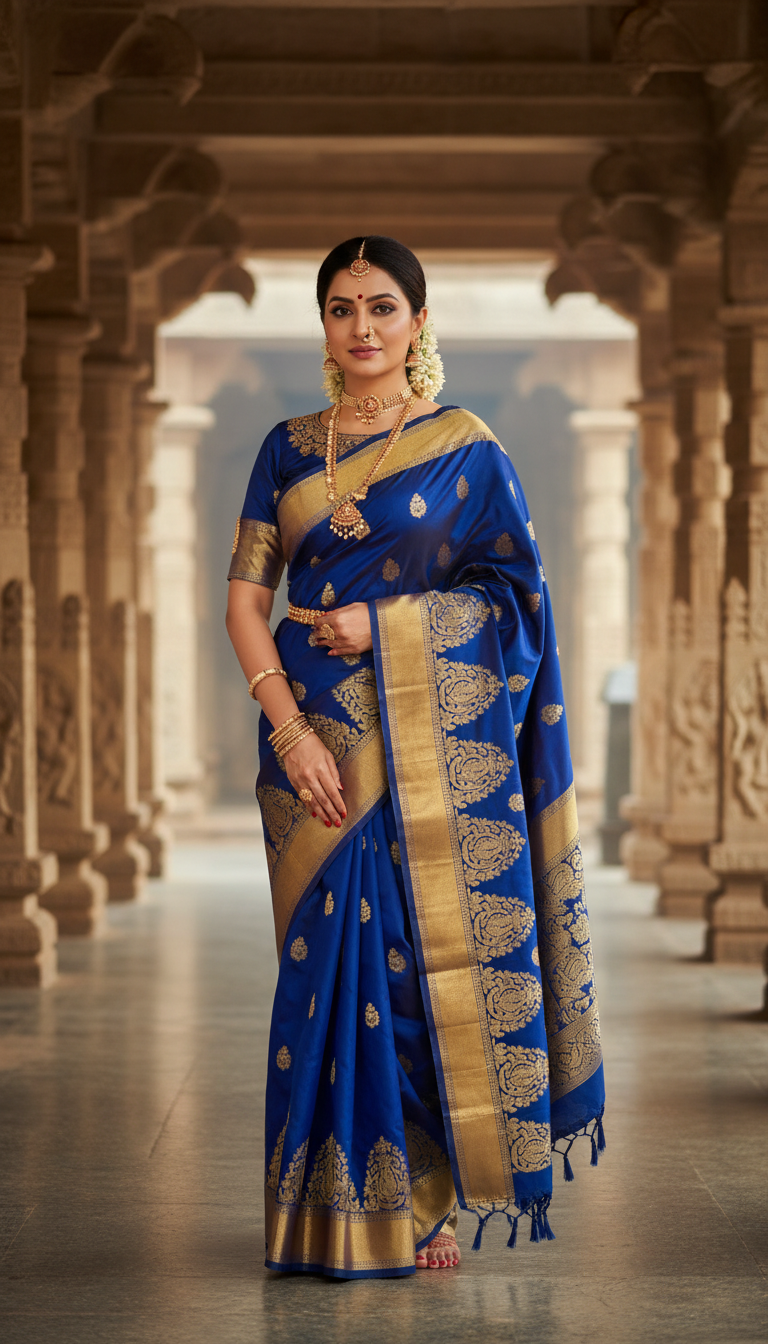
South Indian Temple Saree in Corridor
Discover a stunning image of an adult person wearing a vibrant Temple Saree with temple-inspired motifs, captured in a serene South Indian temple corridor. Perfect for showcasing traditional Indian fashion and heritage in a majestic setting.
How Can You Generate Authentic South Indian Temple Saree Photoshoots Without Costly Location Shoots?
Capturing Dravidian Architectural Majesty and Intricate Zari Motifs in a Single Click
This specialized template allows you to instantly generate hyper-photorealistic portrait photos of a model wearing a luxurious, vibrant Temple Saree inside a majestic, historic South Indian temple corridor. Unlike generic ethnic wear mockups, this AI generator perfectly renders the authentic temple-inspired motifs along the thick zari borders while positioning your subject under the soft, diffused natural light filtering through intricately carved stone pillars. It is an indispensable tool for showcasing South Indian cultural heritage and traditional silk textiles with breathtaking architectural depth.
How to create it in VapuAI
- 1
Upload Reference Image
Upload your model's identity reference image to lock in precise facial structures and ethnic features for the South Indian Temple Saree template.
- 2
Select Saree Template
Choose the South Indian Temple Saree in Corridor template to load the pre-configured Dravidian architectural environment.
- 3
Customize Saree Details
Specify your preferred saree colors, border width, and the style of the temple motifs in the user prompt placeholder.
- 4
Generate the Photo
Generate the high-resolution 9:16 portrait to render the reflective stone floor, carved pillars, and authentic clothing.
Prompt & settings
Creative goal
To create a high-resolution, photorealistic portrait of an adult person wearing a beautiful Temple Saree, standing elegantly in a South Indian temple corridor, emphasizing cultural heritage.
Style anchors
Tips for best results
- •For an authentic South Indian bridal look, specify traditional jewelry like a 'kasu mala' (coin necklace) or temple jewelry in your prompt modifiers.
- •Mention warm color palettes such as deep mustard yellow, vermilion red, or temple green to contrast beautifully with the cool gray tones of the carved stone pillars.
- •Request 'golden hour light' or 'soft morning sun filtering through pillars' to maximize the reflective quality of the ancient stone floor.
Best for
- Heritage Saree Brands wanting to showcase high-end temple sarees with traditional zari borders in an authentic architectural setting without booking expensive temple location shoots.
- South Indian Bridal Wear Designers needing to build elegant digital lookbooks of traditional collections against dramatic, age-honored stone pillars.
- Cultural Content Creators and influencers who want to present themselves or models in classical South Indian attire with flawless cultural and geographical accuracy.
- Ad Agencies executing festive digital campaigns for regional celebrations like Varalakshmi Vratham or Pongal, requiring fast, high-volume visual assets.
- E-commerce Merchandisers looking to replace flat-lays with high-end, contextualized editorial lifestyle images of traditional silk sarees.
Frequently asked questions
Can I change the color and pattern of the temple saree in this generator?
Yes, you can fully customize the fabric color, zari border thickness, and specific temple motifs by adding details to the user prompt placeholder.
How does the generator handle the complex stone carvings of the temple corridor?
The template is pre-trained on Dravidian architectural elements, ensuring that the stone pillars, reliefs, and smooth stone floor maintain realistic perspective and texture.
Can I use my own face or a specific model's face for this temple photoshoot?
Absolutely. By uploading an identity reference image, VapuAI's multi-model workspace maps those facial features onto the subject standing in the corridor.
Is the output image suitable for high-quality print banners?
Yes, the template generates a high-resolution, photorealistic vertical (9:16) portrait optimized for digital screens, social feeds, and high-quality catalog prints.
More Templates in Indian Sarees

Red Banarasi Silk Saree Palace Wedding Prompt
Generate stunning photorealistic images of a person in an elegant red Banarasi silk saree, adorned with traditional jewelry, in a grand Indian palace wedding setting. Perfect for cultural fashion content.

Royal Blue Banarasi Silk Saree on Haveli Swing
Discover the timeless beauty of a royal blue Banarasi silk saree with heavy zari brocade, captured in a serene haveli setting. Perfect for cultural fashion inspiration.

Banarasi Silk Saree Mandap Ceremony
Generate exquisite AI images of an adult person in a luxurious Banarasi Silk saree with heavy zari brocade, captured in a warm, sacred Indian mandap setting. Perfect for cultural fashion and traditional themes.