 VapuAI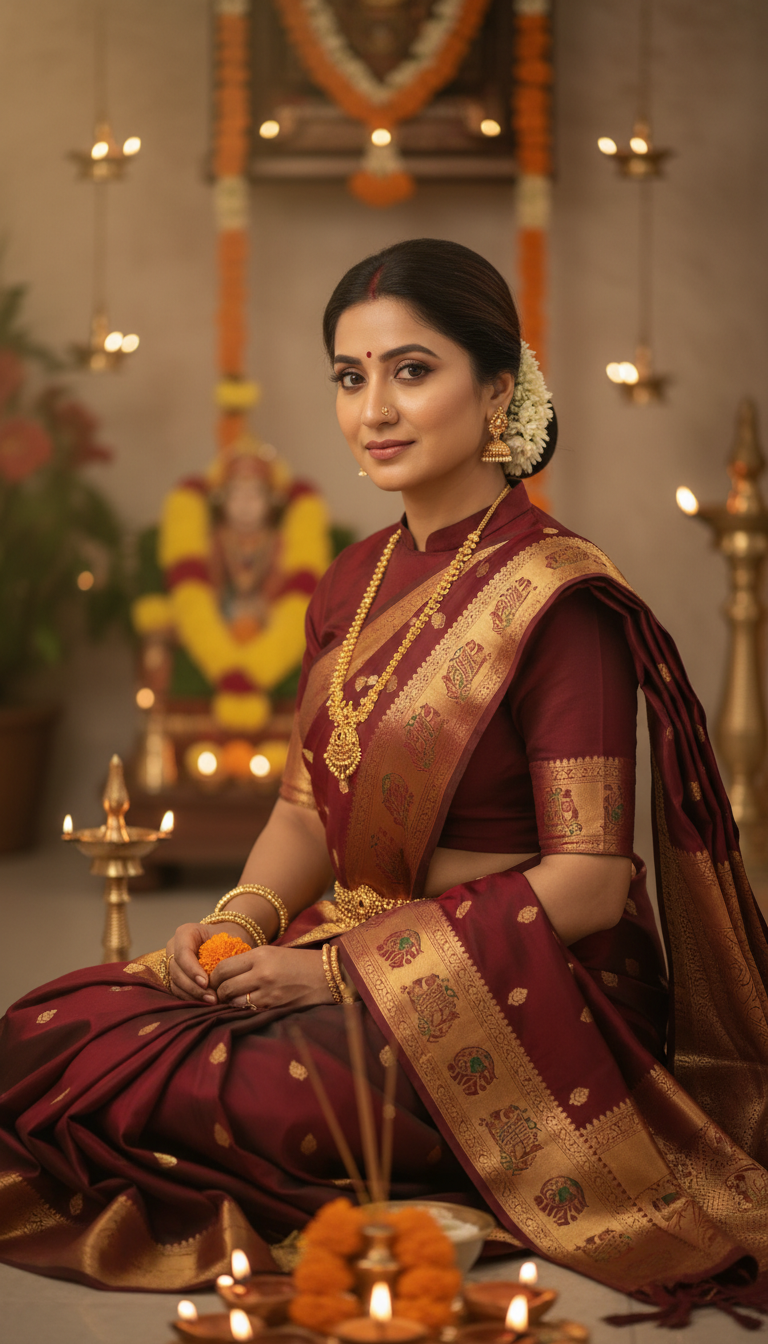
Temple Saree Puja Ceremony
Explore the beauty of Indian tradition with this image of an adult person wearing a stunning Temple Saree during a sacred puja ceremony, featuring exquisite temple-inspired borders and motifs.
How Can You Generate Authentic Spiritual Portraits in Traditional Temple Sarees?
Crafting Reverent Cultural Visuals for Festive Marketing Campaigns
The Temple Saree Puja Ceremony template is an AI-powered portrait generator that allows you to seamlessly place any subject into a spiritually rich, photorealistic setting wearing a stunning traditional temple saree. With this tool, you can effortlessly create high-resolution vertical portraits featuring a serene home puja room adorned with glowing diyas and fresh marigold garlands. It is the perfect solution for producing culturally authentic, reverent imagery at scale without the need for expensive physical photoshoots, elaborate wardrobe sourcing, or complex lighting setups.
How to create it in VapuAI
- 1
Upload Reference Image
Upload a clear headshot or portrait of your subject to capture their facial features and identity.
- 2
Select the Template
Choose the Temple Saree Puja Ceremony template from the VapuAI Indian Sarees category.
- 3
Customize Saree and Details
Enter a custom prompt to adjust specific elements, such as the saree color or additional traditional jewelry.
- 4
Generate the Portrait
Click generate to create a serene, 9:16 high-resolution image illuminated by warm diya lighting.
- 5
Download and Publish
Download the final, campaign-ready visual for your social media, festive campaigns, or digital invites.
Prompt & settings
Creative goal
To create a photorealistic, high-resolution vertical portrait of an adult person wearing a traditional Temple Saree during a serene puja ceremony.
Style anchors
Tips for best results
- •Use reference images with soft, neutral, or gentle expressions to seamlessly match the serene and reverent mood of a sacred puja space.
- •Mention complementary traditional Indian jewelry, like temple necklaces or jhumkas, in your custom prompt to enhance the cultural authenticity of the overall ensemble.
- •Specify a saree color palette in your prompt that beautifully contrasts with the warm, glowing light of oil lamps, such as rich emeralds, deep reds, or mustard yellows.
- •Keep the subject's face well-lit in your uploaded reference image to ensure the AI flawlessly blends their features into the atmospheric, low-light environment of the ceremonial room.
Best for
- Ethnic wear fashion brands needing culturally authentic visuals to showcase temple-border saree aesthetics in a highly relevant religious context.
- Social media influencers and cultural content creators looking to celebrate Indian festivals or daily devotionals with high-quality, reverent imagery.
- Marketing agencies developing festive campaign materials who require photorealistic, emotion-driven portraits without booking expensive traditional locations.
- Jewelry brands aiming to pair their traditional gold ornaments with rich silk sarees in a soft, atmospheric, culturally appropriate setting.
- Event planners designing digital invitations for spiritual milestones, home pujas, or traditional ceremonies who need bespoke, on-brand visual assets.
Frequently asked questions
Can I change the color of the temple saree in the generated image?
Yes, you can easily specify your preferred saree color in the custom prompt field, and the AI will adapt the intricate temple borders and rich silk texture to match your vision.
What kind of lighting does this specific AI template use?
The scene is expertly designed with soft, warm, atmospheric lighting that mimics the glow of traditional diyas (oil lamps) to evoke a peaceful, spiritual, and reverent mood.
Is this template suitable for Instagram Reels or TikTok?
Absolutely. The template naturally defaults to a 9:16 vertical portrait aspect ratio, which is perfectly optimized for full-screen, mobile-first social media platforms.
Do I need to upload a full-body picture to get accurate results?
No, a clear portrait or well-lit headshot is entirely sufficient for the AI to capture the subject's identity and seamlessly integrate them into the traditional puja ceremony scene.
More Templates in Indian Sarees

Red Banarasi Silk Saree Palace Wedding Prompt
Generate stunning photorealistic images of a person in an elegant red Banarasi silk saree, adorned with traditional jewelry, in a grand Indian palace wedding setting. Perfect for cultural fashion content.

Royal Blue Banarasi Silk Saree on Haveli Swing
Discover the timeless beauty of a royal blue Banarasi silk saree with heavy zari brocade, captured in a serene haveli setting. Perfect for cultural fashion inspiration.

Banarasi Silk Saree Mandap Ceremony
Generate exquisite AI images of an adult person in a luxurious Banarasi Silk saree with heavy zari brocade, captured in a warm, sacred Indian mandap setting. Perfect for cultural fashion and traditional themes.