 VapuAI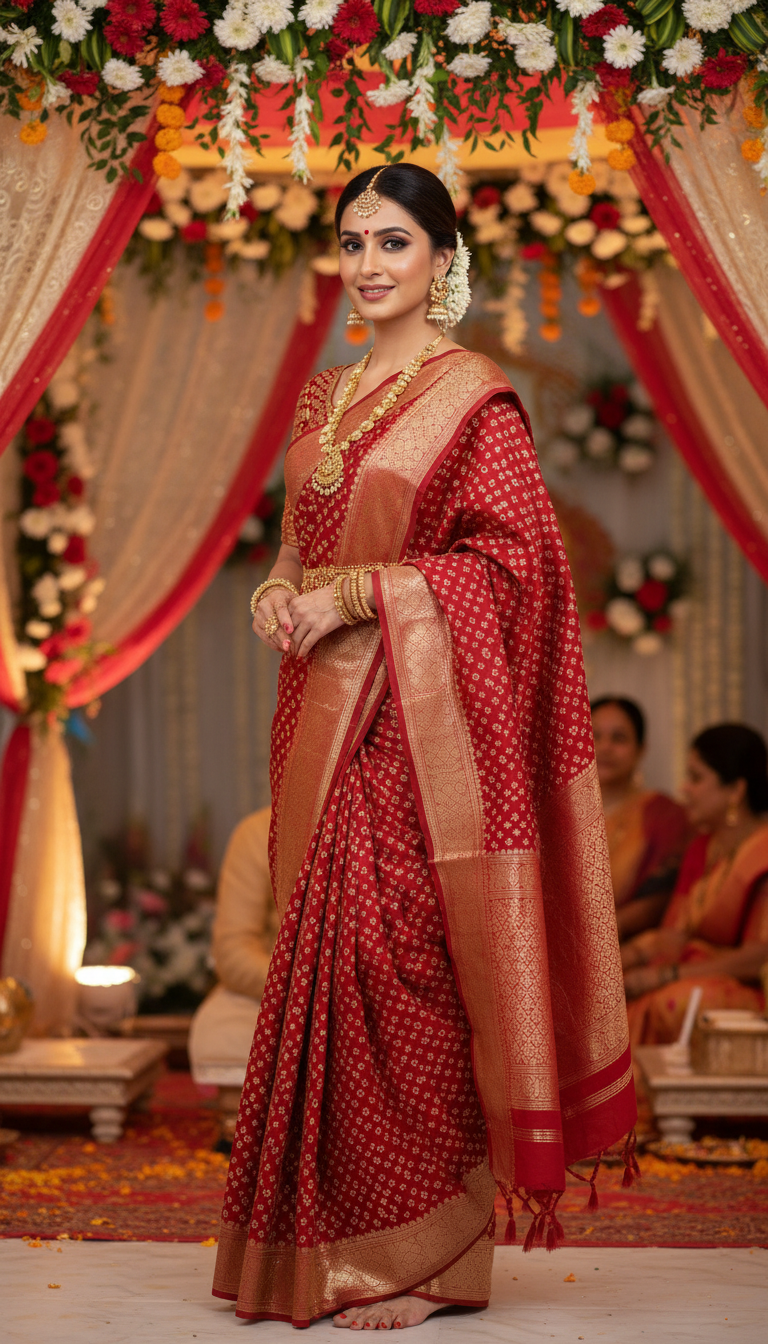
Red Bandhani Gharchola Saree Wedding Ceremony
Discover a beautiful image of an adult person wearing a vibrant red Gharchola bandhani saree with zari checks, perfect for an Indian wedding celebration.
How to Generate Photorealistic Wedding Portraits in a Red Gharchola Saree Using AI
Perfecting the Traditional Gujarati Bridal Look for Your Campaigns
The Red Bandhani Gharchola Saree Wedding Ceremony template is a specialized AI photo generator that allows you to instantly create high-resolution, photorealistic portraits of any adult model wearing a traditional red bandhani saree with intricate zari checks. Set underneath a vibrant wedding canopy adorned with festive floral arrangements, soft fabric drapes, and auspicious lighting, this 9:16 portrait tool is perfect for capturing the joyful, sacred atmosphere of an Indian wedding. Simply upload a reference photo, and VapuAI will render a culturally authentic, campaign-ready bridal or festive visual without the need for expensive physical photoshoots.
How to create it in VapuAI
- 1
Upload Identity Reference
Upload a clear, front-facing photo of the subject to accurately map their facial features into the AI generator.
- 2
Customize Bridal Details
Use the text prompt to specify traditional jewelry, makeup, or subtle adjustments to the wedding canopy scene.
- 3
Configure Format Settings
Ensure the output is set to the 9:16 aspect ratio for optimal vertical social media formatting.
- 4
Generate the Scene
Click generate to seamlessly blend the uploaded face into the photorealistic red bandhani saree and festive environment.
- 5
Download and Publish
Save your high-resolution, campaign-ready Indian wedding visual for use in ads, catalogs, or social media.
Prompt & settings
Creative goal
A high-resolution, photorealistic vertical portrait capturing an adult person gracefully showcasing a red Gharchola bandhani saree with zari checks within a festive wedding setting.
Style anchors
Tips for best results
- •Use a reference image with neutral or soft, warm lighting to ensure the subject's face blends naturally with the festive, auspicious lighting of the wedding canopy.
- •Specify traditional jewelry styles like Polki, Jadau, or heavy gold chokers in your custom prompt to enhance the authenticity of the bridal or wedding guest look.
- •Keep the identity reference photo free of heavy shadows or obstructive accessories so the AI can perfectly map the facial structure into the festive environment.
- •Mention specific floral colors such as marigold orange or jasmine white in the text prompt if you want to subtly influence the background canopy decorations.
Best for
- Ethnic wear fashion brands needing high-volume, photorealistic catalog images of traditional Gharchola sarees to showcase their bridal collections on social media.
- Wedding planners and event agencies creating mood boards or promotional materials that highlight authentic Indian wedding aesthetics and floral canopy decor.
- Cultural lifestyle influencers looking to seamlessly place themselves in a celebratory, traditional Gujarati or Rajasthani wedding setting using a simple reference photo.
- Digital marketing agencies running targeted festive campaigns that require high-quality, 9:16 vertical portraits of models in red bandhani sarees for Instagram Reels or Pinterest ads.
- Bridal makeup artists wanting to visualize how specific traditional jewelry and bridal makeup looks will pair with a vibrant red Gharchola saree under warm, festive lighting.
Frequently asked questions
What makes the Gharchola saree template different from other Indian bridal AI generators?
This specific template focuses exclusively on the traditional red bandhani Gharchola saree with distinctive zari checks, set against a highly detailed wedding canopy background with floral drapes.
Can I use this template for vertical social media posts?
Yes, the template is optimized for a 9:16 vertical portrait aspect ratio, making the generated images perfect for Instagram Stories, Reels, TikToks, and Pinterest pins.
Do I need a professional photoshoot image as the reference photo?
No, a clear, well-lit smartphone selfie or standard portrait is sufficient for the AI to accurately map the subject's face into the photorealistic wedding scene.
Can I customize the jewelry and accessories in the final image?
Yes, you can use the custom prompt feature to describe specific bridal jewelry, bindis, or hair accessories you want paired with the red bandhani saree.
More Templates in Indian Sarees

Red Banarasi Silk Saree Palace Wedding Prompt
Generate stunning photorealistic images of a person in an elegant red Banarasi silk saree, adorned with traditional jewelry, in a grand Indian palace wedding setting. Perfect for cultural fashion content.

Royal Blue Banarasi Silk Saree on Haveli Swing
Discover the timeless beauty of a royal blue Banarasi silk saree with heavy zari brocade, captured in a serene haveli setting. Perfect for cultural fashion inspiration.

Banarasi Silk Saree Mandap Ceremony
Generate exquisite AI images of an adult person in a luxurious Banarasi Silk saree with heavy zari brocade, captured in a warm, sacred Indian mandap setting. Perfect for cultural fashion and traditional themes.