 VapuAI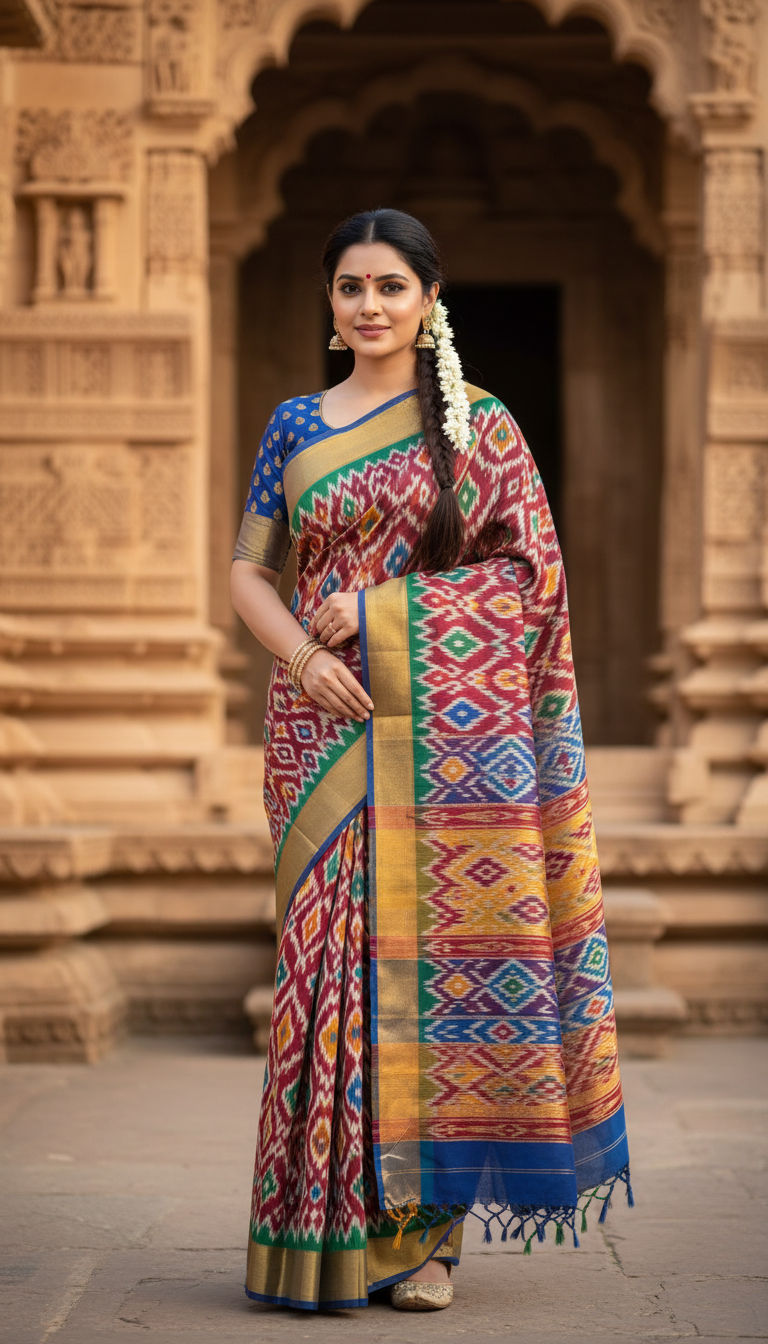
Pochampally Ikat Saree near Heritage Architecture
Discover the elegance of a Pochampally Ikat saree, featuring vibrant geometric designs. This image captures an adult person standing serenely amidst stunning Indian heritage architecture.
How Can You Generate Authentic Pochampally Ikat Saree Portraits with AI?
Showcase Telangana's Geometric Handlooms Against Stunning Historical Backdrops
The Pochampally Ikat Saree near Heritage Architecture template is a specialized AI photo generator that allows you to create photorealistic portraits of any subject wearing a traditional, geometric-patterned Telangana handloom saree against ancient Indian architectural backgrounds. By blending your uploaded reference photo with highly detailed textures of woven silk and cotton, this tool produces campaign-ready visuals bathed in warm natural light. It perfectly captures the essence of cultural heritage, making it effortless to generate striking ethnic fashion imagery for marketing, lookbooks, or social media without coordinating an expensive physical photoshoot at a historical site.
How to create it in VapuAI
- 1
Upload Reference Image
Upload a clear, front-facing reference image of your model or yourself to ensure the AI accurately captures facial features and body structure.
- 2
Select the Template
Choose the 'Pochampally Ikat Saree near Heritage Architecture' template from the Indian Sarees category within the VapuAI workspace.
- 3
Customize the Prompt
Customize your prompt by specifying preferred saree colors, geometric pattern scale, or specific types of heritage backdrops, such as a carved temple pillar or a sandstone fort wall.
- 4
Generate Portrait
Generate the image, allowing VapuAI's engine to seamlessly blend the subject's identity with the intricate handloom textures and warm, soft natural lighting of the architectural scene.
- 5
Download the Final Image
Download the high-resolution 9:16 portrait, ready for immediate use in your fashion lookbooks, Instagram reels, or digital campaign materials.
Prompt & settings
Creative goal
Generate a photorealistic, high-resolution portrait of an adult person gracefully showcasing a Pochampally Ikat saree against a backdrop of ancient Indian heritage architecture.
Style anchors
Tips for best results
- •Describe specific heritage elements in your custom prompt, such as 'intricately carved sandstone pillars' or 'ancient fort courtyards,' to perfectly complement the saree's vibrant hues.
- •Use contrasting color descriptions for the saree, like 'mustard yellow and crimson red geometric Ikat', so the intricate weaving details stand out against the warm, earthy tones of the historical architecture.
- •Upload reference photos with neutral expressions and even, natural lighting to help the AI blend the subject's face smoothly into the soft, sunlit environment of the generated scene.
- •Mention specific traditional accessories in your prompt, such as oxidized silver jewelry or temple gold necklaces, to enhance the authentic cultural styling of the final portrait.
Best for
- Ethnic fashion brands and boutique owners who need to showcase Pochampally weave collections in culturally resonant settings without the high costs of location scouting and heritage site permits.
- Handloom advocates and textile bloggers looking to generate high-resolution, visually striking content that highlights the unique geometric patterns of Telangana's Ikat tradition.
- Marketing agencies developing traditional Indian fashion campaigns that require consistent, professional-grade models styled in authentic regional attire.
- Social media influencers and content creators wanting to seamlessly place themselves into cinematic, historically rich scenes wearing exquisite cultural garments.
- Wedding planners and event stylists creating mood boards and conceptual imagery for culturally themed events, using heritage backdrops like carved temples or palace facades.
Frequently asked questions
Can I change the color of the Pochampally Ikat saree?
Yes, you can specify your desired colors in the custom prompt. Whether you want a vibrant magenta, deep indigo, or a classic red and black geometric pattern, the AI will adapt the handloom design accordingly.
Will the heritage background look like a real location?
Absolutely. The template is optimized to generate highly realistic ancient Indian architecture, complete with accurate textures like carved stone, historical palace facades, and warm, realistic sunlight.
Is this template suitable for commercial fashion campaigns?
Yes, the AI generates high-resolution, photorealistic 9:16 portraits that are campaign-ready, making it ideal for ethnic wear brands, boutiques, and marketing agencies.
Can I use my own face for the saree portrait?
Yes, by uploading a clear reference photo of yourself, the AI will seamlessly map your facial features and body structure onto the model in the generated heritage scene.
More Templates in Indian Sarees

Red Banarasi Silk Saree Palace Wedding Prompt
Generate stunning photorealistic images of a person in an elegant red Banarasi silk saree, adorned with traditional jewelry, in a grand Indian palace wedding setting. Perfect for cultural fashion content.

Royal Blue Banarasi Silk Saree on Haveli Swing
Discover the timeless beauty of a royal blue Banarasi silk saree with heavy zari brocade, captured in a serene haveli setting. Perfect for cultural fashion inspiration.

Banarasi Silk Saree Mandap Ceremony
Generate exquisite AI images of an adult person in a luxurious Banarasi Silk saree with heavy zari brocade, captured in a warm, sacred Indian mandap setting. Perfect for cultural fashion and traditional themes.