 VapuAI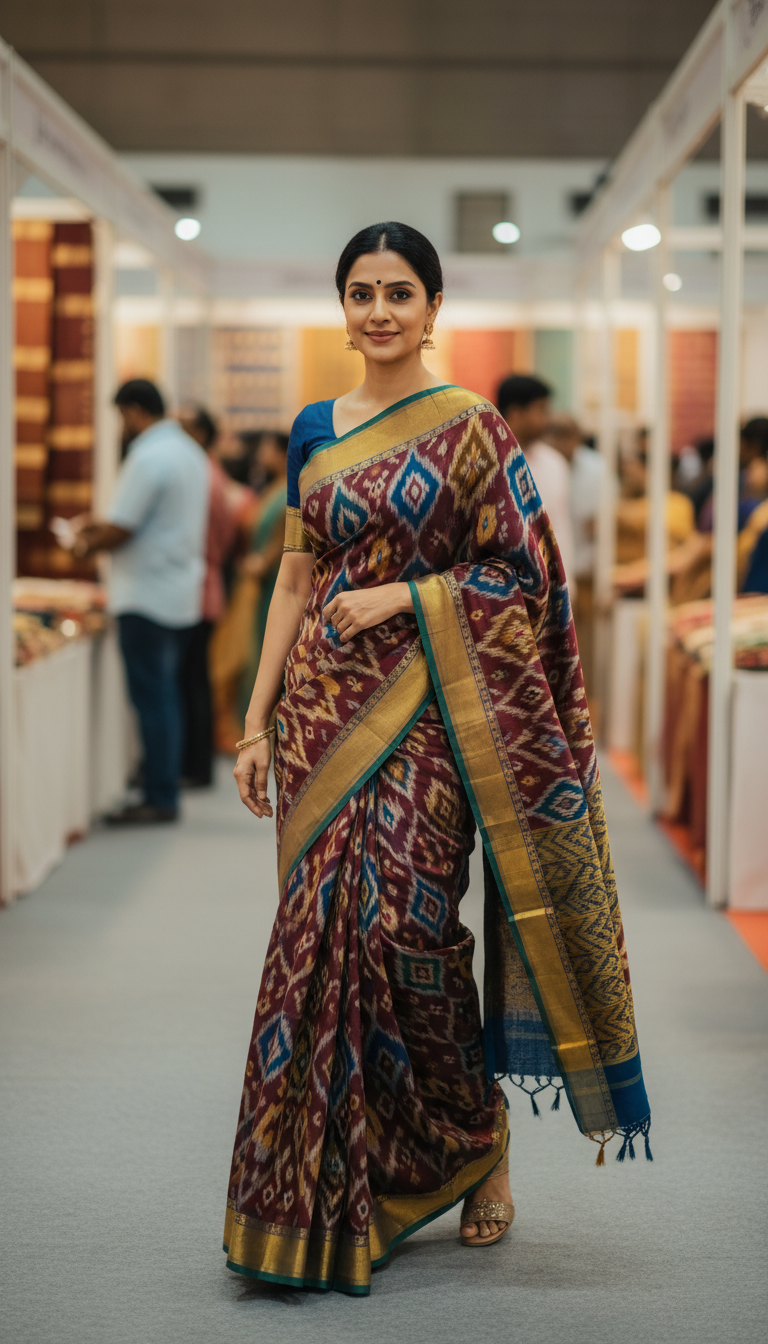
Pochampally Ikat Saree at Handloom Exhibition Walk
Discover the elegance of a Pochampally Ikat saree from Telangana, worn by an adult person at a bustling handloom exhibition. Features vibrant geometric patterns and traditional Indian craftsmanship.
How Can You Generate Realistic Photos of a Pochampally Ikat Saree at a Handloom Exhibition?
Create High-Fidelity Cultural Visuals with Advanced AI Pattern Matching
This Pochampally Ikat Saree at Handloom Exhibition Walk template is a specialized AI photo generator designed to create high-resolution, photorealistic 9:16 portrait images of a model wearing a traditional Telangana Pochampally Ikat saree while walking through a bustling handloom expo. Creators and agencies can effortlessly render the iconic double-weave geometric patterns, vibrant colors, and distinct heritage borders characteristic of genuine Pochampally craftsmanship. The background features a beautifully blurred, authentic indoor exhibition setting with hanging textiles and soft crowds, placing your subject in a lively, culturally rich atmosphere.
How to create it in VapuAI
- 1
Upload Reference Image
Upload a high-quality photo of your subject to guide facial features and ethnicity.
- 2
Select the Template
Choose the Pochampally Ikat Saree at Handloom Exhibition Walk template to load style anchors.
- 3
Customize the Prompt
Add your preferred color combinations for the geometric Ikat weave.
- 4
Generate and Save
Render the high-resolution 9:16 portrait image and download the final asset.
Prompt & settings
Creative goal
Generate a high-resolution, photorealistic, 9:16 portrait image of an adult person gracefully walking during a handloom exhibition, prominently featuring a Pochampally Ikat saree.
Style anchors
Tips for best results
- •To maintain the integrity of the Ikat design, specify bold, contrasting colors like red and white or black and yellow in your custom text prompt.
- •Ensure your identity reference image has clear lighting to help the AI seamlessly map the face onto the model walking through the exhibition hall.
- •Keep the background descriptive prompts minimal, as the template already optimizes the bustling handloom expo scene for a natural depth-of-field effect.
Best for
- Ethical fashion brands looking to showcase traditional handloom-style apparel in realistic, lifestyle-focused exhibition settings without hosting expensive physical photoshoots.
- South Asian lifestyle bloggers who want to post authentic, culturally rich Outfit of the Day images emphasizing Telangana heritage and geometric textiles.
- Creative marketing agencies designing localized Indian festival or handicraft-themed digital campaigns that require high-fidelity, relatable model photography.
- Textile exhibition organizers who need high-quality, aspirational promotional imagery of visitors interacting with handloom displays to boost event attendance.
- E-commerce merchandisers who want to visualize how a Pochampally Ikat saree drapes and moves in a natural, real-world setting.
Frequently asked questions
Can I change the color of the Pochampally Ikat saree?
Yes, you can customize the colors of the geometric patterns and saree border by adding specific color descriptors to the user prompt placeholder.
What makes the Pochampally Ikat pattern look authentic in the generated image?
The template uses advanced style anchors that recognize the characteristic blur-effect of the double-weave Ikat process, ensuring realistic geometric alignment.
Is the background of the exhibition customizable?
The default setting generates a bustling, soft-focused indoor handloom exhibition with other textile displays, but you can suggest minor adjustments like 'bright morning light' or 'fewer crowds'.
Can I use this for commercial advertising campaigns?
Absolutely, VapuAI generates high-resolution, campaign-ready visuals that are perfect for social media ads, websites, and digital marketing materials.
More Templates in Indian Sarees

Red Banarasi Silk Saree Palace Wedding Prompt
Generate stunning photorealistic images of a person in an elegant red Banarasi silk saree, adorned with traditional jewelry, in a grand Indian palace wedding setting. Perfect for cultural fashion content.

Royal Blue Banarasi Silk Saree on Haveli Swing
Discover the timeless beauty of a royal blue Banarasi silk saree with heavy zari brocade, captured in a serene haveli setting. Perfect for cultural fashion inspiration.

Banarasi Silk Saree Mandap Ceremony
Generate exquisite AI images of an adult person in a luxurious Banarasi Silk saree with heavy zari brocade, captured in a warm, sacred Indian mandap setting. Perfect for cultural fashion and traditional themes.