 VapuAI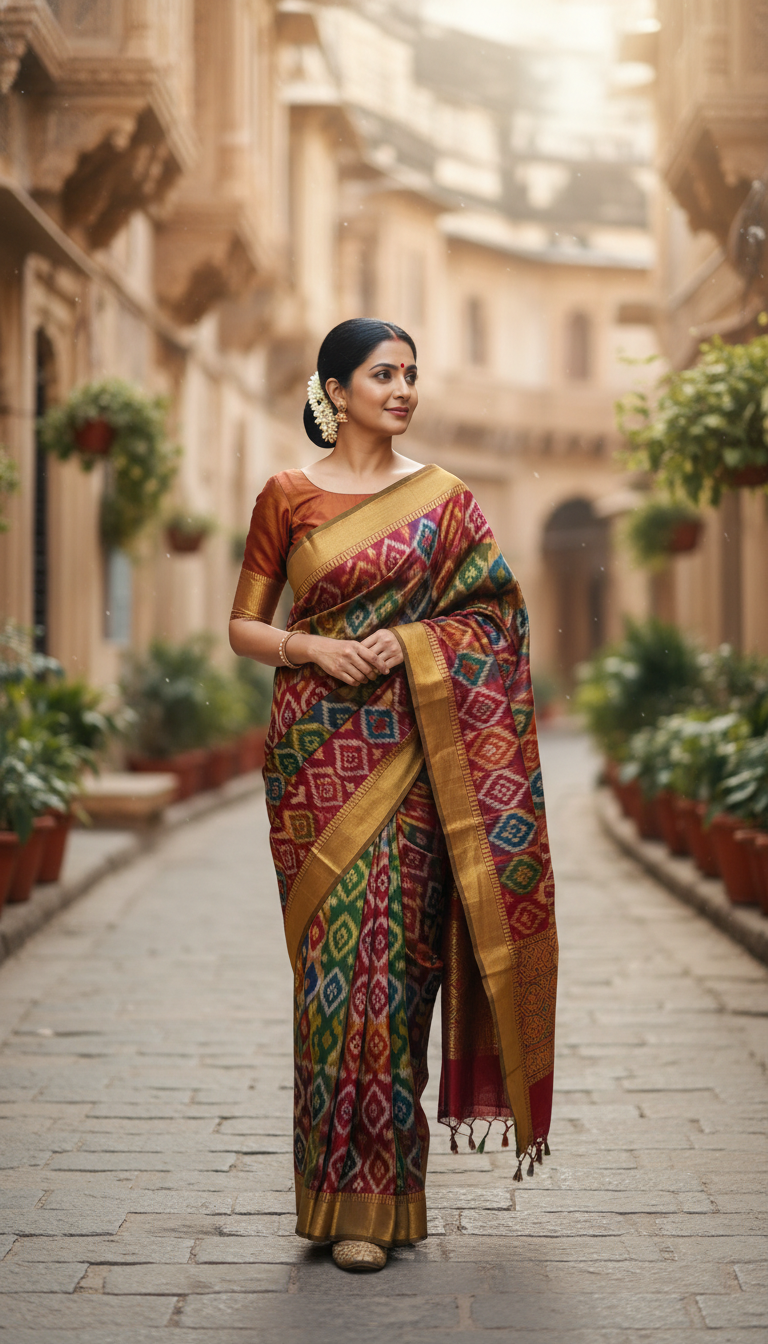
Patola Saree Walk in Ancient Indian City
Experience the timeless charm of an adult person wearing a magnificent Patola double ikat silk saree, walking through an ancient Indian city street with geometric patterns and traditional motifs. Rich colors and natural light capture cultural beauty.
How Can You Generate Authentic Patola Saree Walk Portraits?
Crafting Heritage-Rich Fashion Campaigns with Double Ikat Motifs
The "Patola Saree Walk in Ancient Indian City" template is an AI-powered image generator that allows you to create photorealistic portraits of any person gracefully strolling through historic cobblestone streets in a vibrant, double ikat silk saree. Perfect for producing campaign-ready visuals, this tool meticulously renders the intricate geometric patterns and traditional motifs unique to Patola textiles. Bathed in soft natural daylight against weathered stone architecture, the resulting images evoke a profound sense of cultural heritage without the need for an expensive on-location photoshoot.
How to create it in VapuAI
- 1
Upload Reference Image
Upload a clear reference photo of your subject to map their identity into the Patola saree walking scene.
- 2
Customize Saree and Setting
Add specific text prompts for the double ikat silk colors or desired ancient city street details.
- 3
Set Output Dimensions
Select the 9:16 portrait aspect ratio to capture the full length of the walking pose and the architecture.
- 4
Generate Heritage Portrait
Hit generate to let VapuAI render the photorealistic image combining the cultural fashion and cobblestone background.
- 5
Download and Deploy
Download the final high-resolution portrait for your fashion campaign, client presentation, or social media channels.
Prompt & settings
Creative goal
To capture a photorealistic image of an adult person gracefully walking through an old Indian city street, adorned in a vibrant Patola silk saree, under natural daylight.
Style anchors
Tips for best results
- •Provide a reference image with neutral or soft lighting to ensure the AI can accurately match the natural daylight of the ancient city street setting.
- •Mention specific traditional colors like ruby red, emerald green, or gold in your custom prompt to highlight the vibrant nature of authentic Patola silk.
- •Request subtle movement in your text prompt, such as 'saree pallu catching the breeze,' to enhance the dynamic, photorealistic feel of the walking pose.
- •Keep the subject's face clearly visible and unobstructed in the source image to ensure flawless facial mapping against the historic stone backdrop.
Best for
- Fashion brands and boutique agencies need this template to showcase traditional Patola ethnic wear in an authentic, historic street setting for dynamic catalog updates.
- Social media influencers and cultural content creators use this tool to generate high-quality, photorealistic portraits that celebrate Indian heritage on Instagram or Pinterest.
- Wedding planners and bridal consultants leverage these visuals to present vibrant, elegant saree styling ideas to clients seeking a regal yet culturally rooted aesthetic.
- Textile artists and historians utilize the generator to visualize classic double ikat geometric patterns interacting naturally with sunlight and realistic movement.
- E-commerce marketers rely on this template to quickly produce diverse, culturally rich lifestyle imagery for digital ad campaigns without organizing travel to ancient cities.
Frequently asked questions
What makes the Patola saree template different from other Indian fashion AI generators?
This specific template focuses on the intricate geometric patterns of double ikat Patola silk, combined with a dynamic walking pose set in a sunlit, ancient city street with weathered stone architecture.
Can I change the color of the Patola saree in the final image?
Yes, you can easily guide the AI to generate specific traditional hues by adding your preferred color palette into the custom prompt field before generating.
Is this template suitable for vertical social media formats?
Absolutely. The template is optimized for a 9:16 portrait aspect ratio, making it perfectly framed for Instagram Reels, Stories, TikToks, and Pinterest pins.
Do I need a professional photo as the input reference?
No, any clear, well-lit selfie or standard photograph will work. The AI uses this reference strictly for facial features and body structure, seamlessly placing the subject into the high-resolution heritage scene.
More Templates in Indian Sarees

Red Banarasi Silk Saree Palace Wedding Prompt
Generate stunning photorealistic images of a person in an elegant red Banarasi silk saree, adorned with traditional jewelry, in a grand Indian palace wedding setting. Perfect for cultural fashion content.

Royal Blue Banarasi Silk Saree on Haveli Swing
Discover the timeless beauty of a royal blue Banarasi silk saree with heavy zari brocade, captured in a serene haveli setting. Perfect for cultural fashion inspiration.

Banarasi Silk Saree Mandap Ceremony
Generate exquisite AI images of an adult person in a luxurious Banarasi Silk saree with heavy zari brocade, captured in a warm, sacred Indian mandap setting. Perfect for cultural fashion and traditional themes.