 VapuAI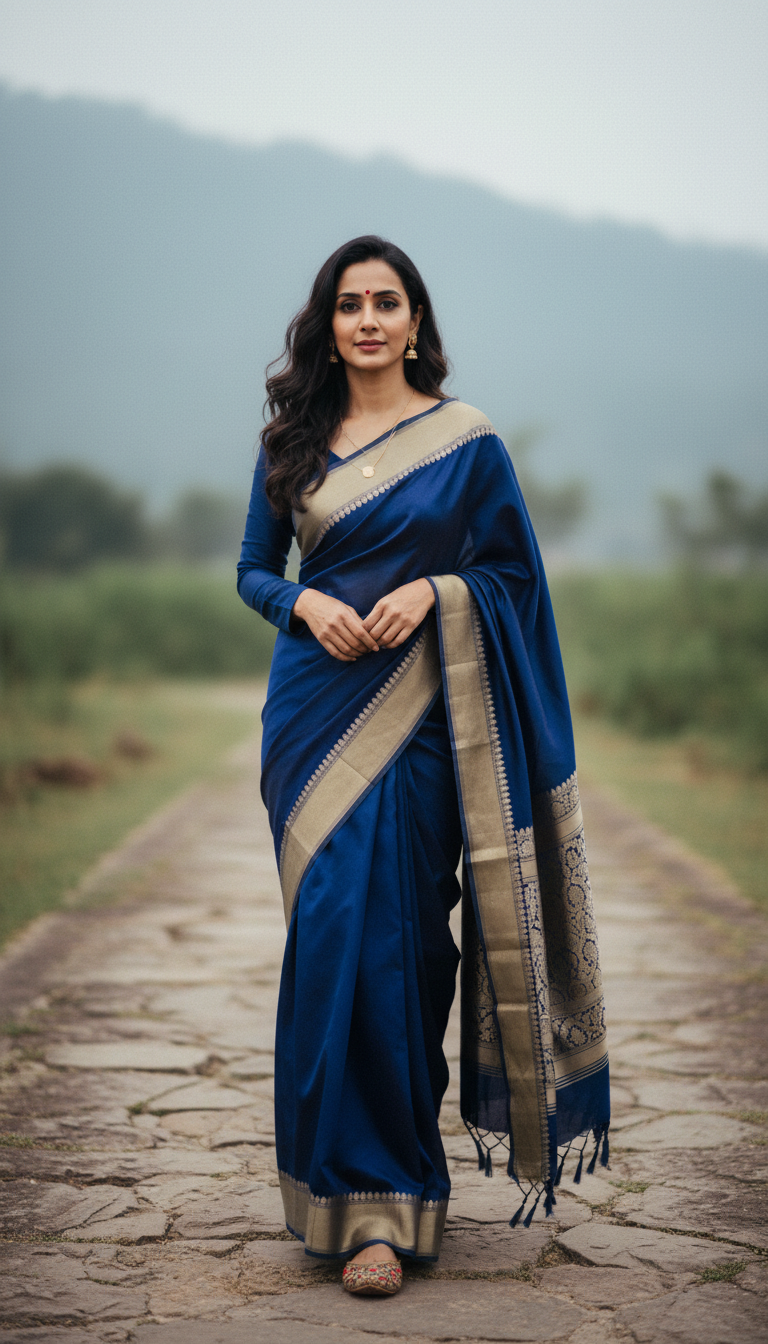
Pashmina Saree on Stone Path in Cool Weather
Experience the elegance of a Pashmina saree as an adult person walks a stone path in cool weather. This image highlights the saree's luxurious wool, softness, and traditional Indian drape in a serene setting.
How Can You Generate Cozy Winter Saree Looks Using AI?
Streamlining Seasonal Ethnic Fashion Campaigns
The "Pashmina Saree on Stone Path in Cool Weather" template is an AI-powered image generator that allows you to instantly create photorealistic portraits of a model walking outdoors in a luxurious winter saree. Designed for autumn and winter fashion campaigns, this prompt recipe captures the rich texture, warmth, and signature drape of a wool Pashmina saree against a serene, rustic stone pathway. The crisp, diffused lighting perfectly highlights the fabric's softness and intricate motifs, giving fashion brands and cultural creators a high-end, editorial-quality visual without needing an outdoor location shoot in freezing temperatures.
How to create it in VapuAI
- 1
Upload a Reference Image
Upload a clear photo of your subject to accurately capture their identity, gender, and ethnicity for the generation.
- 2
Define Saree Details
Enter specific details regarding the Pashmina saree's color, pattern, and traditional embroidery into the custom prompt field.
- 3
Adjust the Atmosphere
Include ambient keywords like 'morning fog' or 'autumn leaves' to tailor the cool weather and rustic stone path environment.
- 4
Generate the Portrait
Click generate to allow the AI to construct your high-resolution 9:16 portrait featuring the luxurious wool texture and serene outdoor setting.
- 5
Download and Publish
Review your campaign-ready winter saree visual, save the file, and utilize it across your marketing channels or social media.
Prompt & settings
Creative goal
Generate a high-resolution, photorealistic vertical portrait of an adult person gracefully walking on a stone path in cool weather, showcasing a luxurious Pashmina saree known for its softness and warmth.
Style anchors
Tips for best results
- •Focus on Fabric Colors: Pashmina sarees look exceptionally rich in deep, warm hues like maroon, forest green, or mustard yellow, which contrast beautifully against a grey stone path.
- •Enhance the Weather Elements: Adding terms like "soft morning fog" or "golden hour frost" to your custom prompt will deepen the cool-weather atmosphere and amplify the cozy vibe of the wool fabric.
- •Specify the Drape Style: Mentioning traditional draping styles, like a pleated pallu wrapped around the shoulders for warmth, will help the AI render a more authentic winter look.
- •Keep Reference Lighting Neutral: Use a reference image with even, neutral lighting so the AI can smoothly apply the gentle, diffused outdoor lighting specified in this template's scene.
Best for
- Ethnic wear brands and fashion retailers looking to launch their winter saree collections with high-quality, photorealistic outdoor catalogs.
- Fashion influencers and lifestyle bloggers who want to produce consistent, season-specific aesthetic content highlighting traditional Indian winter fashion.
- Marketing agencies needing quick, campaign-ready visuals for cultural events or winter wedding promotions without the logistical nightmare of a cold-weather photoshoot.
- Textile designers and boutique owners aiming to visualize how their Pashmina wool saree concepts would drape and move in a real-world, rustic environment.
- Social media managers requiring high-resolution, 9:16 vertical portraits optimized for Instagram Reels covers or Pinterest pins showcasing cozy cultural attire.
Frequently asked questions
Can I change the color and pattern of the Pashmina saree?
Yes, you can customize the saree's appearance by detailing your preferred colors, borders, and traditional motifs in the prompt placeholder.
Will the generated image look like my reference model?
Absolutely. VapuAI uses your uploaded reference image to precisely retain the subject's facial features, gender, and ethnic structure.
What aspect ratio does this template produce?
This template is pre-configured to generate a 9:16 vertical portrait, which is perfectly optimized for mobile viewing, Instagram Stories, and Pinterest.
Does the AI accurately render the texture of a wool saree?
Yes, the underlying prompt is specifically engineered to highlight the soft, luxurious, and slightly thicker textile texture characteristic of authentic Pashmina wool.
More Templates in Indian Sarees

Red Banarasi Silk Saree Palace Wedding Prompt
Generate stunning photorealistic images of a person in an elegant red Banarasi silk saree, adorned with traditional jewelry, in a grand Indian palace wedding setting. Perfect for cultural fashion content.

Royal Blue Banarasi Silk Saree on Haveli Swing
Discover the timeless beauty of a royal blue Banarasi silk saree with heavy zari brocade, captured in a serene haveli setting. Perfect for cultural fashion inspiration.

Banarasi Silk Saree Mandap Ceremony
Generate exquisite AI images of an adult person in a luxurious Banarasi Silk saree with heavy zari brocade, captured in a warm, sacred Indian mandap setting. Perfect for cultural fashion and traditional themes.