 VapuAI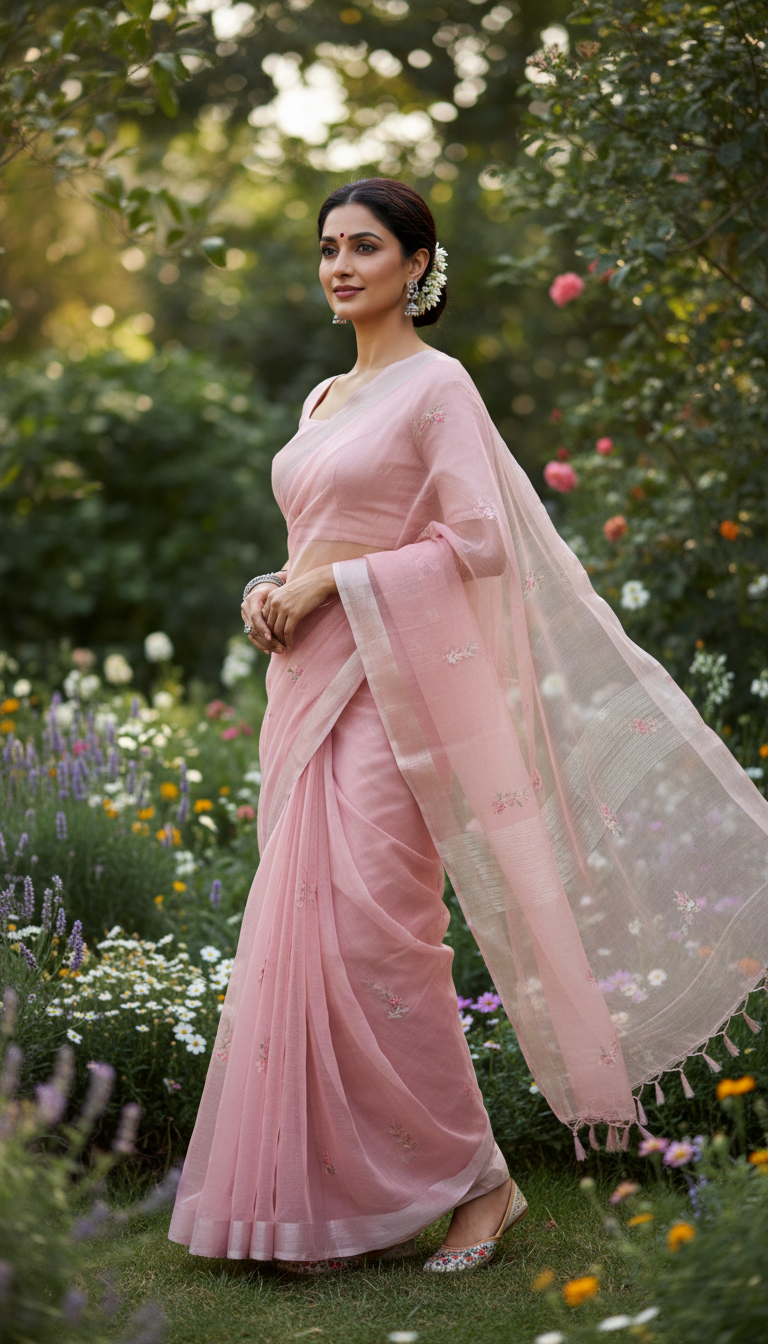
Organza Saree in Garden with Soft Breeze
Discover an exquisite Organza Saree draped elegantly on a person amidst a lush garden setting. This image highlights the sheer texture and graceful flow of the traditional Indian attire.
How to Generate Ethereal Organza Saree Portraits in a Lush Garden Setting
Craft Breathtaking Outdoor Indian Fashion Visuals with Fluid Drape Dynamics
The Organza Saree in Garden with Soft Breeze template is an AI photo generator that allows you to create high-resolution, photorealistic portraits of a subject wearing a sheer, beautifully draped organza saree in a lush outdoor setting. Perfect for highlighting the translucent texture and graceful movement of this lightweight silk yarn fabric, this template automatically captures the ethereal effect of a gentle wind against natural floral backdrops. Simply upload a reference photo to generate campaign-ready ethnic wear visuals bursting with tranquil elegance and soft bokeh effects.
How to create it in VapuAI
- 1
Upload Subject Photo
Upload a clear, front-facing portrait of your subject to serve as the identity reference for the outdoor photoshoot.
- 2
Choose Template
Select the Organza Saree in Garden with Soft Breeze template in the VapuAI workspace.
- 3
Customize Saree and Setting
Add custom prompt details like the color of the sheer organza fabric or specific floral background elements.
- 4
Generate the AI Portrait
Click generate to instantly blend your subject with the ethereal outdoor lighting and graceful drape.
- 5
Download for Campaigns
Download the 9:16 high-resolution image to use across your fashion marketing and social media channels.
Prompt & settings
Creative goal
To generate a high-resolution, photorealistic image of an adult person gracefully draped in an elegant Organza Saree, standing amidst a lush garden with a gentle breeze.
Style anchors
Tips for best results
- •Specify pastel or light colors like lavender, peach, or baby blue in your prompt text, as these shades best highlight the translucent, airy nature of organza fabric in natural sunlight.
- •Ensure your uploaded reference photo has a neutral or soft expression to match the tranquil, ethereal mood of the lush garden environment.
- •Mention specific garden details in your prompt, like 'blooming cherry blossoms' or 'sunlit ferns', to customize the subtle background bokeh and enhance the outdoor aesthetic.
- •Keep the subject's hairstyle prompt relatively simple, such as 'loose waves' or 'soft updo', to complement the feeling of a gentle breeze without overwhelming the visual flow of the sheer saree.
Best for
- Fashion and lifestyle influencers needing high-quality outdoor portraiture without booking costly botanical garden locations or waiting for the perfect weather.
- Ethnic wear brands and boutiques looking to showcase the sheer, lightweight texture of their organza saree collections through photorealistic AI lookbooks.
- Social media managers for bridal wear accounts aiming to produce ethereal, nature-inspired content that highlights traditional Indian attire with a modern, breezy twist.
- Digital marketing agencies running seasonal spring or summer campaigns for South Asian fashion labels, requiring cohesive and natural-looking outdoor visuals at scale.
Frequently asked questions
Can I change the color of the organza saree?
Yes, you can easily customize the saree color by adding specific shade requests, like 'emerald green' or 'blush pink,' into the custom prompt text before generating.
How does the AI handle the sheer texture of organza?
Our platform is optimized to accurately render the translucent, lightweight qualities of organza fabric, ensuring it interacts realistically with the natural outdoor light and soft breeze.
What aspect ratio does this outdoor saree template use?
This template automatically generates a 9:16 vertical portrait, which is the perfect format for mobile-first platforms like Instagram Stories, Reels, and Pinterest.
Will the background garden look photorealistic?
Absolutely. The template is designed to produce a lush, vibrant green environment with a soft, natural bokeh blur that keeps the focus entirely on the subject and their traditional attire.
More Templates in Indian Sarees

Red Banarasi Silk Saree Palace Wedding Prompt
Generate stunning photorealistic images of a person in an elegant red Banarasi silk saree, adorned with traditional jewelry, in a grand Indian palace wedding setting. Perfect for cultural fashion content.

Royal Blue Banarasi Silk Saree on Haveli Swing
Discover the timeless beauty of a royal blue Banarasi silk saree with heavy zari brocade, captured in a serene haveli setting. Perfect for cultural fashion inspiration.

Banarasi Silk Saree Mandap Ceremony
Generate exquisite AI images of an adult person in a luxurious Banarasi Silk saree with heavy zari brocade, captured in a warm, sacred Indian mandap setting. Perfect for cultural fashion and traditional themes.