 VapuAI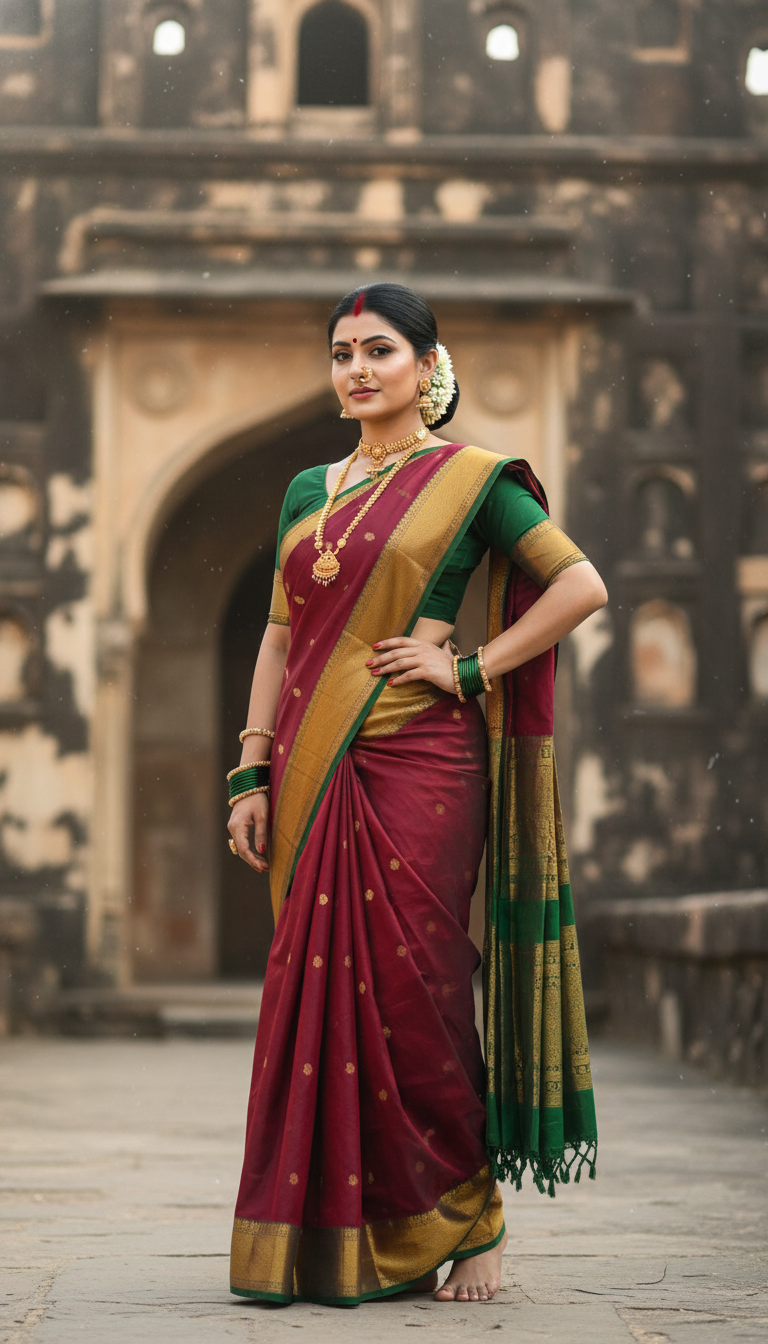
Nauvari Saree at Historic Fort
Discover a stunning image of an adult person wearing a traditional Nauvari saree, confidently captured amidst the majestic backdrop of an ancient Indian fort.
How Can You Generate Majestic Maharashtrian Heritage Portraits in Minutes?
Bring Royal Fort Aesthetics and Nine-Yard Elegance to Your Next Campaign
The Nauvari Saree at Historic Fort template is an AI-powered photo generator that allows you to instantly create photorealistic portraits of a model wearing a traditional Maharashtrian nine-yard drape against the majestic backdrop of an ancient Indian fort. By uploading a simple reference photo, marketing teams and cultural creators can produce campaign-ready visuals featuring authentic cultural pride, complete with sunny natural lighting, traditional jewelry like a nath and gajra, and weathered stone architecture. Forget expensive location scouting; this VapuAI tool delivers high-resolution, culturally rich heritage aesthetics directly to your creative workspace.
How to create it in VapuAI
- 1
Upload Reference Photo
Upload a clear, front-facing reference photo of your model or subject to ensure accurate facial features and identity mapping.
- 2
Select Template
Select the 'Nauvari Saree at Historic Fort' template to lock in the majestic stone wall background and traditional nine-yard draping style.
- 3
Customize Prompt
Customize your prompt by specifying specific saree colors, fabric textures, or additional jewelry details like a traditional Maharashtrian nath.
- 4
Generate Image
Generate your heritage portrait and let VapuAI seamlessly blend the sunny daytime lighting with the robust architecture of the ancient fort.
- 5
Download Output
Download your photorealistic 9:16 vertical image, ready for immediate use in your social media campaigns and cultural lookbooks.
Prompt & settings
Creative goal
A photorealistic vertical portrait showcasing an adult person confidently posing in a traditional Nauvari saree at a historic fort, capturing the rich cultural heritage.
Style anchors
Tips for best results
- •Use a reference image with neutral or soft natural lighting to seamlessly match the template's sunny daytime fort environment.
- •Add specific color preferences for the Nauvari saree in your custom prompt, such as 'vibrant emerald green' or 'deep saffron yellow', to align with your brand palette.
- •Mention specific traditional accessories in your prompt modifications to enhance authenticity, such as emphasizing gold temple jewelry or jasmine gajras.
- •Ensure your uploaded subject photo has a clear, unobstructed face so the AI can perfectly map the identity onto the culturally rich portrait.
Best for
- Cultural fashion brands needing high-volume, location-based lookbooks without the overhead of renting historic monuments or hiring large production crews.
- Travel and heritage marketing agencies wanting to showcase the majestic vibe of Maharashtra's iconic forts paired with authentic regional attire.
- Social media influencers and digital creators looking to celebrate Marathi cultural pride and traditional ethnic fashion in their lifestyle feeds.
- Bridal boutiques and traditional jewelry designers aiming to display their nath and gajra accessories in a photorealistic, historically rich setting.
- Creative directors planning regional festive campaigns who require instant, high-resolution vertical 9:16 portraits for Instagram Reels and Pinterest.
Frequently asked questions
Can I change the color of the Nauvari saree in this template?
Yes, you can easily modify the custom prompt to specify your desired saree color, pattern, or fabric texture while keeping the majestic fort background intact.
Does the AI accurately generate the traditional nine-yard drape?
Absolutely. This template is specifically trained to recognize and render the unique Maharashtrian Nauvari draping style with high-resolution photorealism.
What aspect ratio does this template produce?
The template is optimized to generate a 9:16 vertical portrait, making it perfectly suited for mobile-first platforms like Instagram Stories, Reels, and Pinterest.
Do I need to provide my own background image of a fort?
No, the historic Indian fort backdrop, complete with weathered stone walls and sunny natural lighting, is built directly into the template's scene generation.
More Templates in Indian Sarees

Red Banarasi Silk Saree Palace Wedding Prompt
Generate stunning photorealistic images of a person in an elegant red Banarasi silk saree, adorned with traditional jewelry, in a grand Indian palace wedding setting. Perfect for cultural fashion content.

Royal Blue Banarasi Silk Saree on Haveli Swing
Discover the timeless beauty of a royal blue Banarasi silk saree with heavy zari brocade, captured in a serene haveli setting. Perfect for cultural fashion inspiration.

Banarasi Silk Saree Mandap Ceremony
Generate exquisite AI images of an adult person in a luxurious Banarasi Silk saree with heavy zari brocade, captured in a warm, sacred Indian mandap setting. Perfect for cultural fashion and traditional themes.