 VapuAI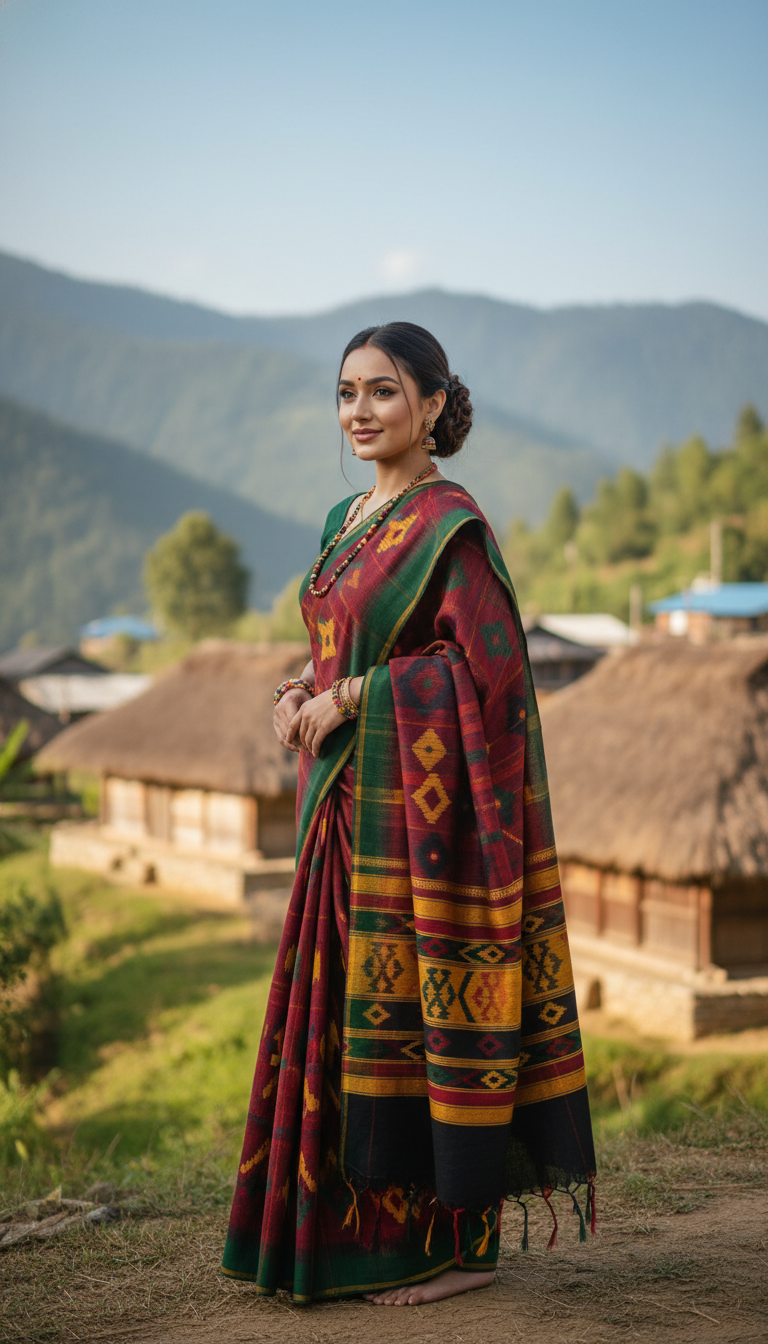
Naga Handloom Saree in Hilly Village
Discover the exquisite beauty of a Naga Handloom saree with bold patterns, draped gracefully on an adult person in a serene hilly village. A celebration of indigenous Indian textile artistry and cultural heritage.
How Can You Generate Authentic Naga Handloom Saree Portraits with AI?
Showcase Indigenous Textile Artistry and Tribal Fashion Instantly
This AI photo template allows you to instantly generate high-resolution, photorealistic portraits of a model wearing a vibrant Naga handloom saree set against a picturesque hilly village in Nagaland. Featuring the distinctive bold geometric patterns and rich colors characteristic of tribal indigenous textiles, the generated scenes beautifully capture the cultural heritage of Northeast India. With VapuAI, you can bypass the logistics of on-location mountain photoshoots and produce campaign-ready visuals that celebrate authentic Indian fashion and traditional wooden architectural backdrops in mere seconds.
How to create it in VapuAI
- 1
Upload Reference Image
Upload a clear facial reference photo of your subject to VapuAI to ensure accurate identity mapping.
- 2
Select Template
Select the Naga Handloom Saree in Hilly Village template from the available Indian fashion styles.
- 3
Customize Prompt
Customize the prompt to define the subject's pose, expression, or the saree's color accents.
- 4
Generate Image
Click Generate to let the AI produce your culturally authentic, high-resolution portrait in seconds.
- 5
Download Final Portrait
Review your generated visual and download the final campaign-ready 9:16 portrait.
Prompt & settings
Creative goal
Generate a high-resolution, photorealistic image of an adult person gracefully wearing a vibrant Naga Handloom saree, set against the backdrop of a traditional hilly village.
Style anchors
Tips for best results
- •Use a reference image with neutral or soft natural lighting to seamlessly match the serene daylight of the mountain village backdrop.
- •Keep the subject's customized prompt simple, focusing on subtle expressions like a gentle smile to maintain the authentic, documentary-style ambiance of the portrait.
- •Ensure your reference photo does not feature heavy modern accessories that might conflict with the traditional aesthetic of indigenous Naga styling.
- •Experiment with different descriptive keywords for the saree's bold geometric patterns if you want the AI to highlight specific traditional color palettes like deep reds and blacks.
Best for
- Ethnic wear brands and boutique marketers looking to showcase authentic tribal fashion and handwoven northeastern Indian textiles in their seasonal campaigns.
- Travel and culture influencers needing striking, culturally accurate imagery to accompany stories about Nagaland's heritage and indigenous artistry.
- Fashion agencies requiring high-volume, photorealistic lifestyle imagery featuring traditional attire and serene mountainous environments without arranging expensive location shoots.
- Editorial designers and digital publishers producing content on Indian cultural wear who need vibrant, 9:16 portrait assets for social media and digital magazines.
Frequently asked questions
What elements make the Naga Handloom Saree template unique?
This template specifically renders the distinctive, bold geometric patterns and vibrant colors of indigenous Naga textiles, paired with a culturally accurate background of a traditional Nagaland village featuring wooden architecture.
Can I adjust the colors of the handwoven saree?
Yes, you can use the custom text prompt feature to suggest specific color palettes, allowing the AI to integrate those hues while maintaining the traditional handloom texture.
Is the background customizable in this specific template?
The core environment remains a picturesque hilly village in Nagaland with lush mountains to ensure thematic consistency, but you can prompt for subtle atmospheric changes like a gentle morning mist or golden hour lighting.
Do I need professional model photos as a reference?
Not at all. A clear, well-lit selfie or standard portrait is sufficient. VapuAI will map the facial features and structure onto the photorealistic model wearing the saree.
More Templates in Indian Sarees

Red Banarasi Silk Saree Palace Wedding Prompt
Generate stunning photorealistic images of a person in an elegant red Banarasi silk saree, adorned with traditional jewelry, in a grand Indian palace wedding setting. Perfect for cultural fashion content.

Royal Blue Banarasi Silk Saree on Haveli Swing
Discover the timeless beauty of a royal blue Banarasi silk saree with heavy zari brocade, captured in a serene haveli setting. Perfect for cultural fashion inspiration.

Banarasi Silk Saree Mandap Ceremony
Generate exquisite AI images of an adult person in a luxurious Banarasi Silk saree with heavy zari brocade, captured in a warm, sacred Indian mandap setting. Perfect for cultural fashion and traditional themes.