 VapuAI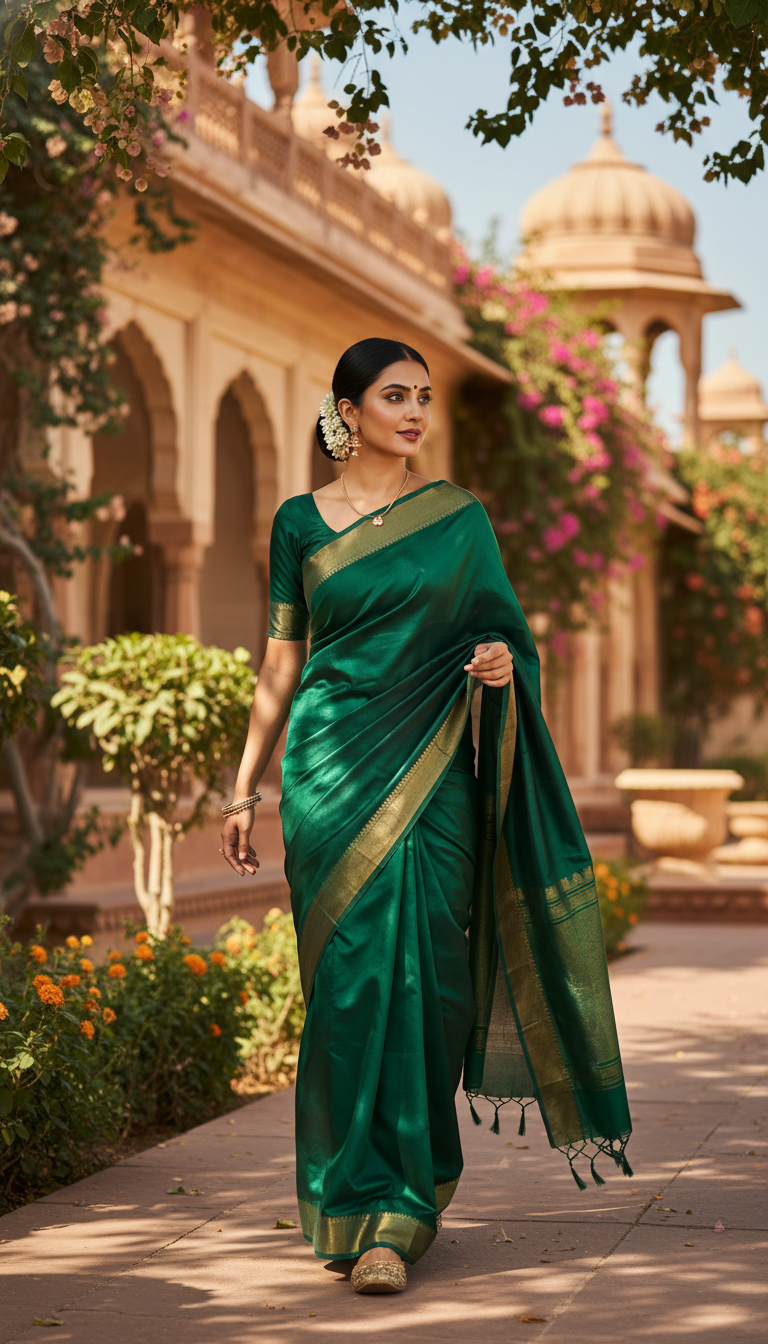
Mysore Silk Saree in Palace Gardens
Discover the elegance of a plain glossy Mysore Silk saree with subtle zari, draped beautifully on an adult person walking through enchanting Indian palace gardens. A timeless cultural fashion statement.
How to Generate Photorealistic Royal Portraits in Mysore Silk
Elevate Your Ethnic Fashion Campaigns with AI-Generated Palace Settings
The "Mysore Silk Saree in Palace Gardens" AI template allows you to instantly generate photorealistic, 9:16 portrait images of a person elegantly walking through a lush, sun-drenched Indian palace courtyard wearing a glossy, plain Mysore silk saree with subtle zari details. By simply uploading a reference photo of your model, our advanced AI workspace replaces expensive on-location destination shoots with a highly polished, campaign-ready visual. The resulting image boasts a serene atmosphere, featuring a soft bokeh background of ornate palace architecture that beautifully contrasts with the vibrant, luxurious drape of the heritage silk.
How to create it in VapuAI
- 1
Upload Reference Image
Upload a clear, front-facing reference image of your subject to ensure accurate facial features, body structure, and skin tone transfer.
- 2
Select the Template
Select the 'Mysore Silk Saree in Palace Gardens' template from the Indian Sarees category within the VapuAI dashboard.
- 3
Customize the Saree Prompt
Customize your text prompt to specify the exact color of the glossy Mysore silk saree (e.g., deep magenta, emerald green, or classic mustard) and any specific subtle zari patterns.
- 4
Adjust Aspect Ratio
Adjust the aspect ratio to 9:16 if you are generating content for social media stories, Reels, or vertical lookbooks.
- 5
Generate and Download
Generate your image and download the high-resolution, photorealistic portrait to immediately integrate into your creative campaigns.
Prompt & settings
Creative goal
To generate a photorealistic image of an adult person gracefully walking through lush palace gardens, adorned in a plain glossy Mysore Silk saree with subtle zari details.
Style anchors
Tips for best results
- •Specify rich, jewel-toned colors for the saree in your prompt, as the glossy texture of Mysore silk catches the simulated soft natural sunlight beautifully.
- •Keep the subject's reference photo well-lit and free of heavy facial obstructions (like oversized sunglasses) to ensure the AI seamlessly blends their identity into the final portrait.
- •Describe minimal, elegant traditional jewelry in your custom prompt to complement the understated luxury of the plain silk without overpowering the subtle zari borders.
- •Use adjectives like 'serene,' 'majestic,' or 'golden hour lighting' in any custom prompt additions to enhance the lush, sun-drenched atmosphere of the palace gardens.
Best for
- Ethnic fashion brands and boutique owners can use this template to showcase their plain glossy silk collections in a luxurious, high-end heritage setting without booking a physical palace location.
- Social media influencers and content creators can generate visually striking, culturally rich OOTD (outfit of the day) portraits that stand out in crowded Instagram or Pinterest feeds.
- Digital marketing agencies can quickly produce A/B testable creative assets featuring traditional Indian attire for festive season ad campaigns.
- Wedding planners and bridal consultants can craft mood boards and styling references for clients looking for an elegant, understated South Indian royal aesthetic.
- Cultural and lifestyle digital magazines can effortlessly source high-resolution, photorealistic editorial imagery to accompany articles on Indian textiles and heritage fashion.
Frequently asked questions
Can I change the color of the Mysore silk saree?
Yes, you can specify your desired saree color in the custom prompt area to match your brand's specific collection or campaign theme.
Does the background have to be a palace garden?
This specific template is optimized for lush Indian palace gardens with ornate architecture and a soft bokeh effect, ensuring a consistent royal aesthetic.
Is the generated image suitable for vertical social media formats?
Absolutely, the template defaults to a 9:16 portrait orientation, making it perfectly sized for Instagram Stories, Reels, and Pinterest pins.
How does the AI ensure the subject looks like my model?
VapuAI uses your uploaded identity reference image to accurately map facial features, gender, ethnicity, and body structure onto the final generated portrait.
More Templates in Indian Sarees

Red Banarasi Silk Saree Palace Wedding Prompt
Generate stunning photorealistic images of a person in an elegant red Banarasi silk saree, adorned with traditional jewelry, in a grand Indian palace wedding setting. Perfect for cultural fashion content.

Royal Blue Banarasi Silk Saree on Haveli Swing
Discover the timeless beauty of a royal blue Banarasi silk saree with heavy zari brocade, captured in a serene haveli setting. Perfect for cultural fashion inspiration.

Banarasi Silk Saree Mandap Ceremony
Generate exquisite AI images of an adult person in a luxurious Banarasi Silk saree with heavy zari brocade, captured in a warm, sacred Indian mandap setting. Perfect for cultural fashion and traditional themes.