 VapuAI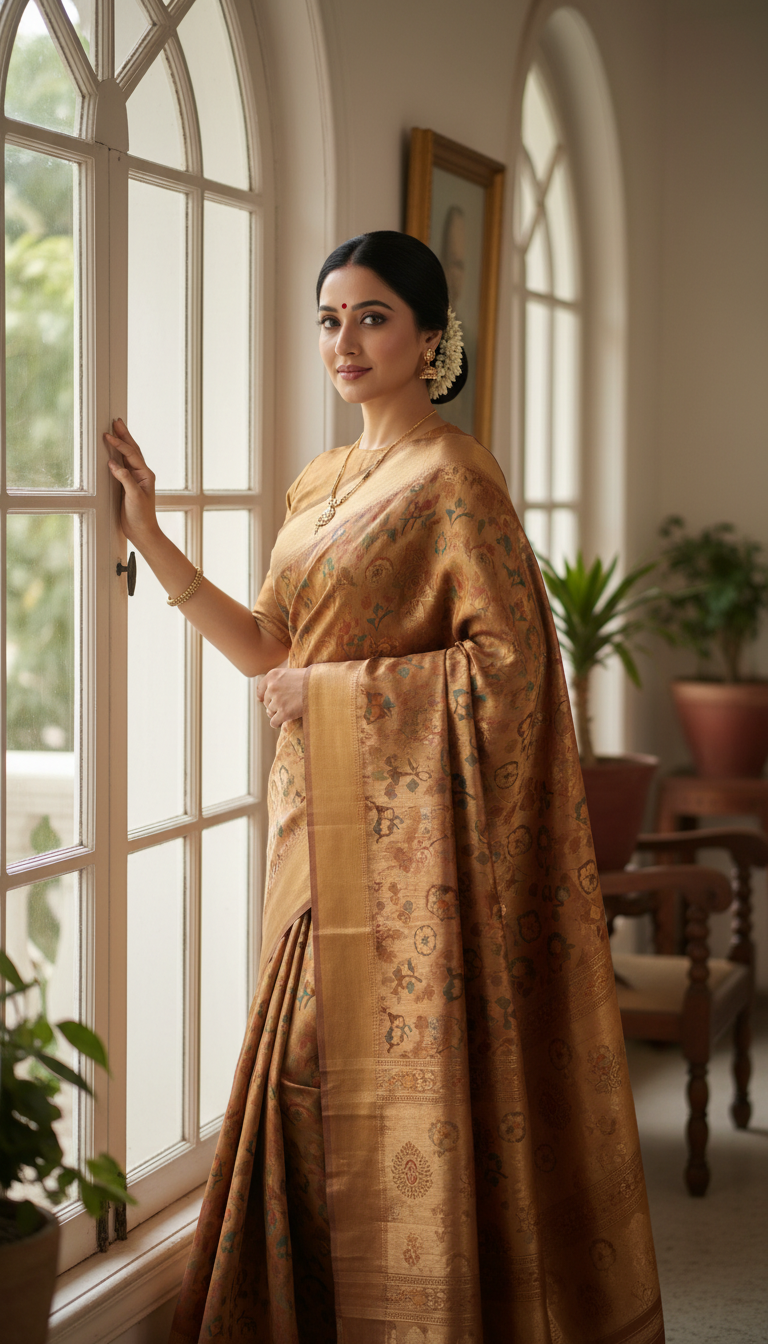
Murshidabad Silk Saree by Window with Soft Light
Elegantly draped Murshidabad Silk saree, rich patterns, and natural window light. A stunning portrait showcasing traditional Indian fashion.
How to Generate Serene Murshidabad Silk Saree Portraits with Natural Window Lighting
Capture the Heritage of West Bengal Handlooms for Your Editorial Campaigns
The Murshidabad Silk Saree by Window with Soft Light template is a specialized AI image generator designed to create photorealistic, 9:16 portraits of models gracefully draped in lightweight, intricately patterned West Bengal silk. By leveraging this tool on VapuAI, content creators, fashion marketers, and boutique agencies can instantly produce serene, culturally rich campaign visuals without organizing a complex indoor photoshoot. The resulting images feature authentic handloom textures, elegant draping, and soft background shadows that evoke a nostalgic, premium aesthetic perfect for social media lookbooks and editorial catalogs.
How to create it in VapuAI
- 1
Upload Reference Image
Upload a clear, high-quality reference photo of your subject's face to ensure accurate identity mapping for the traditional portrait.
- 2
Select the Template
Select the "Murshidabad Silk Saree by Window with Soft Light" template from the Indian Sarees category in your workspace.
- 3
Customize Saree Details
Customize the text prompt to define specific saree colors, traditional block prints, or subtle jewelry details to match your campaign's aesthetic.
- 4
Generate the Portrait
Generate the image, allowing the AI to render the lightweight silk texture and calculate the precise, soft window light diffusion across the subject.
- 5
Download and Publish
Download the final 9:16 photorealistic portrait in high resolution, ready for immediate publication in editorial lookbooks or social media platforms.
Prompt & settings
Creative goal
Generate a photorealistic image of an adult person gracefully draped in a Murshidabad Silk saree, illuminated by soft window light.
Style anchors
Tips for best results
- •Keep custom prompt additions focused on the distinctive features of Murshidabad silk, such as floral motifs, paisley borders, or lightweight printed textures, rather than heavy zari embroidery.
- •Mention specific complementary jewelry like oxidized silver or delicate gold pieces in your prompt to enhance the nostalgic, elegant mood of the indoor home setting.
- •Ensure your reference image has neutral lighting so the AI can seamlessly blend the subject's face into the warm, diffused window light environment.
- •Use color palettes that thrive in natural daylight, such as mustard yellow, deep maroon, or pastel shades, to maximize the photorealistic interplay of light and shadow on the silk.
Best for
- Fashion brands and ethnic wear boutiques seeking to produce high-resolution catalog imagery that highlights the fine, lightweight drape and distinctive prints of authentic Murshidabad silk sarees.
- Cultural influencers and lifestyle bloggers needing serene, aesthetically pleasing 9:16 vertical portraits lit by natural window light for Instagram Reels and Pinterest boards.
- Creative agencies developing localized, heritage-focused marketing campaigns for Indian festive seasons, requiring photorealistic models in traditional West Bengal attire.
- Editorial magazine designers looking for nostalgic, softly lit indoor photography that beautifully contrasts intricate saree motifs with gentle, diffused natural shadows.
Frequently asked questions
Can I change the color and pattern of the Murshidabad silk saree?
Yes, you can easily modify the prompt to specify custom colors, traditional West Bengal prints, or border details while maintaining the realistic drape and lightweight texture of the fabric.
Does this template support landscape or square image ratios?
This specific template is optimized for a 9:16 vertical portrait ratio, making it ideal for social media stories, reels, and mobile-first fashion lookbooks.
How does the AI handle the window lighting effect?
The platform automatically calculates soft, diffused natural light streaming from an off-camera window, casting elegant, realistic shadows that add depth to both the subject and the saree fabric.
Do I need a professional studio photo as my reference?
No, a standard well-lit selfie or headshot is sufficient. The AI extracts the facial features and completely reimagines the lighting and environment to match the serene window-lit scene.
More Templates in Indian Sarees

Red Banarasi Silk Saree Palace Wedding Prompt
Generate stunning photorealistic images of a person in an elegant red Banarasi silk saree, adorned with traditional jewelry, in a grand Indian palace wedding setting. Perfect for cultural fashion content.

Royal Blue Banarasi Silk Saree on Haveli Swing
Discover the timeless beauty of a royal blue Banarasi silk saree with heavy zari brocade, captured in a serene haveli setting. Perfect for cultural fashion inspiration.

Banarasi Silk Saree Mandap Ceremony
Generate exquisite AI images of an adult person in a luxurious Banarasi Silk saree with heavy zari brocade, captured in a warm, sacred Indian mandap setting. Perfect for cultural fashion and traditional themes.