 VapuAI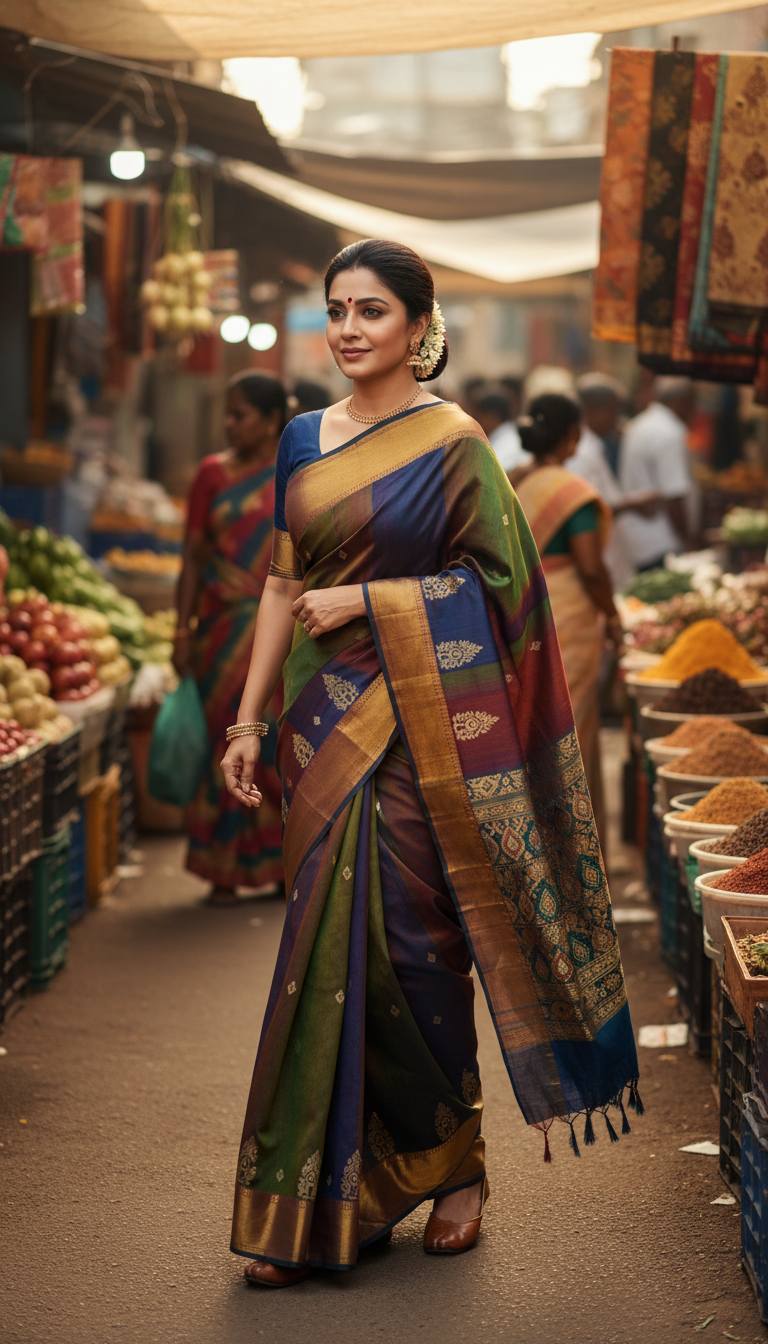
Molakalmuru Saree in Vibrant Weekly Market Scene
Experience the vibrant culture of Karnataka with this stunning image of an adult person wearing a Molakalmuru saree amidst a lively Indian weekly market scene.
How to Generate Authentic Market Scene Photos with a Molakalmuru Saree
Effortless AI Cultural Fashion Photography for Creators
The "Molakalmuru Saree in Vibrant Weekly Market Scene" template is an AI photo generator that transforms your reference image into a photorealistic portrait of an individual wearing a traditional Karnataka silk saree while walking through a bustling Indian street market. Perfect for cultural storytelling, this tool instantly creates 9:16 high-resolution visuals featuring rich tribal motifs, diffused sunlight, and colorful background stalls of spices and textiles. Whether you are producing ethnic fashion campaigns or rich lifestyle content, this template delivers authentic, campaign-ready imagery in seconds.
How to create it in VapuAI
- 1
Upload Reference Photo
Upload a clear, front-facing reference photo of your subject to ensure accurate facial features and body structure in the final image.
- 2
Select the Template
Select the "Molakalmuru Saree in Vibrant Weekly Market Scene" template from the Indian Sarees category in your VapuAI workspace.
- 3
Customize Saree and Scene Details
Customize the prompt if needed, specifying any particular color preferences for the saree's tribal motifs or adjusting the vibrant market background details.
- 4
Generate the Market Scene
Click generate to allow the AI to seamlessly blend your subject's identity with the traditional Karnataka drape and the lively, diffused sunlight of the weekly market.
- 5
Download and Publish
Download the high-resolution 9:16 portrait, ready for immediate publication in your cultural fashion campaigns or social media channels.
Prompt & settings
Creative goal
To generate a high-resolution, photorealistic image of an adult person wearing a Molakalmuru saree, gracefully moving through a bustling Indian weekly market.
Style anchors
Tips for best results
- •Use a reference image with neutral or soft lighting to seamlessly blend with the template's diffused natural sunlight filtering through the market awnings.
- •If customizing the prompt, request contrasting colors for the saree, like deep maroon or mustard yellow, to make the subject pop against the colorful fruits and spices in the background.
- •Keep your subject's face clear of heavy modern accessories in the reference photo so the AI can accurately map their features before generating traditional styling.
- •Utilize the native 9:16 aspect ratio specifically for mobile-first platforms like Instagram Stories or TikTok to maximize the immersive impact of the vertical street photography framing.
Best for
- Fashion marketing agencies needing high-volume, culturally authentic lifestyle imagery to showcase South Indian ethnic wear without staging expensive on-location street shoots.
- Travel and culture influencers looking to create visually rich, consistent social media content highlighting Karnataka's traditional textiles in a realistic, bustling environment.
- E-commerce brands selling traditional Indian jewelry or accessories who require vibrant, realistic market-walk portraits as striking background contexts for their products.
- Textile designers and boutique owners wanting to visualize their Molakalmuru drape concepts in a lively, real-world setting to build mood boards or promotional materials.
- Content creators focusing on regional Indian heritage who want to generate stunning 9:16 vertical storytelling assets for Instagram Reels or Pinterest.
Frequently asked questions
Can I change the color of the Molakalmuru saree?
Yes, you can customize the text prompt before generating to specify your desired saree colors, such as traditional rich reds, earthy tones, or vibrant modern hues.
What kind of background does this AI template generate?
The template creates a photorealistic, bustling Indian weekly market scene complete with colorful stalls displaying fruits, vegetables, and textiles, all illuminated by soft, diffused natural sunlight.
Is this template suitable for commercial fashion campaigns?
Absolutely. The output is a high-resolution, campaign-ready image perfect for lookbooks, social media ads, and ethnic fashion marketing materials.
Will my subject's face look exactly like the uploaded photo?
Yes, VapuAI precisely maps the facial features, gender, and ethnicity from your uploaded reference image to maintain high fidelity in the final generated portrait.
More Templates in Indian Sarees

Red Banarasi Silk Saree Palace Wedding Prompt
Generate stunning photorealistic images of a person in an elegant red Banarasi silk saree, adorned with traditional jewelry, in a grand Indian palace wedding setting. Perfect for cultural fashion content.

Royal Blue Banarasi Silk Saree on Haveli Swing
Discover the timeless beauty of a royal blue Banarasi silk saree with heavy zari brocade, captured in a serene haveli setting. Perfect for cultural fashion inspiration.

Banarasi Silk Saree Mandap Ceremony
Generate exquisite AI images of an adult person in a luxurious Banarasi Silk saree with heavy zari brocade, captured in a warm, sacred Indian mandap setting. Perfect for cultural fashion and traditional themes.