 VapuAI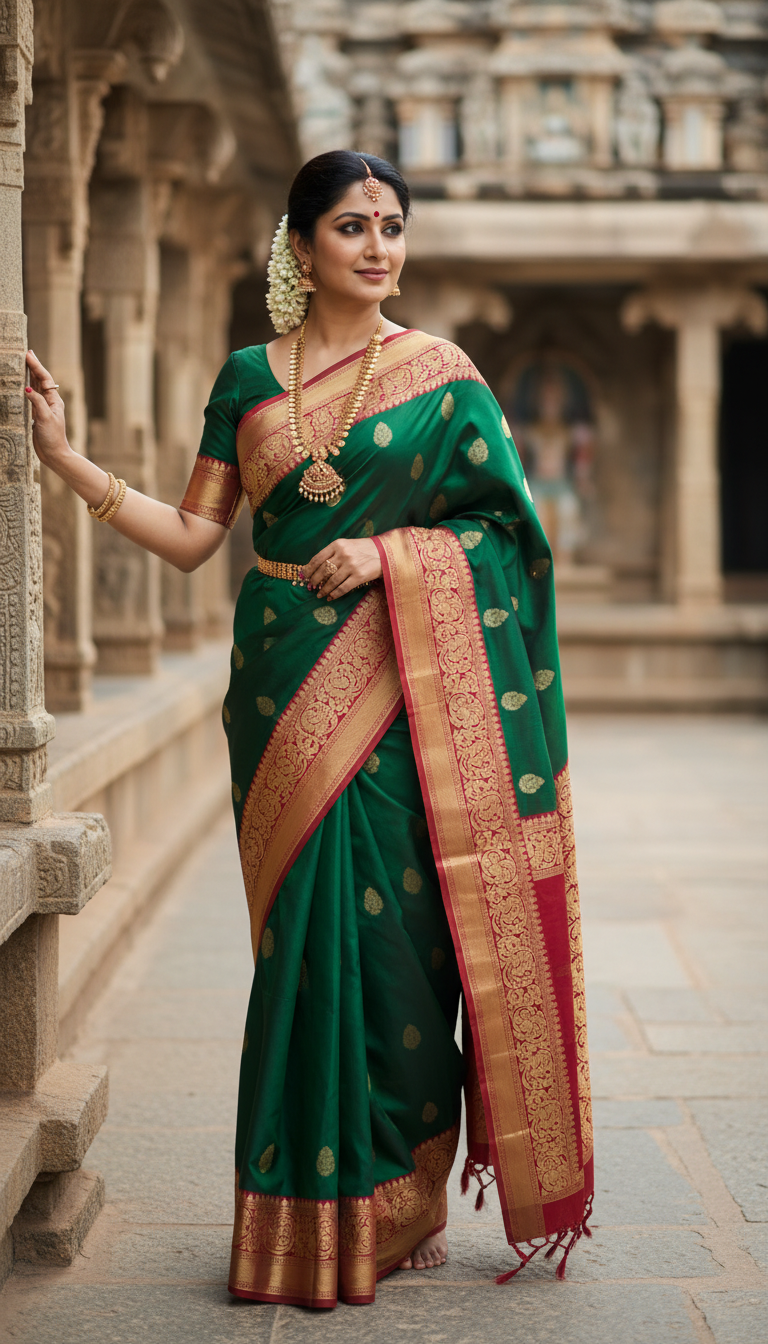
South Indian Kanjeevaram Saree in Temple Courtyard
Experience the beauty of a traditional Kanjeevaram silk saree with exquisite temple motifs, worn by a person in a tranquil South Indian temple courtyard. A true symbol of heritage and elegance.
How Can I Generate Authentic Kanjeevaram Saree Temple Portraits Using AI?
Showcase South Indian Heritage with Photorealistic Temple Backdrops
This AI photo template allows you to instantly generate high-resolution, photorealistic portraits of a model wearing a traditional Kanjeevaram silk saree within a serene South Indian temple courtyard. Featuring exquisite details like gold zari work, traditional temple motifs, and jasmine gajras, the generator places your subject in an authentic cultural setting with weathered stone pillars and dappled natural sunlight. It is the perfect digital production tool for producing culturally rich, campaign-ready ethnic wear imagery without the logistics of an on-location heritage shoot.
How to create it in VapuAI
- 1
Upload Reference Image
Upload a clear, front-facing photo of your subject's face to ensure accurate facial feature mapping.
- 2
Select the Template
Select the 'South Indian Kanjeevaram Saree in Temple Courtyard' template from the Indian Sarees workspace.
- 3
Customize the Saree Details
Customize the prompt by specifying the exact color of the Kanjeevaram silk and specific jewelry preferences.
- 4
Generate the AI Portrait
Click generate to render your photorealistic 9:16 portrait complete with ancient stone architecture and natural courtyard lighting.
- 5
Download and Publish
Download the high-resolution image for immediate use in your social media reels, lookbooks, or campaign landing pages.
Prompt & settings
Creative goal
To generate a high-resolution, photorealistic image of a person elegantly draped in a traditional Kanjeevaram saree within a serene temple courtyard, showcasing cultural grace and intricate details.
Style anchors
Tips for best results
- •Specify the primary and border colors of the Kanjeevaram saree in your custom prompt to perfectly match your brand's seasonal collection.
- •Mention traditional South Indian jewelry like a 'manga malai' or antique gold 'jhumkas' to enhance the authenticity of the cultural portrait.
- •Use reference photos with neutral lighting so the AI can seamlessly blend the subject's face into the warm, dappled natural sunlight of the temple courtyard.
- •Describe the exact placement of the jasmine flowers (gajra) in the subject's hair, such as 'a thick jasmine garland on a traditional braid', for added realism.
Best for
- Ethnic fashion brands looking to produce high-volume, culturally authentic social media campaigns featuring premium Kanjeevaram silk.
- Influencers and content creators wanting to showcase traditional South Indian festive looks without organizing an elaborate temple photoshoot.
- Marketing agencies designing heritage-themed promotional materials for Diwali, Pongal, or traditional wedding seasons.
- Bridal makeup artists and stylists creating mood boards to visualize traditional South Indian bridal and guest aesthetics.
Frequently asked questions
Can I change the color of the Kanjeevaram saree in this template?
Yes, you can easily customize the saree's color, including both the body and the zari border, by updating the text prompt before generating the image.
Does the AI generate realistic South Indian temple backgrounds?
Absolutely. The template is engineered to render authentic architectural details like weathered stone pillars, intricate carvings, and sunlit courtyards typical of South Indian temples.
Is this template suitable for high-resolution print campaigns?
Yes, VapuAI generates campaign-ready, high-resolution visuals that maintain exceptional detail in the silk texture and background architecture, making them suitable for both digital and print media.
Do I need a professional reference photo to use this generator?
While professional photos are not required, providing a clear, well-lit, and front-facing image of your subject ensures the most accurate and photorealistic facial rendering.
More Templates in Indian Sarees

Red Banarasi Silk Saree Palace Wedding Prompt
Generate stunning photorealistic images of a person in an elegant red Banarasi silk saree, adorned with traditional jewelry, in a grand Indian palace wedding setting. Perfect for cultural fashion content.

Royal Blue Banarasi Silk Saree on Haveli Swing
Discover the timeless beauty of a royal blue Banarasi silk saree with heavy zari brocade, captured in a serene haveli setting. Perfect for cultural fashion inspiration.

Banarasi Silk Saree Mandap Ceremony
Generate exquisite AI images of an adult person in a luxurious Banarasi Silk saree with heavy zari brocade, captured in a warm, sacred Indian mandap setting. Perfect for cultural fashion and traditional themes.