 VapuAI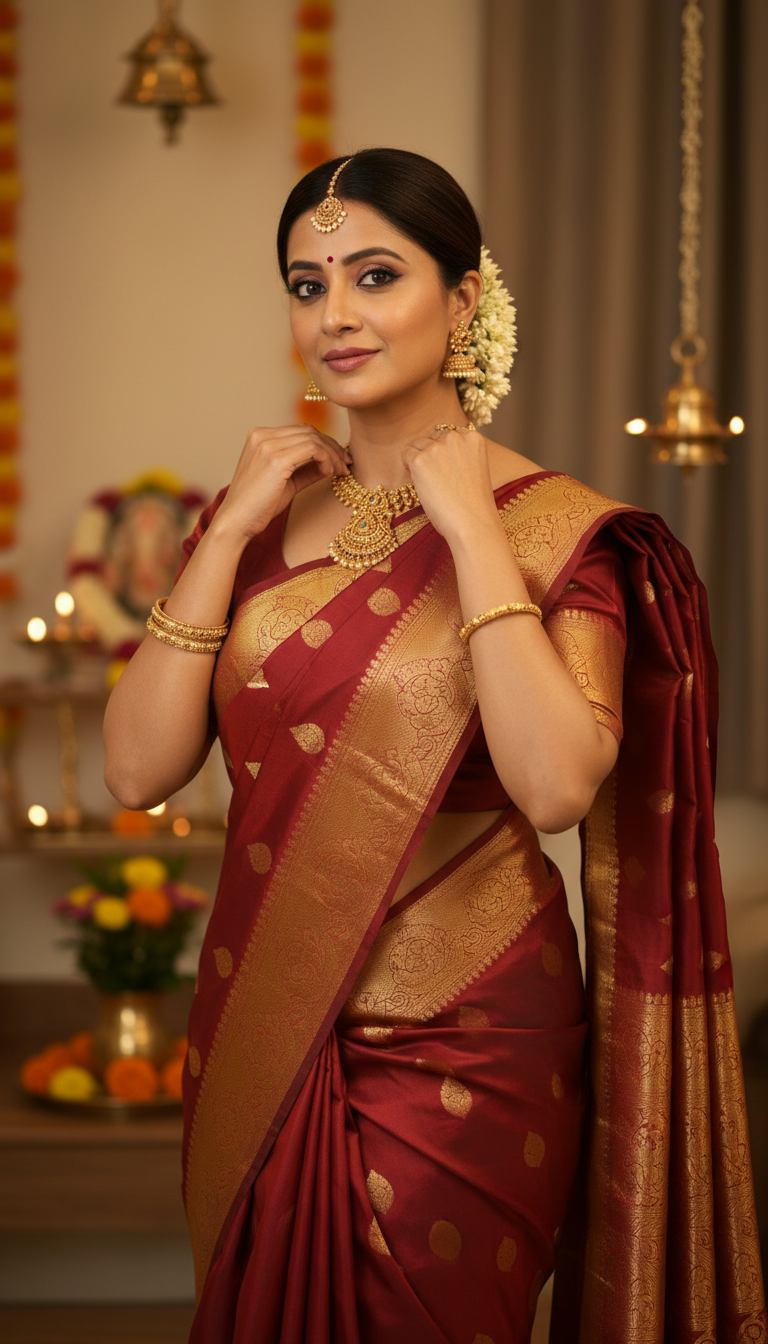
Kanjeevaram Saree Festive Home Temple Jewelry
Discover a stunning image of an adult person adorned in a vibrant Kanjeevaram silk saree with gold temple motifs and traditional Indian temple jewelry in a festive home setting.
How Can You Generate Photorealistic Kanjeevaram Saree Portraits for Festive Campaigns?
Crafting Authentic South Indian Cultural Visuals from Home
The Kanjeevaram Saree Festive Home Temple Jewelry template is an AI-powered image generator that allows you to create photorealistic, high-resolution portraits of an adult wearing a heavy mulberry silk Kanjeevaram saree adorned with intricate gold temple motifs inside a warmly lit, festive Indian home. Perfect for cultural fashion campaigns and ethnic wear marketing, this VapuAI tool seamlessly blends traditional South Indian aesthetics, like gajra, bindis, jhumkas, and heavy temple jewelry, with ambient indoor lighting to produce rich, campaign-ready visuals without the need for an expensive on-location photoshoot.
How to create it in VapuAI
- 1
Upload Reference Image
Upload a clear front-facing photo to map the subject's identity into the festive scene.
- 2
Select the Template
Open the 'Kanjeevaram Saree Festive Home Temple Jewelry' workspace in the VapuAI dashboard.
- 3
Customize the Look
Add custom text to specify the saree's color, zari border details, and specific traditional accessories.
- 4
Generate Portrait
Click generate to process the AI rendering with warm, ambient indoor lighting and rich silk textures.
- 5
Download and Export
Save the high-resolution 9:16 portrait for your fashion campaigns and social media channels.
Prompt & settings
Creative goal
Generate a photorealistic, high-resolution portrait of an adult person gracefully showcasing a heavy mulberry silk Kanjeevaram saree with intricate temple motifs in a festive home setting, subtly adjusting temple jewelry.
Style anchors
Tips for best results
- •Specify the saree's base and border colors (e.g., 'emerald green with a crimson red zari border') in your custom prompt for precise brand alignment.
- •Ensure your uploaded reference image has neutral, balanced lighting to blend perfectly with the warm, ambient indoor illumination of the festive home setting.
- •Mention specific traditional accessories like 'fresh jasmine gajra' or 'antique gold temple jhumkas' to enhance the cultural authenticity of the portrait.
- •Use 9:16 aspect ratio settings when downloading to perfectly fit vertical formats like Instagram Reels, TikToks, or Pinterest idea pins.
Best for
- Ethnic fashion brands needing high-volume, photorealistic catalog images showcasing traditional Kanjeevaram silk sarees in relatable, festive home settings.
- Social media influencers and content creators looking to celebrate South Indian festivals like Diwali, Pongal, or Navratri with authentic cultural visuals.
- Marketing agencies designing campaign-ready assets for Indian jewelry brands, specifically highlighting traditional gold temple necklaces and jhumkas.
- Wedding planners and bridal makeup artists wanting to demonstrate authentic pre-wedding or festive guest looks in a warm, inviting indoor environment.
Frequently asked questions
What makes this template different from other Kanjeevaram saree generators?
This template specifically renders the subject in a warmly lit, ornately decorated festive home environment, focusing on the intricate gold temple motifs of the saree and heavy traditional temple jewelry, rather than outdoor or wedding-specific backgrounds.
Can I change the color of the Kanjeevaram silk saree?
Yes, you can customize the prompt to specify any color combination for the mulberry silk and the gold zari border to match your brand's specific ethnic wear collection.
Does the AI preserve the facial features from my uploaded photo?
Absolutely. VapuAI uses your uploaded reference image to accurately map facial features, body structure, and ethnicity, seamlessly integrating them into the photorealistic festive portrait.
Is the generated image suitable for commercial marketing?
Yes, the high-resolution, photorealistic output is campaign-ready and ideal for lookbooks, social media ads, and digital catalogs for fashion or jewelry brands.
More Templates in Indian Sarees

Red Banarasi Silk Saree Palace Wedding Prompt
Generate stunning photorealistic images of a person in an elegant red Banarasi silk saree, adorned with traditional jewelry, in a grand Indian palace wedding setting. Perfect for cultural fashion content.

Royal Blue Banarasi Silk Saree on Haveli Swing
Discover the timeless beauty of a royal blue Banarasi silk saree with heavy zari brocade, captured in a serene haveli setting. Perfect for cultural fashion inspiration.

Banarasi Silk Saree Mandap Ceremony
Generate exquisite AI images of an adult person in a luxurious Banarasi Silk saree with heavy zari brocade, captured in a warm, sacred Indian mandap setting. Perfect for cultural fashion and traditional themes.