 VapuAI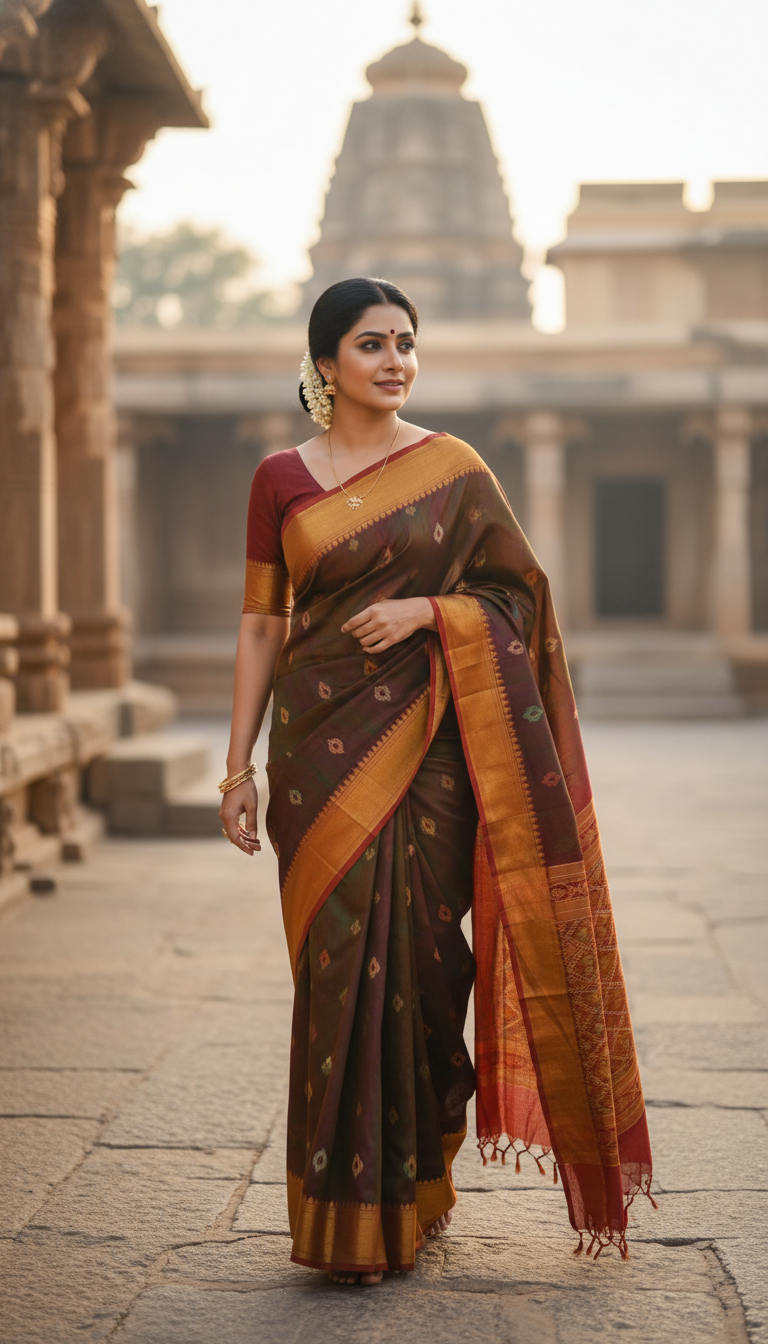
Ilkal Saree in Temple Town
Stunning photorealistic image of an adult person wearing a traditional Ilkal saree with a red border, walking in a historical temple town. Captures cultural fashion and heritage.
How Can You Generate Authentic Ilkal Saree Temple Portraits with AI?
Bring Karnataka's Heritage to Life with Red-Border Ilkal Sarees and Historic Temple Backdrops
The Ilkal Saree in Temple Town template is a specialized AI image generator that allows you to instantly create photorealistic portraits of individuals wearing a traditional Karnataka Ilkal saree with its signature red border, set against the breathtaking backdrop of a historic stone temple. By simply uploading a reference photo, you can generate culturally accurate, high-resolution visuals featuring intricate stone archways and golden-hour lighting. Perfect for South Indian heritage campaigns, ethnic fashion lookbooks, and travel promotions, this multi-model workspace eliminates the need for expensive on-location shoots while maintaining absolute authenticity.
How to create it in VapuAI
- 1
Upload Reference Photo
Upload a clear, front-facing reference photo of your subject to ensure accurate facial features and body structure mapping.
- 2
Select the Template
Choose the 'Ilkal Saree in Temple Town' template to set up the authentic red-bordered saree and historic Karnataka temple aesthetic.
- 3
Customize Your Prompt
Enter custom details such as traditional jewelry styles or specific draping preferences in the custom prompt field.
- 4
Generate the Portrait
Click generate to create your photorealistic vertical portrait bathed in golden-hour temple lighting.
- 5
Download or Enhance
Download your high-resolution campaign-ready image or use VapuAI's editing tools to upscale and refine the visual.
Prompt & settings
Creative goal
Generate a high-resolution, photorealistic vertical portrait of an adult person gracefully walking through a vibrant temple town, elegantly draped in a traditional Ilkal saree.
Style anchors
Tips for best results
- •Use reference images with neutral lighting so the AI can effectively apply the template's warm, golden-hour temple lighting seamlessly to your subject's face.
- •Add keywords for specific traditional South Indian jewelry, like temple necklaces or jasmine flowers in the hair, to enhance cultural authenticity.
- •Mention the exact draping style in your custom prompt if you want the Ilkal saree's red border (pallu) prominently displayed across the shoulder.
- •Keep the subject's facial expression serene or subtly smiling in the reference photo to match the sacred, traditional mood of the temple town environment.
Best for
- Ethnic wear fashion brands needing high-quality lookbooks featuring traditional Ilkal sarees without organizing expensive on-location shoots in Karnataka.
- Cultural influencers and travel bloggers wanting to showcase authentic South Indian heritage styles in their social media feeds.
- Marketing agencies developing festive campaign materials that require culturally accurate, vibrant temple town visuals.
- Event planners creating mood boards or promotional materials for traditional South Indian weddings and cultural festivals.
- Textile designers visualizing how different draping styles of the red-bordered Ilkal saree look in natural, golden-hour lighting.
Frequently asked questions
What makes the Ilkal Saree AI template unique?
This template specifically generates the distinct red-bordered Ilkal saree native to Karnataka, set against a culturally accurate historic stone temple bathed in golden-hour light.
Can I change the color of the Ilkal saree?
Yes, while the classic red border is the default staple of the Ilkal style, you can use the custom prompt feature to specify different base colors for the saree fabric.
Are the generated temple backgrounds realistic?
Absolutely. The AI is tuned to render hyper-realistic ancient Karnataka stone architecture, complete with carved pillars, archways, and warm, bustling atmospheres.
Is this template suitable for high-resolution fashion campaigns?
Yes, VapuAI generates campaign-ready, high-resolution portraits in a 9:16 vertical format, perfect for Instagram Reels, Pinterest, and digital fashion lookbooks.
More Templates in Indian Sarees

Red Banarasi Silk Saree Palace Wedding Prompt
Generate stunning photorealistic images of a person in an elegant red Banarasi silk saree, adorned with traditional jewelry, in a grand Indian palace wedding setting. Perfect for cultural fashion content.

Royal Blue Banarasi Silk Saree on Haveli Swing
Discover the timeless beauty of a royal blue Banarasi silk saree with heavy zari brocade, captured in a serene haveli setting. Perfect for cultural fashion inspiration.

Banarasi Silk Saree Mandap Ceremony
Generate exquisite AI images of an adult person in a luxurious Banarasi Silk saree with heavy zari brocade, captured in a warm, sacred Indian mandap setting. Perfect for cultural fashion and traditional themes.