 VapuAI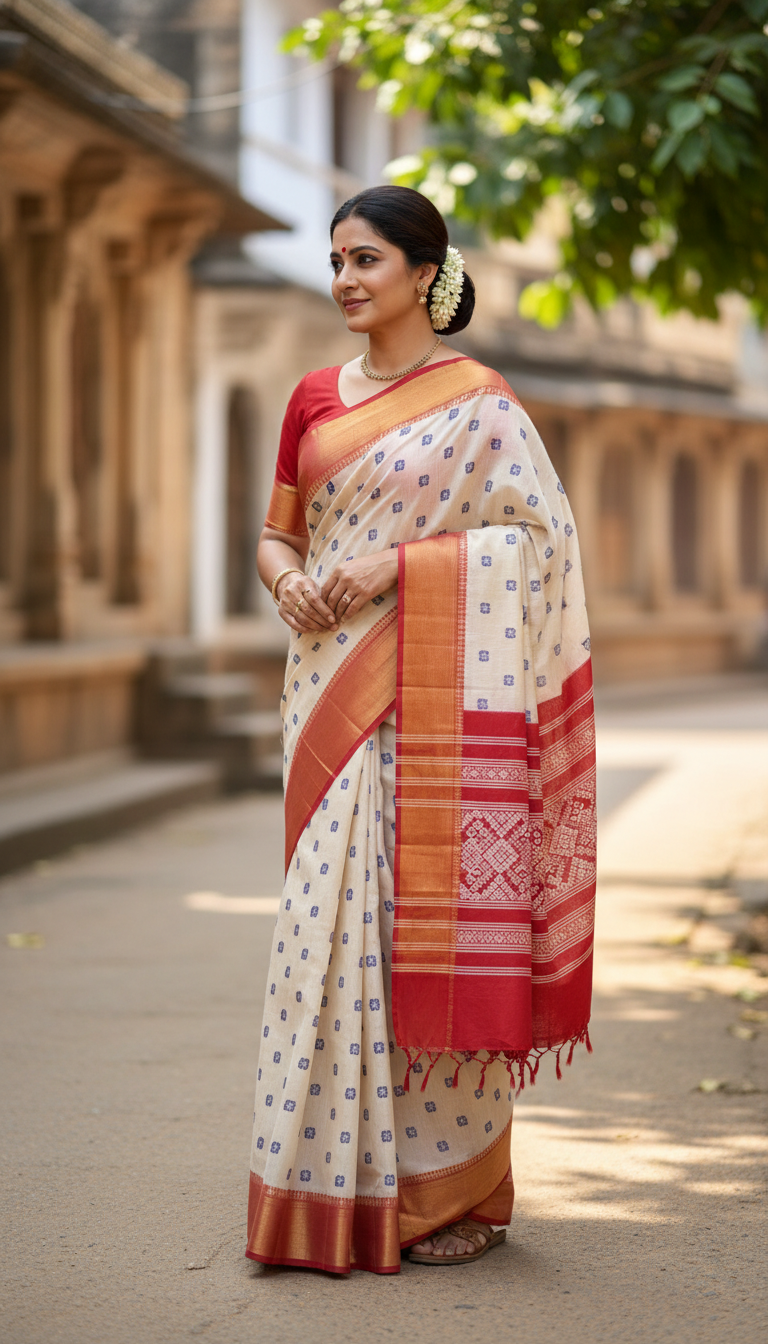
Ilkal Saree in Heritage Village Street
Discover the timeless beauty of an Ilkal saree, known for its iconic red borders, elegantly showcased by an adult person in a rustic Indian heritage village setting. Authentic cultural fashion from Karnataka.
How Can You Generate Authentic Ilkal Saree Village Portraits?
Bring Karnataka's Handloom Heritage to Your Creative Campaigns
The Ilkal Saree in Heritage Village Street template allows you to instantly generate high-resolution, photorealistic portraits of any person draped in a traditional red-bordered Ilkal saree set against a rustic Karnataka village backdrop. Forget the hassle of organizing a destination photoshoot in South India or sourcing authentic handloom textiles. VapuAI lets you create stunning, culturally rich visuals that feature iconic traditional jewelry, jasmine flowers, and intricate stone-carved architecture. It is the perfect tool for brands and creators looking to produce striking, heritage-inspired ethnic wear imagery with incredible realism and perfect lighting.
How to create it in VapuAI
- 1
Upload Reference Image
Upload a clear portrait photo of the person you want to feature in the heritage scene to guarantee accurate facial features.
- 2
Select the Ilkal Saree Template
Choose the 'Ilkal Saree in Heritage Village Street' template from the VapuAI library under the Indian Sarees category.
- 3
Customize the Look
Add specific prompt instructions for the saree body color or traditional jewelry to match your creative campaign.
- 4
Generate Portrait
Click generate to create the photorealistic image of the subject seamlessly integrated into the Karnataka village environment.
- 5
Download and Publish
Download your high-resolution heritage portrait, ready to be used across your brand's digital and print platforms.
Prompt & settings
Creative goal
Generate a high-resolution, photorealistic image of an adult person gracefully draped in an Ilkal saree, standing in a vibrant heritage village street, capturing traditional Indian charm.
Style anchors
Tips for best results
- •For the most realistic outcome, use a reference image where the subject has natural, even lighting on their face.
- •Specify regional jewelry like a traditional nose ring or temple necklace in your custom prompt to enhance the authentic South Indian aesthetic.
- •Mention 'golden hour lighting' in your text prompt to make the warm earthy tones of the village stone buildings and the red saree border pop.
- •Ensure your source photo has a neutral expression if you want to capture the graceful, timeless mood characteristic of heritage portraits.
Best for
- Ethnic fashion brands can use this template to showcase traditional South Indian handlooms without organizing expensive outdoor location shoots.
- Travel and culture bloggers can generate highly aesthetic, photorealistic visuals of Karnataka's heritage villages to accompany their regional storytelling.
- Creative agencies managing regional festive campaigns can rapidly produce localized, culturally authentic marketing materials featuring the iconic red-bordered Ilkal saree.
- Social media influencers can transform their everyday selfies into striking traditional portraits adorned with jasmine flowers and temple jewelry for festive content.
- Textile enthusiasts and digital artists can visualize traditional Indian weaving styles in authentic, sunlit rustic environments to build visually rich digital lookbooks.
Frequently asked questions
Can I change the color of the Ilkal saree?
Yes, while the iconic red border is a staple of the Ilkal style, you can use the custom text prompt to modify the body color of the saree to suit your brand palette.
Does the AI background look like a real Indian village?
Absolutely. The template is designed to render a sunlit, unpaved heritage street in Karnataka complete with intricate stone carvings, earthy tones, and ancient flora.
Will the generated person look exactly like my uploaded photo?
Yes, VapuAI strictly references the facial features, gender, and ethnicity of your uploaded image to place your specific subject naturally into the heritage scene.
Is this image resolution suitable for print campaigns?
Yes, this template generates high-resolution, photorealistic images in a 9:16 portrait format, making them perfect for both digital ads and high-quality print materials.
More Templates in Indian Sarees

Red Banarasi Silk Saree Palace Wedding Prompt
Generate stunning photorealistic images of a person in an elegant red Banarasi silk saree, adorned with traditional jewelry, in a grand Indian palace wedding setting. Perfect for cultural fashion content.

Royal Blue Banarasi Silk Saree on Haveli Swing
Discover the timeless beauty of a royal blue Banarasi silk saree with heavy zari brocade, captured in a serene haveli setting. Perfect for cultural fashion inspiration.

Banarasi Silk Saree Mandap Ceremony
Generate exquisite AI images of an adult person in a luxurious Banarasi Silk saree with heavy zari brocade, captured in a warm, sacred Indian mandap setting. Perfect for cultural fashion and traditional themes.