 VapuAI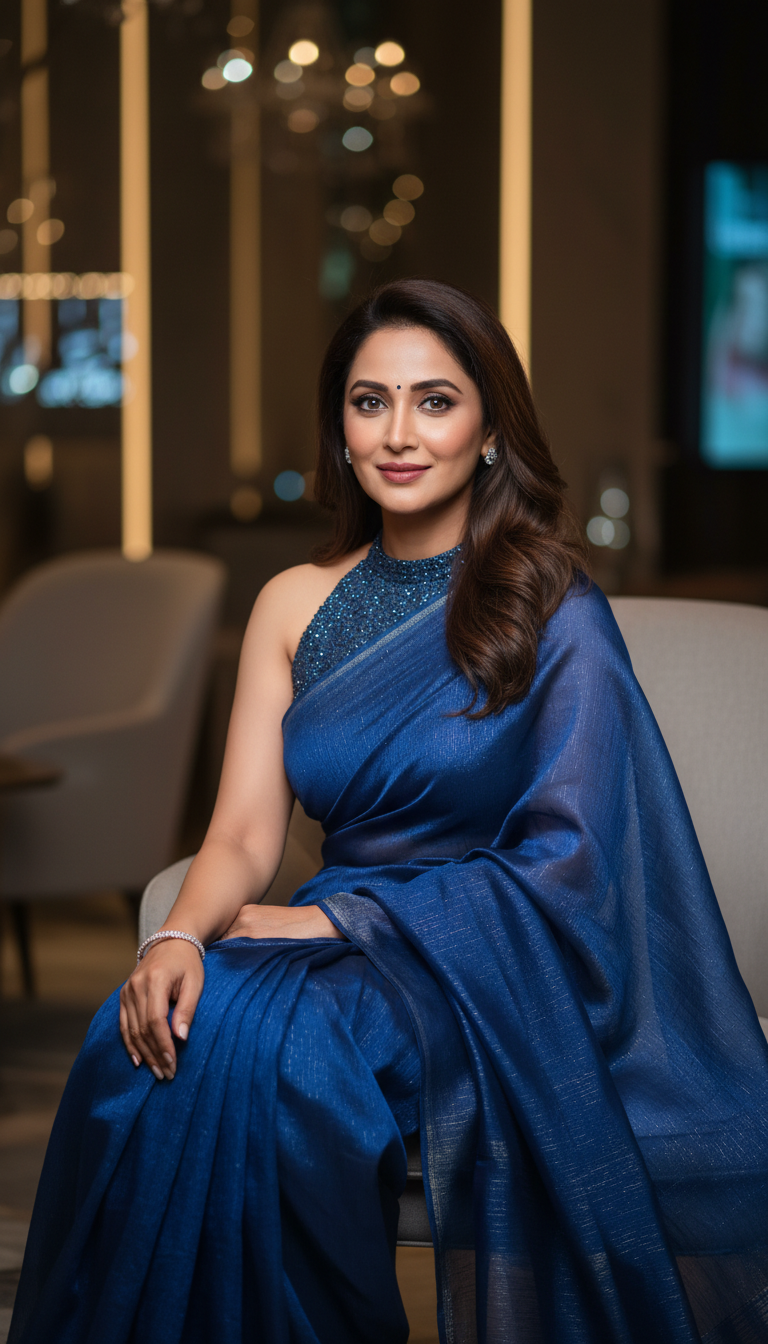
Georgette Saree at Modern Party Scene
Discover an elegant portrait of an adult person wearing a flowy Georgette saree, perfectly styled for a modern party setting. High-resolution fashion image.
How to Generate Upscale Modern Party Portraits in Georgette Sarees
Perfecting the Fusion of Traditional Indian Drapes and Contemporary Glamour
The Georgette Saree at Modern Party Scene template is a specialized AI image generator that allows you to create photorealistic 9:16 portraits of a person draped in a flowing, crinkled Georgette saree within a sophisticated contemporary event setting. By simply uploading a reference photo, you can generate high-resolution fashion visuals featuring atmospheric dim lighting, modern furniture, and a soft bokeh background effect. This template perfectly bridges traditional Indian ethnic wear with upscale modern aesthetics, delivering campaign-ready visuals ideal for fashion brands, influencers, and event marketing teams looking to showcase elegant party-ready saree styling.
How to create it in VapuAI
- 1
Upload Reference Image
Upload a clear, high-resolution portrait image to serve as the identity reference for your subject's facial features and body structure.
- 2
Customize Saree Prompt
Customize the prompt to specify the color of the Georgette saree, any specific draping style, and the subtle details of the party attire.
- 3
Adjust Scene Settings
Adjust the scene preferences if you want to emphasize certain elements of the upscale modern party setting, such as specific contemporary furniture or atmospheric lighting tones.
- 4
Generate Portrait
Generate the image to instantly create a photorealistic, 9:16 portrait visual complete with a cinematic soft bokeh background.
- 5
Download and Use
Download the final campaign-ready image to use across your marketing channels, lookbooks, or social media campaigns.
Prompt & settings
Creative goal
Capture an adult person elegantly draped in a flowy, crinkled Georgette saree, seated at a sophisticated modern party, with features derived from a reference image.
Style anchors
Tips for best results
- •Choose a reference image with neutral or soft expressions to perfectly match the sophisticated, elegant mood of an upscale modern party setting.
- •Specify vibrant or metallic saree colors like midnight blue, emerald green, or rose gold in your prompt to contrast beautifully against the dim, atmospheric background lighting.
- •Mention contemporary accessories like sleek diamond chokers or modern clutch bags in your prompt to enhance the fusion of traditional flowy fabrics with modern party wear.
- •Since the template utilizes a soft bokeh effect, keep your custom prompt focused on the subject's draping, fabric crinkles, and styling rather than overly complex background details.
Best for
- Fashion brands and e-commerce retailers needing high-quality lifestyle imagery to showcase lightweight, party-wear Georgette sarees in modern environments without booking expensive venues.
- Social media influencers and content creators looking to consistently generate elegant, on-brand fusion looks for their Instagram or Pinterest feeds.
- Creative agencies developing digital marketing campaigns for Indian festive seasons or contemporary cocktail events that require a sophisticated, upscale aesthetic.
- Event planners and wedding decorators wanting to create realistic mood boards showing guests dressed in traditional yet modern attire amidst contemporary decor.
- Fashion editors and digital magazine publishers needing photorealistic editorial portraits to highlight the trending fusion of crinkled fabrics and modern party glamour.
Frequently asked questions
Can I change the color of the Georgette saree in the generated image?
Yes, you can easily customize the color and styling of the flowy Georgette saree by adding your desired color palette into the custom prompt before generating.
What kind of background does this AI template produce?
The template automatically generates a sophisticated, upscale modern party environment featuring dim, atmospheric lighting, contemporary furniture, and a soft background bokeh effect.
Is the aspect ratio suitable for social media stories or reels?
Absolutely. The template defaults to a 9:16 portrait aspect ratio, making the high-resolution images perfectly optimized for mobile screens, Instagram Reels, Stories, and Pinterest pins.
Will the generated image retain the likeness of the person in my reference photo?
Yes, the AI uses your uploaded reference photo to accurately derive facial features, gender, ethnicity, and body structure while seamlessly placing the subject into the modern party scene.
More Templates in Indian Sarees

Red Banarasi Silk Saree Palace Wedding Prompt
Generate stunning photorealistic images of a person in an elegant red Banarasi silk saree, adorned with traditional jewelry, in a grand Indian palace wedding setting. Perfect for cultural fashion content.

Royal Blue Banarasi Silk Saree on Haveli Swing
Discover the timeless beauty of a royal blue Banarasi silk saree with heavy zari brocade, captured in a serene haveli setting. Perfect for cultural fashion inspiration.

Banarasi Silk Saree Mandap Ceremony
Generate exquisite AI images of an adult person in a luxurious Banarasi Silk saree with heavy zari brocade, captured in a warm, sacred Indian mandap setting. Perfect for cultural fashion and traditional themes.