 VapuAI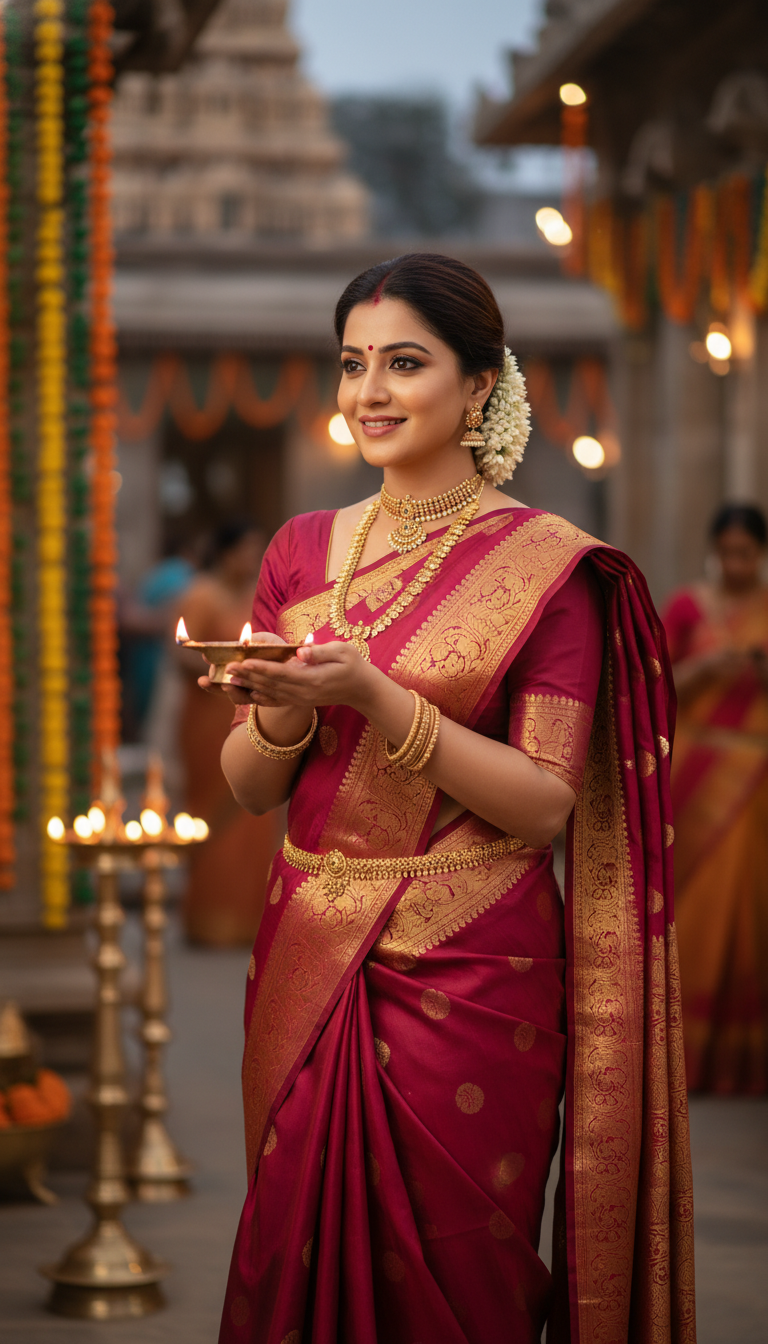
Dharmavaram Saree Festival Glow
Experience the beauty of a Dharmavaram silk saree, worn by an adult person holding a brass lamp at a traditional Indian festival, captured in a high-resolution, photorealistic image.
How Do You Generate Authentic Dharmavaram Saree Festival Portraits?
Crafting the Perfect Warm Lamp-Lit Aesthetic for Ethnic Campaigns
The Dharmavaram Saree Festival Glow template is an AI-powered image generation tool that allows you to create photorealistic portraits of any person wearing a vibrant Dharmavaram silk saree while holding a traditional brass lamp. With this workspace, marketers and creators can instantly produce culturally rich, high-resolution visuals set against warm, ambient temple or evening festival backdrops. It is the perfect solution for generating campaign-ready ethnic wear imagery that captures a joyful, spiritual atmosphere without requiring an expensive on-location photoshoot.
How to create it in VapuAI
- 1
Upload Subject Reference
Upload a clear reference image of your subject to accurately capture their identity for the festive portrait.
- 2
Choose the Template
Select the Dharmavaram Saree Festival Glow template to establish the cultural setting and warm ambient lighting.
- 3
Customize the Saree and Scene
Adjust the text prompt to include specific colors for the Dharmavaram silk saree and detail the traditional jewelry.
- 4
Generate the Festive Portrait
Click generate to produce a high-resolution, 9:16 portrait featuring the subject holding a glowing brass lamp.
- 5
Download and Deploy
Download the campaign-ready image and use it for your social media marketing or cultural fashion lookbooks.
Prompt & settings
Creative goal
Capture a high-resolution, photorealistic image of an adult person gracefully adorned in a vibrant Dharmavaram silk saree, holding a traditional brass lamp at a festive Indian celebration.
Style anchors
Tips for best results
- •Ensure your reference image has even lighting to allow the AI to naturally apply the warm, ambient glow of the brass lamp across the subject's face.
- •Specify contrasting colors in your prompt, such as a deep mustard or rich crimson Dharmavaram silk, to make the broad borders pop against the softly lit festival background.
- •Mention specific traditional South Indian jewelry like temple necklaces or jasmine flowers in the hair to enhance the cultural authenticity of the portrait.
- •Keep background descriptions subtle, such as blurred temple pillars in the evening, so the primary focus remains on the saree and the glowing brass lamp.
Best for
- Ethnic wear fashion brands needing high-volume, photorealistic catalog images featuring the broad borders and rich pallu characteristic of Dharmavaram sarees.
- Cultural event promoters and festival organizers looking to create inviting, culturally rich marketing materials illuminated by warm brass lamp lighting.
- Social media influencers and content creators wanting to seamlessly place themselves in a serene, traditional South Indian festival setting for Diwali or Pongal campaigns.
- Advertising agencies requiring diverse, high-resolution lifestyle imagery to pitch traditional jewelry or ethnic apparel collections to clients.
- Digital artists and editorial designers building mood boards or magazine spreads centered around South Indian cultural heritage and religious festivals.
Frequently asked questions
What makes the Dharmavaram Saree Festival Glow template unique?
This template specifically focuses on the rich textures of South Indian Dharmavaram silk paired with the warm, spiritual lighting of a traditional brass lamp, perfect for cultural campaigns.
Can I change the color of the Dharmavaram saree in the generated image?
Yes, you can easily customize the prompt to specify your desired saree color, ensuring the final image matches your brand's specific ethnic wear collection.
Is this template suitable for high-resolution print campaigns?
Absolutely. The template is optimized to generate campaign-ready, high-resolution, and photorealistic 9:16 portraits suitable for both digital marketing and print materials.
Does the AI accurately retain the subject's facial features?
Yes, VapuAI uses your uploaded reference image to precisely map the subject's facial features, gender, and ethnicity into the traditional festive scene.
More Templates in Indian Sarees

Red Banarasi Silk Saree Palace Wedding Prompt
Generate stunning photorealistic images of a person in an elegant red Banarasi silk saree, adorned with traditional jewelry, in a grand Indian palace wedding setting. Perfect for cultural fashion content.

Royal Blue Banarasi Silk Saree on Haveli Swing
Discover the timeless beauty of a royal blue Banarasi silk saree with heavy zari brocade, captured in a serene haveli setting. Perfect for cultural fashion inspiration.

Banarasi Silk Saree Mandap Ceremony
Generate exquisite AI images of an adult person in a luxurious Banarasi Silk saree with heavy zari brocade, captured in a warm, sacred Indian mandap setting. Perfect for cultural fashion and traditional themes.