 VapuAI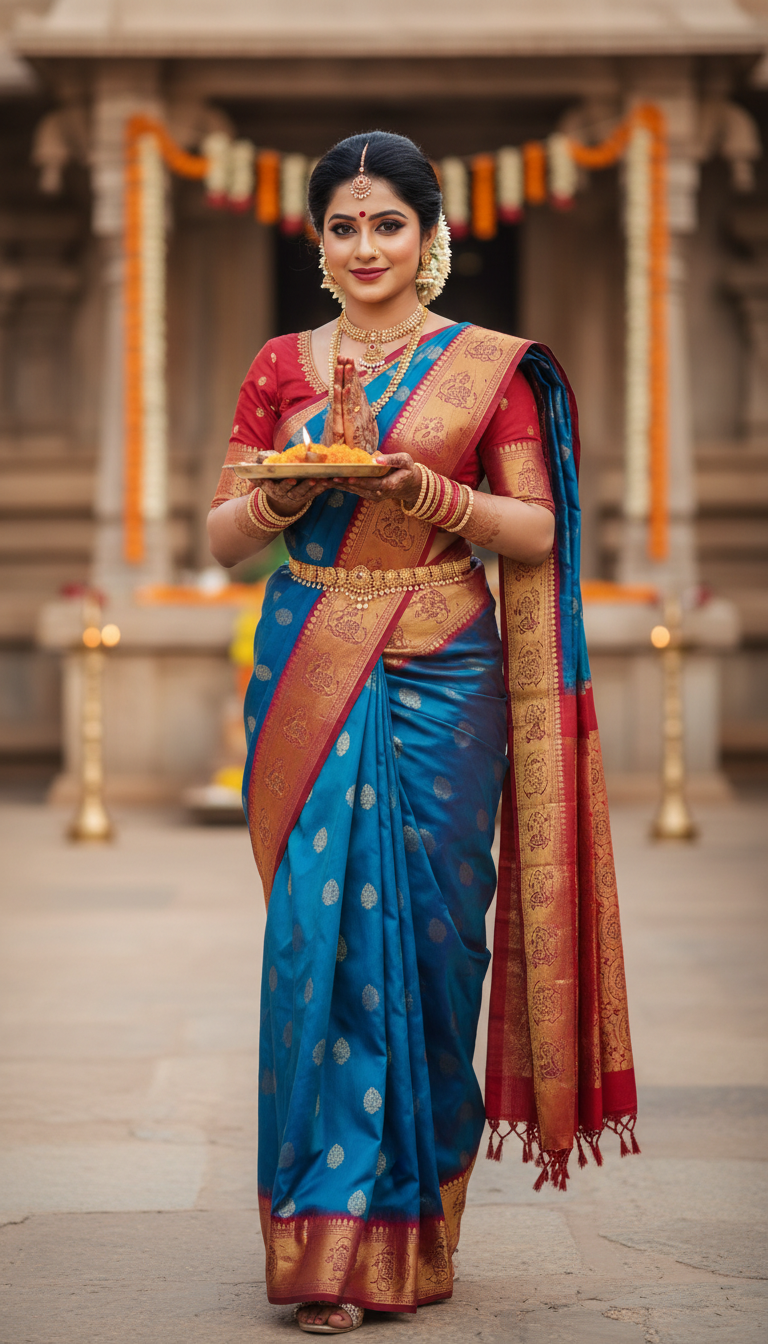
Dharmavaram Saree Bridal Ritual Procession
Experience the splendor of a Dharmavaram silk saree worn by an adult person in a traditional Indian bridal ritual procession, featuring exquisite broad borders and a rich pallu, embodying cultural grace.
How Can You Generate Authentic Dharmavaram Bridal Saree Photos at Scale?
Elevate Your South Indian Wedding Campaigns with Photorealistic AI Visuals
The Dharmavaram Saree Bridal Ritual Procession template is an AI-powered image generator that allows you to create stunning, photorealistic portraits of anyone participating in a traditional South Indian wedding ceremony while wearing a rich Dharmavaram silk saree. Perfect for capturing the essence of cultural grace, this template seamlessly integrates your uploaded reference photo to generate a high-resolution 9:16 vertical image. The generated scene surrounds your subject with warm natural light, hints of temple courtyard architecture, floral decorations, and the distinct broad borders and pallu synonymous with authentic bridal fashion, making it ideal for high-volume campaign production.
How to create it in VapuAI
- 1
Upload your reference portrait
Upload a high-quality, front-facing image of your subject. Ensure the face is clearly visible to accurately map the identity into the South Indian bridal setting.
- 2
Select the template
Navigate to the Indian Sarees category and select the Dharmavaram Saree Bridal Ritual Procession template in the VapuAI workspace.
- 3
Customize the bridal details
Input any specific color preferences for the Dharmavaram silk saree's body and broad border, or mention traditional accessories like temple jewelry in the prompt field.
- 4
Generate the AI image
Click the generate button to allow the AI to render your high-resolution 9:16 portrait set in a softly lit traditional temple courtyard.
- 5
Download and deploy
Export your campaign-ready visual directly or use VapuAI's integrated enhancement tools to upscale the image for high-end print and digital marketing.
Prompt & settings
Creative goal
Generate a photorealistic image of an adult person gracefully participating in a traditional Indian ritual procession, adorned in a vibrant Dharmavaram silk saree with rich borders and pallu, captured in a vertical 9:16 portrait.
Style anchors
Tips for best results
- •Use a reference photo with even lighting and a neutral or soft expression to allow the AI to seamlessly adapt the face to the warm, natural lighting of the temple courtyard.
- •When customizing the text prompt, explicitly mention contrasting colors for the saree's broad border and body (e.g., 'mustard yellow body with a crimson red border') to highlight the classic Dharmavaram style.
- •Request specific traditional accessories like 'antique temple jewelry,' 'heavy gold jhumkas,' or 'fresh jasmine gajra' to enhance the authenticity of the South Indian bridal look.
- •Keep the environment descriptions aligned with the template's baseline by suggesting 'softly lit mandap background' or 'festive outdoor diyas' rather than introducing harsh modern settings.
Best for
- Wedding planners and bridal consultants can visualize clients in traditional South Indian attire to curate culturally accurate mood boards and styling references.
- Ethnic fashion brands and boutique owners can generate campaign-ready catalog images of Dharmavaram sarees without the high overhead and logistics of physical photoshoots.
- Social media influencers and content creators can produce engaging cultural content for festive seasons, showcasing rich silk textiles and traditional jewelry to their regional audiences.
- Marketing agencies handling regional Indian campaigns can rapidly scale highly localized visual assets for digital ads, print media, and targeted promotions.
- Event photographers and videographers can use these generated visuals to pitch authentic temple wedding concepts and custom aesthetic ideas to prospective clients.
Frequently asked questions
Can I change the color of the Dharmavaram saree in the generated image?
Yes, you can specify your desired saree and border colors in the custom prompt field. The AI will seamlessly apply these colors while maintaining the traditional broad borders and rich pallu characteristic of Dharmavaram silk.
What aspect ratio does this template produce?
This template generates a vertical 9:16 portrait. It is perfectly optimized for social media stories, reels, TikToks, and mobile-first digital marketing campaigns.
Do I need a professional photo for the face swap reference?
No, a standard selfie or clear photo is sufficient. However, for the most photorealistic results, ensure the reference image has good lighting and clearly shows the subject's facial features without heavy shadows or obstructions.
Can the AI recreate intricate temple jewelry along with the saree?
Absolutely. The template is intrinsically designed to include cultural bridal motifs, and you can further emphasize elements like heavy gold necklaces, matha pattis, and intricate bangles by adding them to your custom prompt.
More Templates in Indian Sarees

Red Banarasi Silk Saree Palace Wedding Prompt
Generate stunning photorealistic images of a person in an elegant red Banarasi silk saree, adorned with traditional jewelry, in a grand Indian palace wedding setting. Perfect for cultural fashion content.

Royal Blue Banarasi Silk Saree on Haveli Swing
Discover the timeless beauty of a royal blue Banarasi silk saree with heavy zari brocade, captured in a serene haveli setting. Perfect for cultural fashion inspiration.

Banarasi Silk Saree Mandap Ceremony
Generate exquisite AI images of an adult person in a luxurious Banarasi Silk saree with heavy zari brocade, captured in a warm, sacred Indian mandap setting. Perfect for cultural fashion and traditional themes.