 VapuAI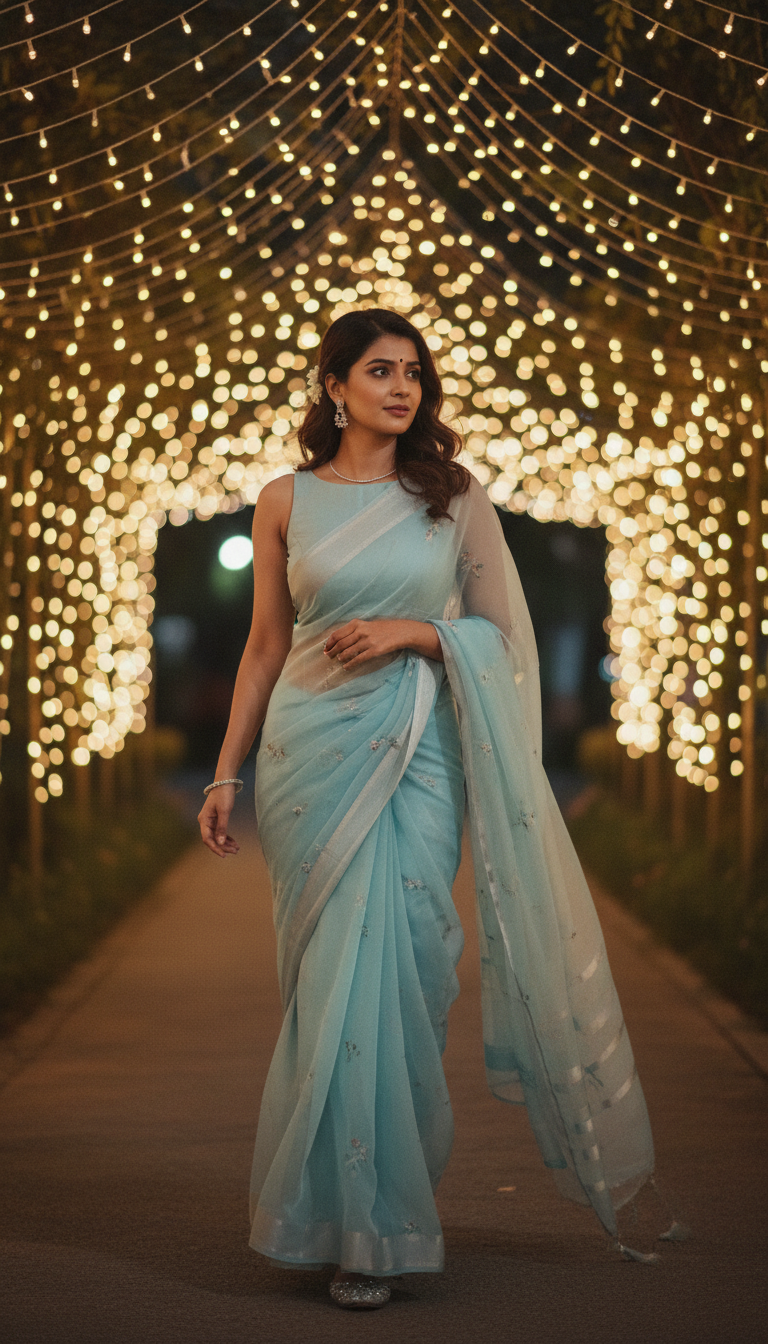
Chiffon Saree Glow: Walking Under String Lights
Discover the ethereal beauty of a lightweight chiffon saree worn by an adult person walking under enchanting string lights. Perfect for elegant Indian fashion inspiration and traditional attire.
How to Generate Luminous Chiffon Saree Evening Portraits with AI
Perfecting the Festive String Light Aesthetic for Fashion Campaigns
The Chiffon Saree Glow template is an AI-powered photo generator that allows you to create photorealistic 9:16 vertical portraits of a subject gracefully walking in a lightweight, semi-transparent chiffon saree under warm, enchanting string lights. This specific tool captures the beautiful interplay of evening illumination against soft fabric drapes, making it effortless for brands and creators to produce high-resolution, culturally rich fashion visuals. Whether you are designing for a festive campaign or an elegant ethnic wear lookbook, you can instantly place any subject into this serene, outdoor evening setting with just a reference photo.
How to create it in VapuAI
- 1
Upload Subject Photo
Upload a clear, front-facing reference photo of your subject to capture their exact facial features and body structure.
- 2
Select the Template
Choose the 'Chiffon Saree Glow: Walking Under String Lights' template from the Indian Sarees category in your workspace.
- 3
Customize the Saree and Scene
Customize the prompt by specifying the exact color of the chiffon saree, blouse details, or any specific jewelry you want to complement the evening glow.
- 4
Generate the Portrait
Generate the image to let VapuAI render the photorealistic twilight setting, string lights, and the natural drape of the lightweight fabric.
- 5
Download and Deploy
Download the high-resolution 9:16 portrait and seamlessly integrate it into your social media campaigns, lookbooks, or client presentations.
Prompt & settings
Creative goal
Generate a photorealistic vertical portrait of an adult person gracefully walking in a lightweight chiffon saree under enchanting string lights, capturing a serene and elegant mood.
Style anchors
Tips for best results
- •Enhance the twilight ambiance by specifying deep, rich saree colors like midnight blue or emerald green in your prompt, which contrast beautifully against the warm string lights.
- •Mention specific fabric textures like 'sheer chiffon' or 'subtle zari border' in the prompt to maximize the AI's rendering of light passing through the lightweight material.
- •Use a high-quality reference image with soft, even lighting on the subject's face so the AI can naturally blend their features into the directional overhead string lights.
- •Add keywords for complementary accessories, such as 'oxidized silver jhumkas' or 'minimalist diamond choker,' to complete the elegant evening aesthetic.
Best for
- Fashion marketing agencies need this template to produce high-volume, festive lookbooks that highlight the elegant drape and sheer texture of lightweight evening ethnic wear.
- Social media influencers can use this evening glow aesthetic to maintain a consistent, high-end visual grid during Diwali or wedding seasons without booking costly twilight photoshoots.
- E-commerce apparel brands rely on this tool to showcase how their chiffon saree designs might look in a realistic, warmly lit outdoor environment, boosting buyer visualization.
- Event planners and wedding decorators can generate stunning mood boards featuring walking subjects under string lights to pitch festive or reception themes to high-end clients.
Frequently asked questions
Can I change the color of the chiffon saree in this AI template?
Yes, you can easily customize the saree's color by adding specific hues, such as pastel pink or ruby red, into the custom prompt box before generating.
What aspect ratio does the Chiffon Saree Glow template produce?
This template is specifically designed to output a 9:16 vertical portrait, making it perfectly optimized for Instagram Reels, TikTok, and Pinterest fashion boards.
Does the AI accurately render the sheer texture of chiffon?
Absolutely. The template is pre-configured with style anchors that focus on the lightweight, semi-transparent drape of chiffon, especially how it catches the warm glow of the evening string lights.
Do I need a professional photo of the subject to start?
No professional photography is required. As long as you upload a clear, well-lit selfie or standard photo, VapuAI will seamlessly adapt the subject's identity into the cinematic evening setting.
More Templates in Indian Sarees

Red Banarasi Silk Saree Palace Wedding Prompt
Generate stunning photorealistic images of a person in an elegant red Banarasi silk saree, adorned with traditional jewelry, in a grand Indian palace wedding setting. Perfect for cultural fashion content.

Royal Blue Banarasi Silk Saree on Haveli Swing
Discover the timeless beauty of a royal blue Banarasi silk saree with heavy zari brocade, captured in a serene haveli setting. Perfect for cultural fashion inspiration.

Banarasi Silk Saree Mandap Ceremony
Generate exquisite AI images of an adult person in a luxurious Banarasi Silk saree with heavy zari brocade, captured in a warm, sacred Indian mandap setting. Perfect for cultural fashion and traditional themes.