 VapuAI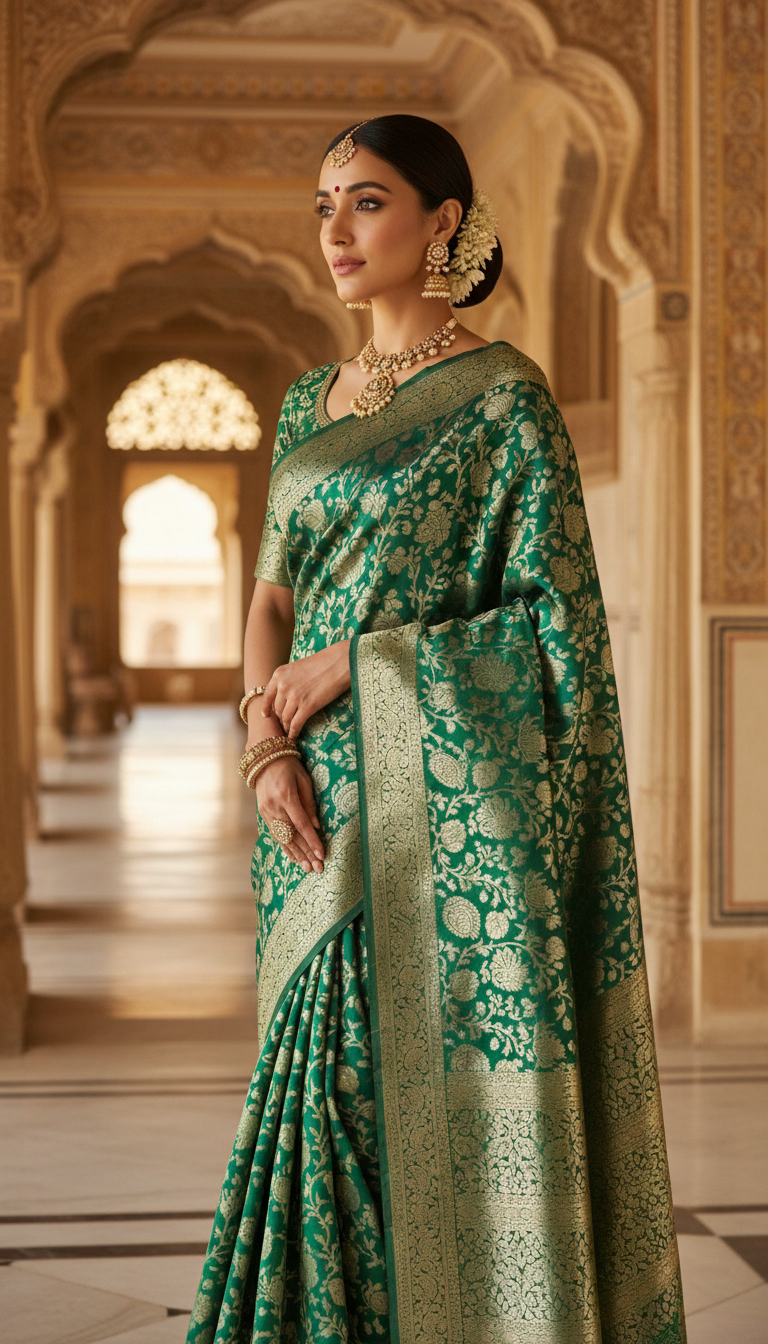
Brocade Saree in Royal Palace
Discover a majestic portrait of an adult person in a luxurious Brocade Saree, intricately woven with zari, set against a grand Indian palace backdrop. Experience traditional elegance and cultural richness.
How to Generate Opulent Indian Heritage Portraits for Your Brand
Elevate Your Creative Production with Photorealistic Palace Backdrops
The "Brocade Saree in Royal Palace" template is an AI-powered creative tool that allows you to generate high-resolution, photorealistic portraits of any subject dressed in a luxurious zari-woven brocade saree against a grand palace interior. Ideal for fashion campaigns and cultural storytelling, this template seamlessly blends your uploaded reference image with an ornate setting featuring intricately carved walls, polished marble floors, and diffused natural light. Whether you need majestic visuals for social media or high-end ethnic wear marketing, this template delivers authentic, regal elegance in seconds.
How to create it in VapuAI
- 1
Upload Reference Image
Upload a clear, front-facing reference photo of your subject to ensure accurate facial features, gender, and ethnic identity transfer.
- 2
Choose the Template
Select the "Brocade Saree in Royal Palace" template to automatically apply the 9:16 portrait aspect ratio, intricate zari saree styling, and majestic architectural backdrop.
- 3
Customize Your Prompt
Customize the text prompt if you wish to adjust specific details, such as the color of the brocade fabric or subtle lighting nuances in the palace corridor.
- 4
Generate Portrait
Click generate to allow VapuAI's multi-model engine to render a photorealistic portrait that blends your subject into the opulent marble and carved-stone environment.
- 5
Download and Use
Download the high-resolution, campaign-ready visual and seamlessly integrate it into your social media feeds, digital catalogs, or marketing campaigns.
Prompt & settings
Creative goal
Generate a high-resolution, photorealistic portrait of an adult person wearing an exquisite Brocade Saree, standing elegantly within a grand palace interior, with identity derived from a reference image.
Style anchors
Tips for best results
- •Use a reference image with even, natural lighting on the subject's face to ensure a seamless blend with the template's diffused palace window lighting.
- •Keep your custom prompt additions focused on fabric colors or specific jewelry styles, letting the template naturally handle the ornate palace arches and marble floors.
- •Avoid heavily stylized or filtered reference photos; a neutral, unedited portrait yields the most authentic, photorealistic ethnic fashion result.
- •If you want to emphasize the zari work on the brocade, add descriptive keywords like 'close-up intricate gold thread detailing' to your customization prompt.
Best for
- Ethnic fashion brand marketers can use this tool to produce campaign-ready visuals showcasing rich brocade textures without the expense of an on-location palace photoshoot.
- Social media influencers and content creators can quickly generate high-end, regal portraits to elevate their personal brand and celebrate Indian cultural heritage.
- Creative agencies designing wedding and festive marketing materials can leverage this template to deliver photorealistic, culturally accurate saree imagery for their clients at volume.
- Digital artists and editorial designers can use these ornate, architecturally rich palace backgrounds to create striking visual narratives for digital magazines and lookbooks.
- Event planners and bridal boutiques can visualize and present bespoke royal styling concepts to prospective brides using simple reference photos.
Frequently asked questions
Can I change the color of the brocade saree?
Yes, you can specify your preferred saree color in the custom prompt section before generating the image, and the AI will adapt the luxurious fabric accordingly.
Does the AI maintain the facial features from my uploaded photo?
Absolutely. The template uses your uploaded reference image to precisely map the subject's facial features, body structure, and ethnicity into the final portrait.
Is the generated image high-resolution enough for print marketing?
Yes, this template produces high-resolution, photorealistic outputs in a 9:16 portrait format, making them ideal for both digital campaigns and high-quality print materials.
What kind of background is included in this template?
The background features an opulent Indian palace interior with ornate architectural arches, intricate wall carvings, polished marble floors, and regal natural lighting.
More Templates in Indian Sarees

Red Banarasi Silk Saree Palace Wedding Prompt
Generate stunning photorealistic images of a person in an elegant red Banarasi silk saree, adorned with traditional jewelry, in a grand Indian palace wedding setting. Perfect for cultural fashion content.

Royal Blue Banarasi Silk Saree on Haveli Swing
Discover the timeless beauty of a royal blue Banarasi silk saree with heavy zari brocade, captured in a serene haveli setting. Perfect for cultural fashion inspiration.

Banarasi Silk Saree Mandap Ceremony
Generate exquisite AI images of an adult person in a luxurious Banarasi Silk saree with heavy zari brocade, captured in a warm, sacred Indian mandap setting. Perfect for cultural fashion and traditional themes.