 VapuAI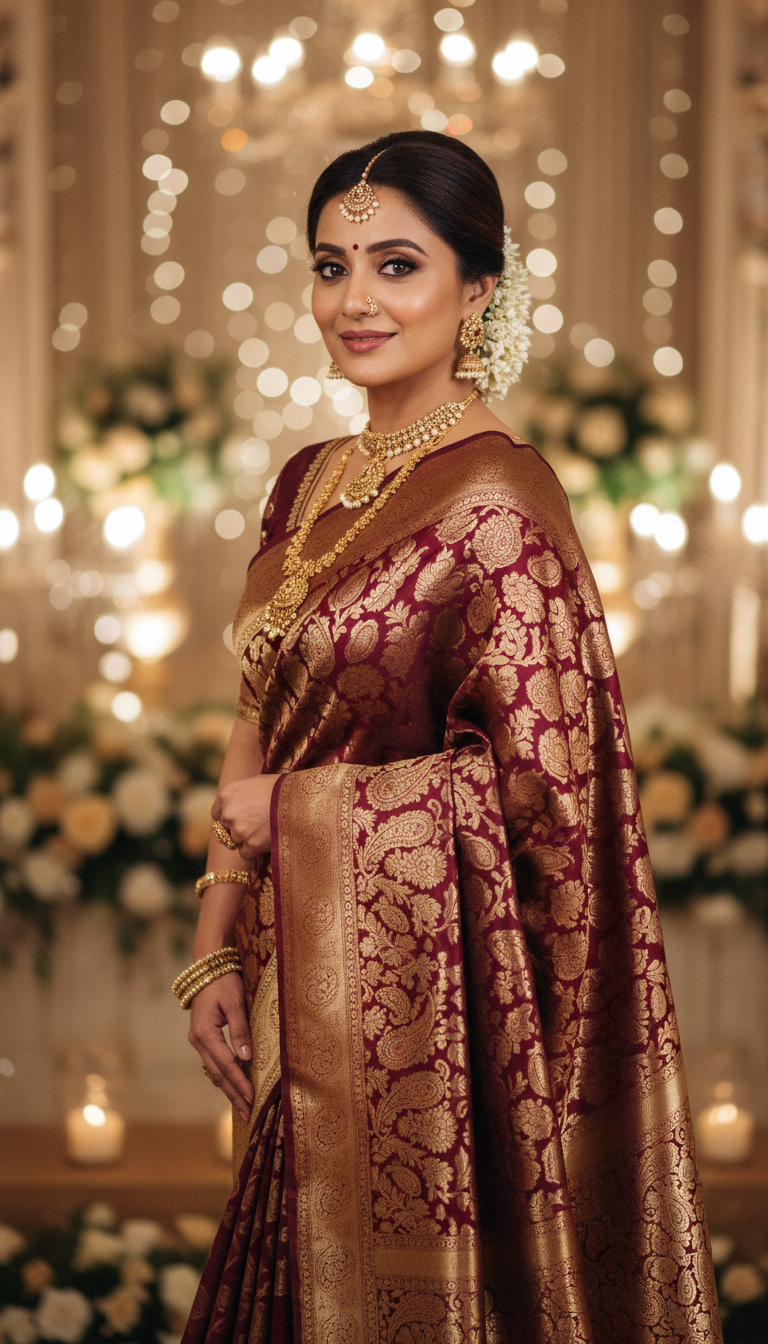
Brocade Saree at Formal Wedding Reception
Discover an elegant image of an adult person in a stunning Brocade Saree, perfect for a formal Indian wedding reception. Featuring rich zari work and traditional styling, embodying cultural sophistication.
How Can You Generate High-End Brocade Saree Wedding Portraits in Seconds?
Streamline Your Festive Ethnic Wear Campaigns with Lifelike AI Photography
The Brocade Saree at Formal Wedding Reception template is an AI-powered photo generation tool that allows you to instantly create photorealistic, 9:16 portrait images of a model wearing a luxurious brocade saree in a high-end wedding setting. With this template, creators and marketers can effortlessly produce campaign-ready visuals featuring rich zari work, set against a sophisticated backdrop of warm lighting, glimmering chandeliers, and tasteful floral arrangements. Whether you are building an ethnic fashion lookbook or designing social media assets for the wedding season, this specific scene captures the joyful, celebratory grandeur of an Indian reception without the need for expensive on-location photoshoots.
How to create it in VapuAI
- 1
Upload Identity Reference
Upload a clear reference portrait to lock in the subject's identity for the generated image.
- 2
Select Template
Choose the Brocade Saree at Formal Wedding Reception template in your VapuAI dashboard.
- 3
Customize Prompt
Add custom prompt details such as the specific color of the brocade saree and desired jewelry.
- 4
Generate Image
Click generate to produce your photorealistic 9:16 vertical portrait set in a formal wedding reception.
- 5
Download Output
Review your generated ethnic wear photo and download the high-resolution file for your marketing campaign.
Prompt & settings
Creative goal
A high-resolution, photorealistic vertical image of an adult person wearing an elegant Brocade Saree, gracefully posing at a formal wedding reception.
Style anchors
Tips for best results
- •Specify exact brocade colors in your custom prompt, such as deep emerald, classic maroon, or royal gold, to perfectly match your current festive collection.
- •Use high-quality reference photos with even lighting so the AI can flawlessly integrate the subject's face into the warm, ambient lighting of the wedding reception hall.
- •Request specific traditional accessories in your prompt, like a Kundan choker or statement jhumkas, to complement the luxurious zari work of the brocade saree.
- •Keep the model's expression prompt joyful or sophisticated to align seamlessly with the celebratory, grand mood of the formal reception environment.
Best for
- Bridal fashion brands and boutique owners who need volume-driven, photorealistic catalog images showcasing traditional brocade sarees in authentic reception settings.
- Social media influencers and lifestyle creators looking to feature culturally rich, high-resolution ethnic fashion looks on their Instagram and Pinterest feeds.
- Creative agencies managing festive marketing campaigns that require visually striking, culturally accurate wedding attire imagery to engage Indian audiences.
- Wedding planners and event stylists who want to create premium mood boards and promotional materials highlighting traditional Indian cultural fashion.
- E-commerce managers needing rapid, model-accurate visual content for festive wear collections featuring ornate zari work and luxurious fabrics.
Frequently asked questions
What aspect ratio does this brocade saree template produce?
This template is optimized to generate 9:16 vertical portraits, making the images perfectly sized for Instagram Reels, TikTok, Pinterest, and mobile-first e-commerce galleries.
Can I change the color of the brocade saree?
Yes, you can easily customize the prompt by specifying your preferred saree color, and the AI will adapt the luxurious fabric and zari work to match your brand's requirements.
Will the background look like a real wedding venue?
Absolutely. The template automatically generates a photorealistic formal wedding reception environment, complete with warm, subtle lighting, ornate floral arrangements, and glimmering chandeliers.
Do I need professional modeling photos to use as a reference?
No professional photos are required. As long as you upload a clear, well-lit image of a face, VapuAI will accurately map the identity onto the adult person in the generated reception scene.
More Templates in Indian Sarees

Red Banarasi Silk Saree Palace Wedding Prompt
Generate stunning photorealistic images of a person in an elegant red Banarasi silk saree, adorned with traditional jewelry, in a grand Indian palace wedding setting. Perfect for cultural fashion content.

Royal Blue Banarasi Silk Saree on Haveli Swing
Discover the timeless beauty of a royal blue Banarasi silk saree with heavy zari brocade, captured in a serene haveli setting. Perfect for cultural fashion inspiration.

Banarasi Silk Saree Mandap Ceremony
Generate exquisite AI images of an adult person in a luxurious Banarasi Silk saree with heavy zari brocade, captured in a warm, sacred Indian mandap setting. Perfect for cultural fashion and traditional themes.