 VapuAI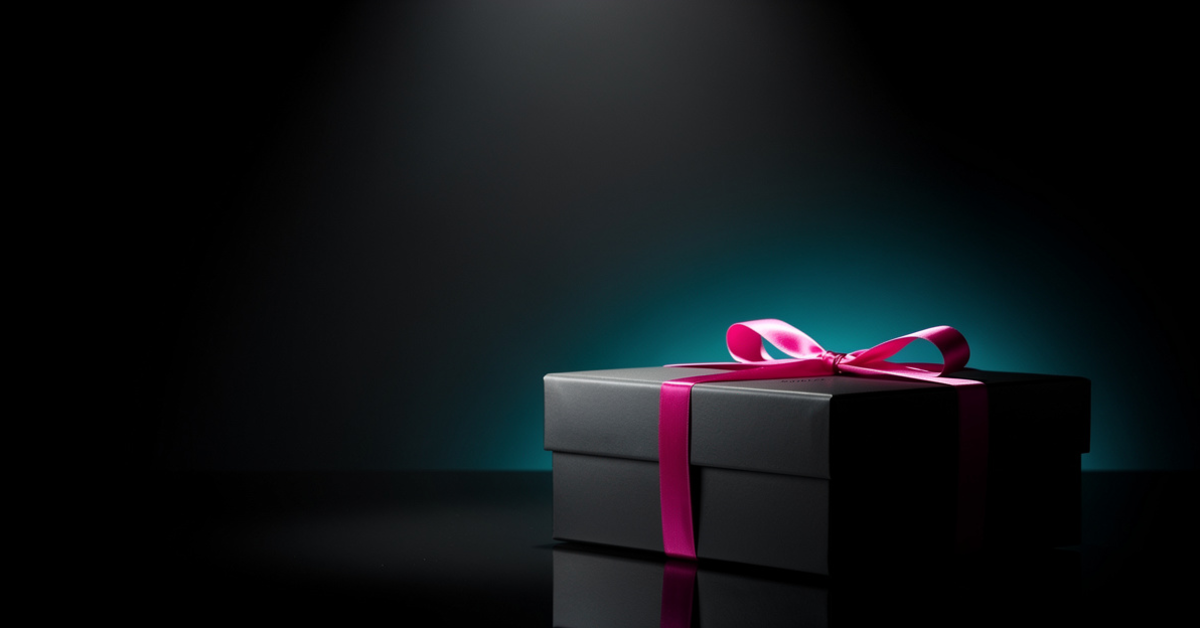
Announcement
Announcement template for Social Media Content: generate an on-brand announcement visual with VapuAI in minutes.
How Do You Create High End Teaser Visuals That Drive Launch Anticipation?
Design Premium Reveal Assets with Perfect Copy Placement
The VapuAI Announcement template is a premium visual generator designed to produce cinematic, high-contrast teaser images featuring a sleek wrapped product box on a dark reflective surface, perfect for building pre-launch hype. With this template, you can instantly create moody, studio-grade reveal graphics that feature dramatic spotlights, soft bokeh, and a striking cyan backlight halo. Crucially, the composition is engineered to place the focal product in the lower-right quadrant, leaving clean, uncluttered negative space in the upper-left area for you to overlay your announcement text, launch dates, or brand copy later. This ensures your social media feeds look incredibly sophisticated while maintaining maximum legibility for your marketing messages.
How to create it in VapuAI
- 1
Access the Workspace
Navigate to the VapuAI ideas library and open the Announcement template under the social media category.
- 2
Refine Brand Details
Enter your custom prompt details to define your packaging materials, ribbon colors, and signature highlight tones.
- 3
Set Composition Controls
Ensure the focus remains in the lower-right quadrant to maintain the perfect layout for your future text overlays.
- 4
Render the Teaser
Click generate to produce the moody, high-contrast visual with realistic lens bokeh and dramatic studio spotlights.
- 5
Add Launch Typography
Download the final high-resolution image and overlay your announcement text in the clean upper-left negative space.
Prompt & settings
Tips for best results
- •Keep your descriptions focused on high-end textures like matte black, brushed metal, or velvet to maximize the luxury aesthetic of the spotlight.
- •Use contrasting color values for the ribbon and the background halo to make the product pop against the moody, dark background.
- •Avoid adding text directly in the generation stage, because the layout is specifically designed to let you add clean, vector-based typography afterward.
Best for
- E-commerce brand managers who need to build mystery and excitement around an upcoming physical product drop without spending thousands on physical studio photography.
- Social media agency directors looking to deliver high-end, consistent teaser campaigns for premium client accounts across Instagram and LinkedIn.
- Digital product creators wanting a cinematic reveal graphic to announce their new course, ebook, or software launch with a physical box-style representation.
- Marketing campaign coordinators who need fast, scroll-stopping visual assets that offer clean negative space for custom typography overlays.
- Boutique agency designers who want to quickly generate high-fidelity mockups for client pitch decks to showcase potential launch campaign aesthetics.
Frequently asked questions
Can I change the color of the ribbon and the background halo?
Yes, you can specify your exact brand colors in the custom prompt to replace the default magenta ribbon and cyan backlight with your own color palette.
Why is the product placed in the lower-right corner of the image?
The composition is intentionally off-center to leave clean, high-contrast negative space in the upper-left area. This allows you to easily overlay crisp text, logos, or call-to-action buttons without cluttering the main graphic.
Does this template generate actual text on the image?
No, this template focuses on generating high-quality photographic assets without embedded text. This gives you the flexibility to add your own localized copy, fonts, and branding in post-production.
What social media platforms is this visual optimized for?
The wide, cinematic aspect ratio works beautifully for landscape posts on LinkedIn, Twitter, and Facebook, and it can be easily cropped or extended for vertical stories and reels.
More Templates in AI Social Media Content Generator
Event Countdown
Event Countdown template for Social Media Content: generate an on-brand event countdown visual with VapuAI in minutes.
Multi Platform Promo
Multi Platform Promo template for Social Media Content: generate an on-brand multi platform promo visual with VapuAI in minutes.
Product Feature
Product Feature template for Social Media Content: generate an on-brand product feature visual with VapuAI in minutes.