 VapuAI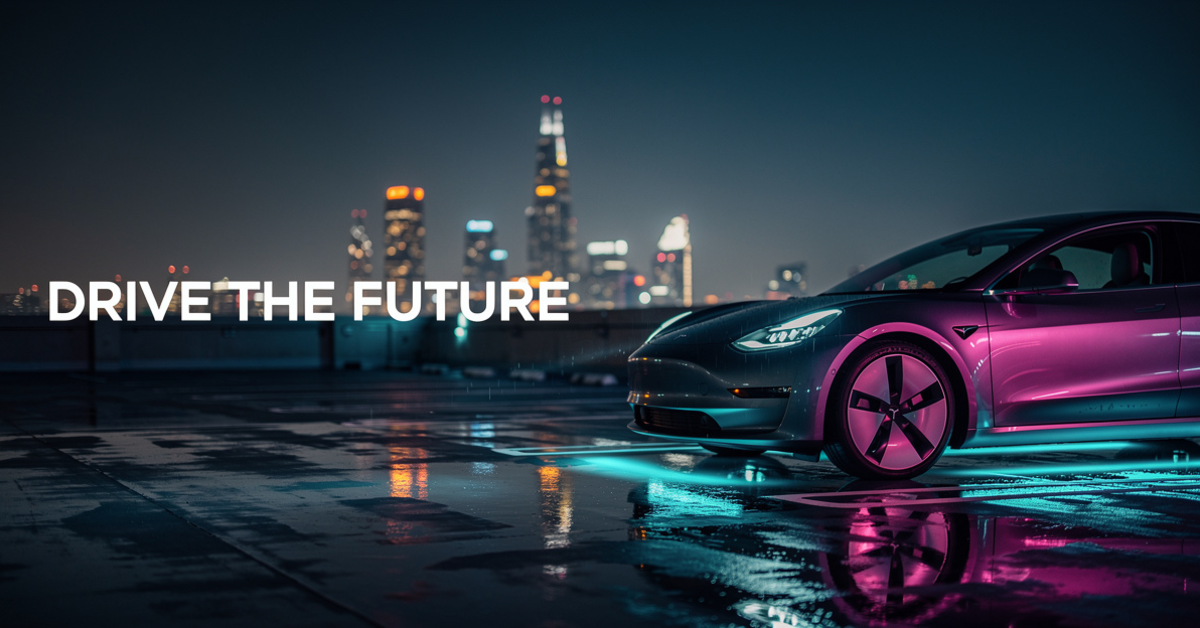
Responsive Landscape
Responsive Landscape template for Google Display Ad: generate an on-brand responsive landscape visual with VapuAI in minutes.
How Do You Generate High Performing Wide Visuals for Google Display Campaigns?
Maximize Your Ad Performance with Perfectly Formatted Negative Space
The Responsive Landscape template is a specialized AI image generator designed to produce wide-format, horizontally oriented marketing visuals that leave a dedicated, clean copy zone on one side of the image while showcasing a cinematic, high-contrast hero subject on the other. Optimized for Google Display Network campaigns, this template ensures your visual assets maintain a professional balance of negative space and rich detail. By anchoring your product or subject to the right third of the frame, it allows you to overlay high-converting text and calls-to-action on the left without cluttering the design. Perfect for automotive, tech, and premium product launches, it delivers a stunning cinematic aesthetic that captures clicks.
How to create it in VapuAI
- 1
Access the template
Select the Responsive Landscape template from the VapuAI platform interface.
- 2
Customize the prompt
Input your specific product details, lighting preferences, and desired twilight atmosphere.
- 3
Define composition
Ensure your focal subject is anchored to the right third of the canvas to preserve the left-side copy zone.
- 4
Generate and export
Run the AI generator and download your optimized 1.91:1 landscape visual for Google Ads.
Prompt & settings
Tips for best results
- •Keep the left side of your prompt description clean and dark to ensure text legibility when you overlay ad copy later.
- •Use atmospheric descriptors like wet pavement, twilight, and neon bokeh to create a premium, high-contrast depth of field.
- •Incorporate complementary color schemes, such as cyan and magenta, to make your hero product stand out against dark backdrops.
Best for
- Performance marketing managers who need to rapidly produce 1.91:1 ratio assets for Google Responsive Display Ads without hiring expensive photographers.
- Automotive and lifestyle brand coordinators who want to showcase sleek products like vehicles or tech gadgets in dramatic, high-contrast twilight settings.
- Ad agency creative directors who require high-quality concept art with built-in negative space for client copy overlays.
- Social media managers running cross-channel landscape campaigns on platforms that prioritize horizontal cinematic storytelling.
- Growth hackers seeking to A/B test different background lighting schemes and product angles at scale to optimize click-through rates.
Frequently asked questions
What is the aspect ratio of the Responsive Landscape template?
The template is optimized for a 1.91:1 aspect ratio, which is the standard size for Google Responsive Display Ad landscape assets.
Can I use this template for non-automotive products?
Yes, while the default recipe showcases a modern vehicle, you can customize the prompt to feature tech gadgets, luxury consumer goods, or apparel.
How does the template ensure there is room for my ad text?
The prompt structure is engineered to anchor the main subject to the right side of the frame, naturally leaving a wide, darkened copy zone on the left.
Do I need to add text directly in the AI generator?
We recommend generating the clean background visual first, and then adding dynamic ad text via your ad platform or graphic editor for maximum crispness.
More Templates in AI Google Display Ad Generator

Leaderboard
Leaderboard template for Google Display Ad: generate an on-brand leaderboard visual with VapuAI in minutes.

Medium Rectangle
Medium Rectangle template for Google Display Ad: generate an on-brand medium rectangle visual with VapuAI in minutes.

Mobile
Mobile template for Google Display Ad: generate an on-brand mobile visual with VapuAI in minutes.