 VapuAI
AI Generated Professional studio backdrop photos with awesome lighting and rich textures
Professional studio backdrop templates with moody lighting and rich textures
Templates in this Category
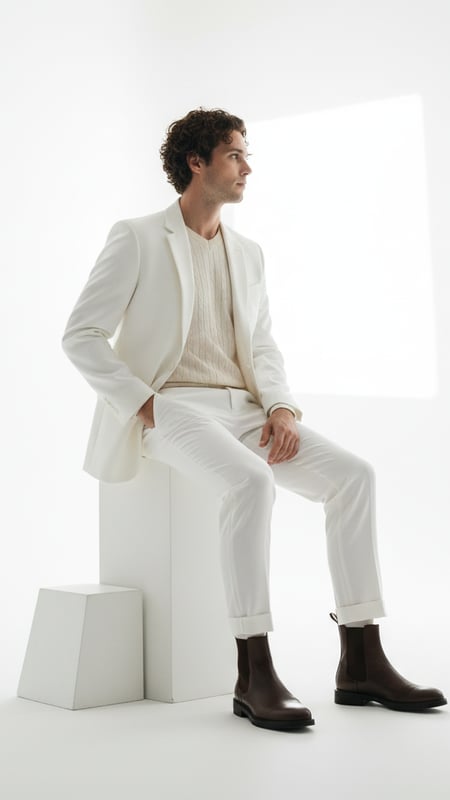
High-Key Minimalist - Monochromatic Formal Editorial
AI Generated Bright high-key editorial portrait in all-white formal wear on minimalist white set
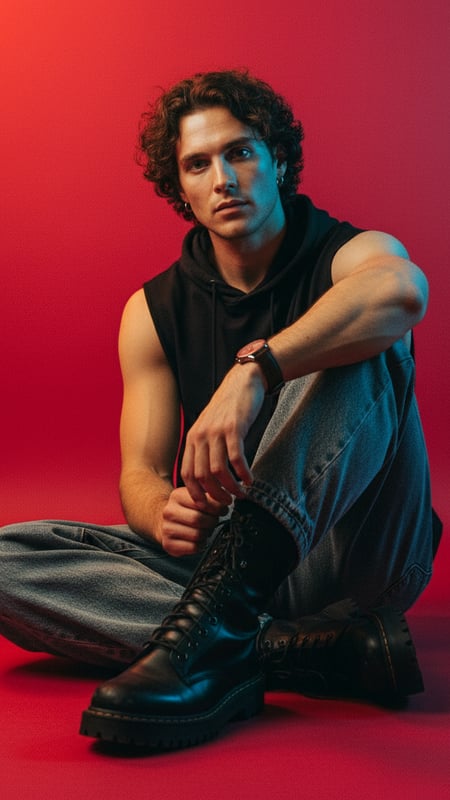
Studio Editorial - Cool-Warm Split Portrait
High-contrast color-split studio portrait with tactile focus on denim and leather
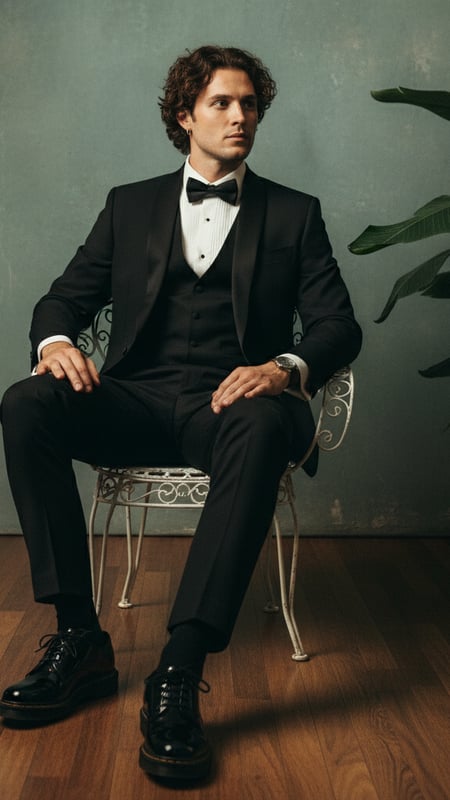
Tuxedo & Tropicals - Formal Contrast Portrait
Full-length formal portrait in black tuxedo, seated in lush, textured, dimly lit environment
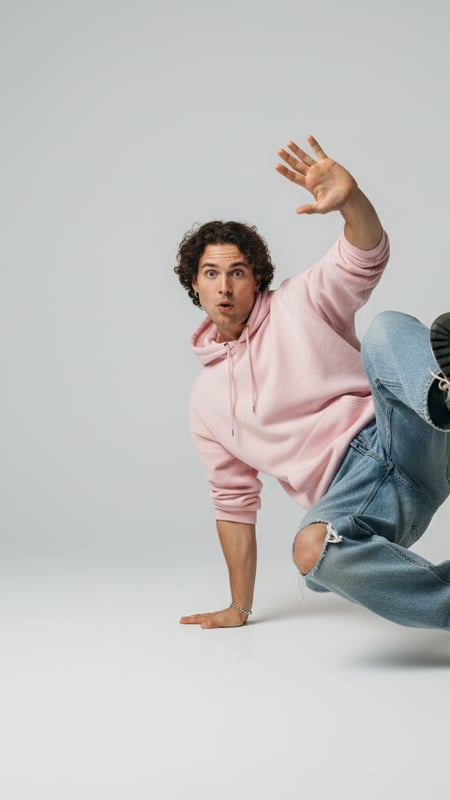
Dynamic Freestyle - Bright High-Key Studio Portrait
Full-length high-key studio portrait in dynamic low-ground pose with casual streetwear
Related categories
Ready to Transform Your Images?
Use our AI-powered transformation tool to create stunning image changes. Upload your photo and select a template to get started.
The VapuAI AI studio photo generator is a multi-model creative workspace that allows you to instantly generate professional, high-end studio photography without the need for expensive equipment, complex lighting setups, or physical photoshoots. Whether you are producing a High-Key Minimalist editorial for a modern fashion brand, a striking Tuxedo & Tropicals formal contrast portrait for a magazine cover, or dynamic freestyle headshots for your social media channels, this platform delivers campaign-ready visuals in seconds. Designed specifically for content creators, social media managers, and marketing agencies, our AI studio photography templates give you the power to craft on-brand imagery at incredible volume. Gone are the days of renting out expensive studio spaces, coordinating schedules, and hiring specialized lighting technicians. With VapuAI, you can achieve sophisticated, highly technical looks, such as cool-warm split lighting and bright high-key portraiture, entirely in the cloud. By leveraging our diverse suite of integrated AI tools, you can seamlessly generate, edit, and enhance your editorial concepts to match your exact brand guidelines and aesthetic requirements. From high-fashion lookbooks and striking promotional assets to polished professional profiles, our AI studio photo generator empowers you to scale your visual content production effortlessly. This ensures that every single image looks meticulously staged, perfectly lit, and completely ready for your next big digital or print campaign. Explore exciting creative crossovers by blending your studio looks with other VapuAI aesthetics, such as Professional Headshots or even seasonal campaigns like Christmas Photography, all managed within one intuitive workspace.
Who Is This For?
- Fashion and lifestyle creators need to generate high-end, editorial-style portraits consistently without booking expensive studio time or buying high-end lighting gear.
- Marketing agencies use this tool to quickly mock up and finalize campaign-ready visuals featuring dramatic studio lighting for their diverse and demanding client roster.
- Social media managers leverage dynamic freestyle and split-lighting portraits to create visually cohesive and eye-catching feeds that drive higher audience engagement.
- E-commerce brands rely on minimalist, high-key studio aesthetics to showcase apparel and accessories on diverse AI models in a controlled, premium environment.
- Independent magazine publishers use the studio photography generator to craft bespoke, magazine-quality cover shots and editorial spreads on a tight production budget.
How to Use This Template
- 1Upload a high-quality base image or reference photo of your subject to guide the structural and facial details of your AI-generated studio portrait.
- 2Select a dedicated studio photography template that matches your desired aesthetic, such as the High-Key Minimalist or Cool-Warm Split Portrait.
- 3Customize the text prompt and generation settings to adjust lighting intensity, background elements, and wardrobe specifics to fit your campaign needs.
- 4Generate your studio portraits, letting VapuAI's workspace apply professional-grade lighting, crisp depth of field, and flawless editorial grading.
- 5Download your favorite high-resolution campaign-ready visuals directly to your device for immediate publication across your marketing and social channels.
Tips for Best Results
Pay close attention to your lighting descriptors in the prompt; specifying terms like 'rim lighting,' 'softbox diffusion,' or 'cool-warm split' will drastically improve the editorial feel.
When using the Tuxedo & Tropicals template, balance the contrast by describing specific foliage colors against the formal wear to make the subject pop.
Keep your backgrounds simple when aiming for a High-Key Minimalist look; explicitly prompt for a 'seamless white backdrop' to avoid unwanted visual distractions.
Use evenly lit reference photos if you are using image-to-image features, as extreme shadows on the input can conflict with the AI's generated studio lighting.
Enhance the final output using VapuAI's built-in upscaling tools to ensure the skin texture, fabric details, and eye catchlights meet print-ready editorial standards.
Frequently Asked Questions
What makes an AI studio photo look realistic?
Realistic AI studio photography relies on accurate lighting physics, depth of field, and high-fidelity skin textures. VapuAI perfectly simulates professional studio environments, from softbox lighting to sharp edge contrast, creating highly believable editorial shots.
Can I use these AI studio photos for commercial campaigns?
Yes, all images generated through VapuAI's studio templates are campaign-ready and cleared for commercial use by agencies, brands, and content creators.
Do I need to know professional photography terminology to use this tool?
While knowing terms like 'high-key' or 'split lighting' helps refine your results, our pre-built templates like Dynamic Freestyle and Studio Editorial handle the complex lighting setups for you automatically.
How do I achieve a specific color grade in my AI studio portraits?
You can select a template like the Cool-Warm Split Portrait or simply add specific color grading instructions, such as 'monochromatic formal' or 'cinematic teal and orange,' directly into your text prompt.
Can I create consistent studio portraits for an entire marketing team?
Absolutely. By using the same studio template and lighting prompts across multiple generation sessions, you can maintain a unified, professional aesthetic that is perfect for team pages and brand consistency.
What is the best aspect ratio for studio photography?
The ideal aspect ratio depends on your destination platform. We recommend using 4:5 for Instagram portraits, 16:9 for website banners, and 8:10 for traditional print editorials.