 VapuAI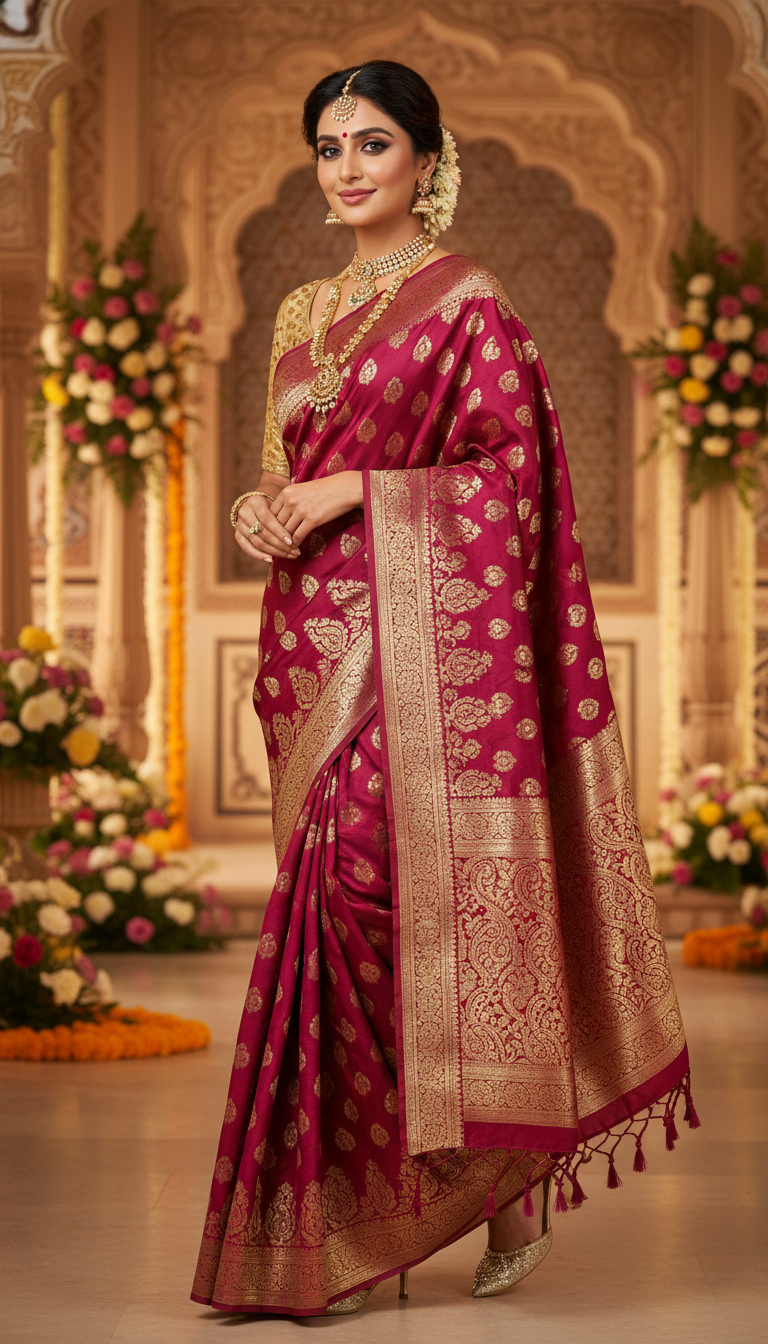
Opulent Zari Saree Walk at Grand Indian Ceremony
Captivating image of an adult person gracefully walking in a vibrant Zari Saree, rich with gold and silver threadwork, during a grand Indian ceremony. Showcases traditional Indian elegance and festive fashion.
How to Generate Photorealistic Zari Saree Ceremony Walk Images
Showcase Intricate Gold Threadwork in Festive Indian Settings
The "Opulent Zari Saree Walk at Grand Indian Ceremony" template is an AI-powered image generator that allows you to instantly place a subject in a lavish, heavily embroidered Zari saree walking gracefully through a festive event venue. Featuring hyper-realistic details of gold and silver threadwork against rich fabrics, this template captures the true elegance of traditional Indian celebrations. It is perfect for fashion marketing campaigns, bridal portfolios, and cultural social media content where conveying movement, opulence, and authentic ethnic fashion in a vertical 9:16 format is essential.
How to create it in VapuAI
- 1
Upload Subject Photo
Upload a clear, front-facing reference photo of your subject to ensure the AI accurately captures their facial features and body structure.
- 2
Customize Prompt
Describe any specific customization in the prompt box, such as your preferred color palette for the Zari saree or the type of traditional decor in the grand ceremony background.
- 3
Adjust Settings
Adjust VapuAI's advanced settings to enhance the warm, festive lighting or to emphasize the photorealistic sheen of the gold and silver thread embellishments.
- 4
Generate Image
Click generate to produce a high-resolution, 9:16 portrait of your subject walking gracefully through the opulent event venue.
- 5
Download and Use
Download your campaign-ready visual and seamlessly integrate it into your marketing materials, fashion lookbooks, or social media feeds.
Prompt & settings
Creative goal
A photorealistic image of an adult person gracefully walking during a grand ceremony, adorned in an opulent Zari Saree, showcasing its intricate gold or silver thread embellishments.
Style anchors
Tips for best results
- •Use a reference image with neutral or soft lighting to allow the AI to seamlessly blend the subject's face into the warm, opulent lighting of the grand ceremony setting.
- •Specify the exact base color of the saree (e.g., deep maroon, royal emerald) in your custom prompt to make the gold and silver Zari threadwork pop dramatically.
- •Mention the style of traditional Indian jewelry, such as Kundan or Polki, you want the subject to wear to perfectly complement the richness of the festive outfit.
- •Keep the subject's reference photo expression relatively poised or softly smiling to match the elegant, graceful mood of a ceremonial walk.
Best for
- Ethnic fashion brands needing high-resolution, campaign-ready visuals of Zari sarees to showcase intricate threadwork without organizing expensive on-location photoshoots.
- Wedding planners and event agencies creating mood boards or promotional materials that highlight the grandeur of Indian ceremonies and luxury bridal wear.
- Influencers and digital creators wanting to generate culturally rich, photorealistic portraits of themselves in traditional attire for festive social media posts.
- Cultural lifestyle magazines requiring editorial-quality imagery of graceful saree walks to accompany articles on Indian heritage fashion and festive celebrations.
Frequently asked questions
Can I change the color of the Zari saree in the prompt?
Yes, you can specify your desired saree color, such as ruby red or midnight blue, in your custom prompt. The AI will adapt the gold and silver threadwork to contrast beautifully against your chosen base color.
What aspect ratio does this template produce?
This template generates images in a 9:16 portrait orientation, which is perfectly optimized for vertical mobile viewing and social media platforms like Instagram Reels, Stories, and Pinterest.
Will the AI preserve my subject's facial features accurately?
Absolutely. VapuAI uses your uploaded reference image to maintain the identity, facial structure, and ethnicity of the subject while placing them seamlessly into the opulent ceremony setting.
Is the background strictly limited to a wedding venue?
The background defaults to a grand Indian ceremony with traditional decor, but you can easily customize it to be a cultural festival, a regal event hall, or a palace courtyard using your text prompts.